
Build AI Telegram Bot with Multi-Session Memory & Summaries
Empower users with a highly personalized AI chatbot experience, significantly reducing manual context management and providing instant access to conversation history and summaries.
Managing context in chatbots across multiple interactions or users leads to disjointed conversations and poor user experience. This workflow deploys an AI-powered Telegram chatbot with robust multi-session memory, enabling personalized, continuous conversations and instant summaries.



Documentation
AI-Powered Telegram Chatbot with Advanced Session Management
This n8n workflow creates an intelligent Telegram chatbot capable of maintaining context across multiple conversations and user sessions. It leverages Google Sheets for persistent memory and OpenAI's powerful language models to offer dynamic interactions, on-demand summaries, and precise answers to questions based on chat history. Users can easily manage their conversations, ensuring a seamless and personalized experience.
Key Features
- Intelligent Multi-Session Management: Start new conversations, check current sessions, and seamlessly resume past interactions with unique session IDs.
- Context-Aware AI Responses: Utilize OpenAI's GPT-4o-mini with LangChain memory to maintain conversational context and provide relevant, coherent replies.
- On-Demand Conversation Summaries: Instantly generate concise summaries of entire chat sessions using AI, perfect for quick recaps.
- Historical Question Answering: Query past conversations to get specific answers based on previously exchanged information.
- Google Sheets for Data Persistence: Securely log all chat interactions and session states in a Google Sheet for review and analysis.
How It Works
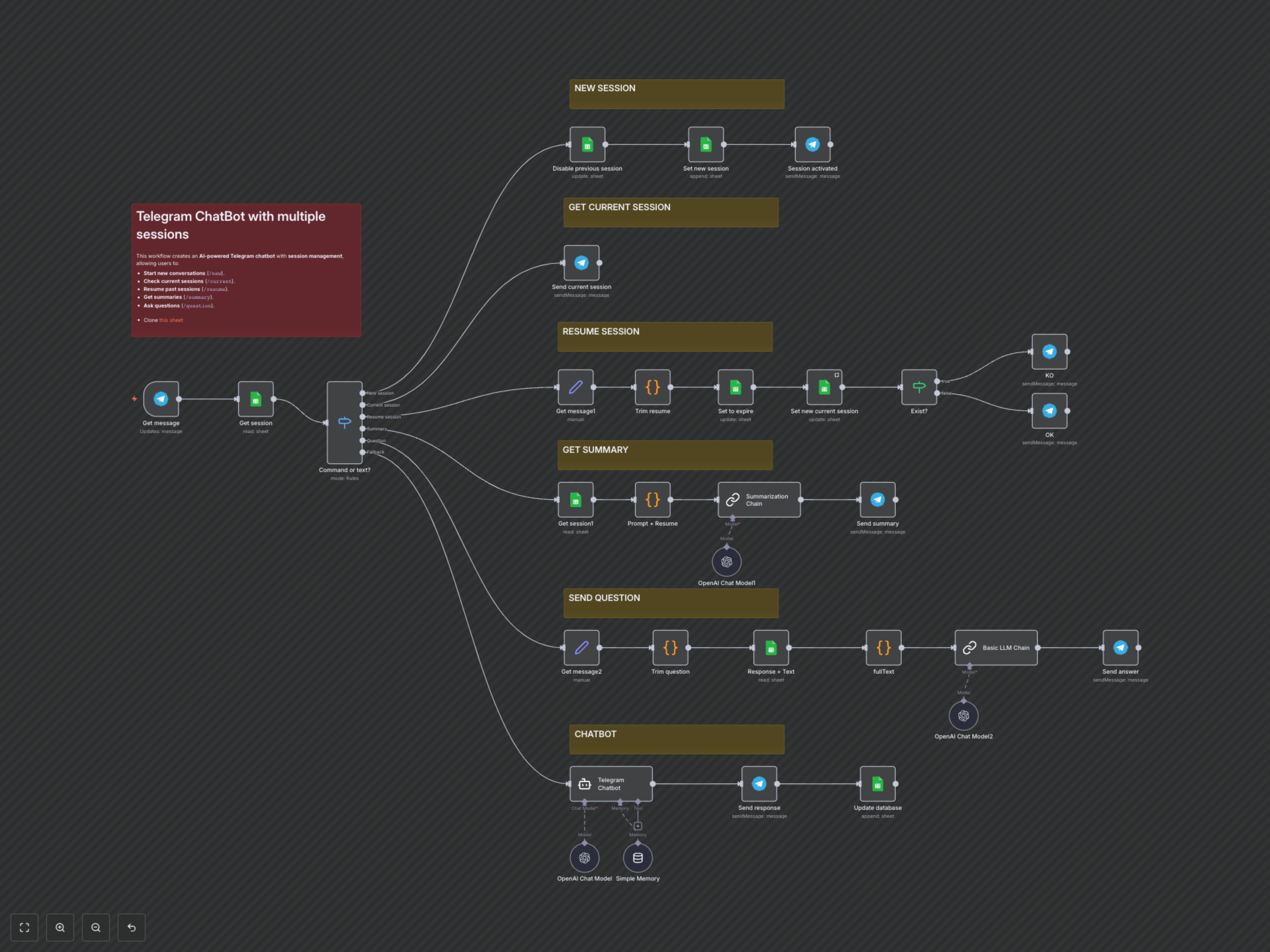
This workflow is triggered by incoming messages to your Telegram bot. It begins by retrieving the user's current active session from a dedicated 'Session' Google Sheet. A 'Switch' node then intelligently routes the message based on specific commands, ensuring a tailored response:
- **/new** command: Deactivates any existing session and creates a new one in the 'Session' Google Sheet, confirming the new active session via Telegram.
- **/current** command: Retrieves and sends the ID of the user's currently active conversation session.
- **/resume
** command: Allows users to reactivate a specific past conversation session by its ID, updating its status in Google Sheets and confirming success or failure. - **/summary** command: Fetches the entire conversation history for the active session from the 'Database' Google Sheet. A LangChain Summarization Chain, powered by OpenAI, generates a concise summary that is then sent back to the user.
- **/question
** command: Retrieves the full conversation history from the 'Database' sheet. A LangChain Basic LLM Chain, integrated with OpenAI, analyzes this history to answer the user's specific query within the provided context, sending the answer via Telegram. - General Chatbot Interaction (Default): For any message not recognized as a command, the input is processed by the 'Telegram Chatbot' agent. This agent utilizes an OpenAI Chat Model (gpt-4o-mini) and a LangChain Simple Memory to maintain conversational context within the active session, providing intelligent, ongoing dialogue.
- Conversation Logging: All user prompts and AI responses are automatically appended to the 'Database' Google Sheet, timestamped and linked to their respective session IDs, ensuring a comprehensive record of all interactions.