
AI-Powered Email Management: Automate Tasks & Boost Productivity
Automate email replies, drafts, and organization, saving hours weekly while ensuring professional, consistent communication.
Manually managing emails, sending replies, and organizing your inbox is a time-consuming daily chore. This AI-powered n8n workflow intelligently automates common email tasks in Gmail, drastically reducing manual effort and freeing up your time for critical work.



Documentation
AI-Powered Email Agent for Gmail
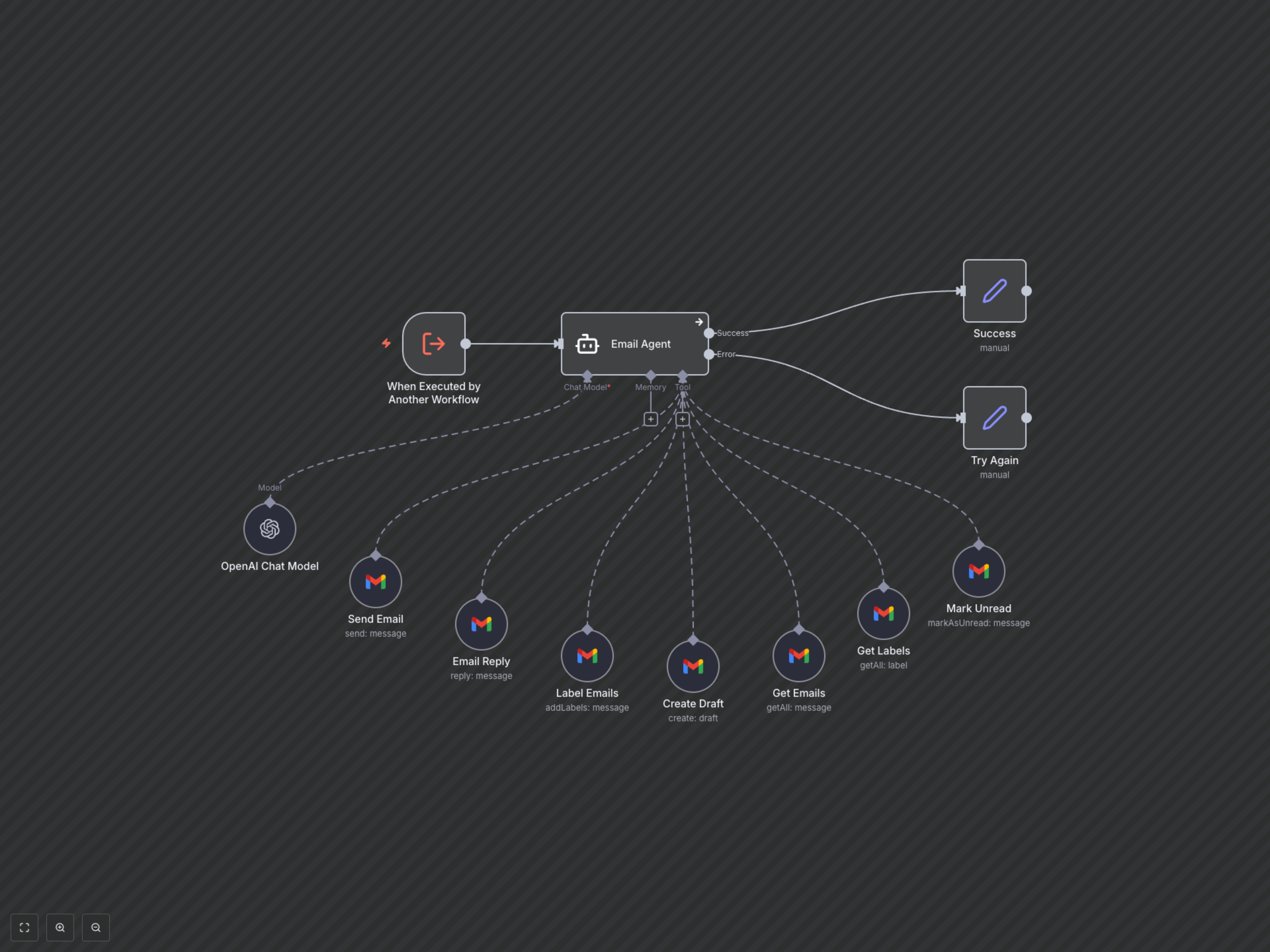
This powerful n8n workflow transforms your email management with an intelligent AI agent. By leveraging OpenAI's advanced language model and n8n's Gmail integration, you can automate routine and complex email tasks simply by providing natural language instructions. Designed for professionals and teams, it aims to streamline communication, reduce manual workload, and boost overall productivity by handling sending, drafting, replying, retrieving, labeling, and marking emails as unread.
Key Features
- Intelligent email sending and drafting capabilities.
- Automated email retrieval and information extraction.
- Effortless email replies, marking as unread, and comprehensive labeling.
- Professional, HTML-formatted email responses consistently signed by "Nate."
- Handles complex email management requests using natural language instructions.
How It Works
This workflow operates as a sophisticated AI assistant. It is triggered by an external input, such as a message from another n8n workflow or a connected application, containing your specific email request (e.g., "Draft an email to Bob about the project deadline"). An OpenAI LangChain Agent, powered by the advanced GPT-4o model, interprets this request. Based on your instructions and its pre-defined tools, the AI intelligently selects and executes the appropriate Gmail action—whether that's sending a new email, replying to an existing one, creating a draft, retrieving specific emails, applying labels, or marking an email as unread. All outgoing communications are professionally formatted in HTML and consistently signed, ensuring a polished and cohesive brand voice. The outcome of the AI's action, be it a confirmation of a sent email or retrieved information, is then returned as the workflow's output.