
Centralize Telegram Support & Automate User Messaging
Prevent critical customer messages from deletion and centralize support operations, enabling efficient team collaboration and broad user communication via Telegram.
Managing customer support on Telegram can be chaotic, with messages easily deleted and no central ticketing or broadcast system. This workflow transforms your Telegram Supergroup into a robust ticketing system and enables mass broadcasting, ensuring message history is preserved and support operations are streamlined.


Documentation
Unified Telegram Customer Support & Broadcasting
Elevate your Telegram customer service with this n8n workflow, transforming a standard Supergroup into a powerful ticketing system and enabling mass communication from a dedicated channel. Designed for businesses and teams, it ensures no message is lost and every customer interaction is managed efficiently.
Key Features
- Indestructible Chat History: Messages forwarded into support topics cannot be deleted by users from both sides, safeguarding crucial business communications and maintaining full context.
- Team-Based Ticketing System: Convert your Telegram Supergroup into a collaborative support hub, allowing multiple team members to respond to individual customer tickets (topics) efficiently.
- Automated Ticket Creation: Automatically creates a new dedicated support topic for each new user in your Supergroup, ensuring organized and focused customer conversations from the first message.
- Seamless Support Reply Forwarding: Support team replies from within topics are automatically forwarded directly back to the original user's private chat, creating a smooth support experience.
- Intelligent Topic Re-creation: If a support topic is accidentally deleted or closed, the system automatically recreates it upon the next user message, preserving the conversation flow and historical data.
- Efficient User Broadcasting: Broadcast important announcements or updates from a designated Telegram channel to all your bot's users, excluding those who have blocked the bot.
- Redis-Powered User Data Management: Securely store user data, chat IDs, and topic IDs in a fast Redis database for quick retrieval and personalized interactions.
How It Works
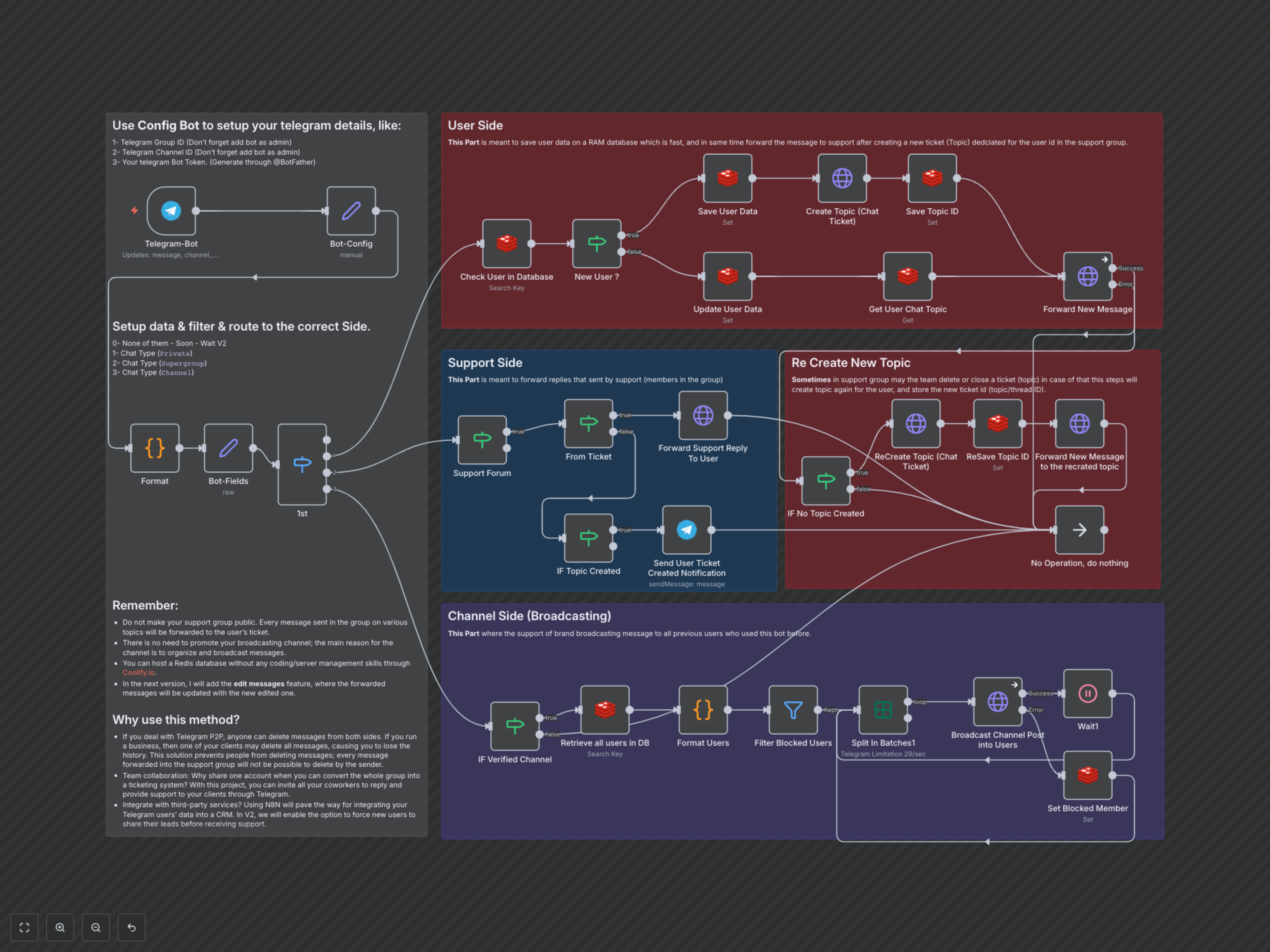
This workflow intelligently processes incoming messages to your Telegram bot, routing them based on their origin and purpose.
- For Users Messaging the Bot (Private Chat):
- The workflow first checks if the user exists in the Redis database.
- If it's a new user, their data is saved, and a new forum topic (ticket) is created in your designated support Supergroup with their details. The unique message_thread_id (topic ID) is stored in Redis.
- If it's an existing user, the workflow retrieves their stored topic ID.
- The user's message is then forwarded into their respective topic in the support Supergroup. If the topic has been deleted, the system recreates it and updates the ID in Redis.
- A notification is sent to the user upon new ticket creation, informing them that their inquiry is being handled.
- For Support Team Replies (Supergroup Topic):
- When a support agent replies within a user's topic in the Supergroup, the workflow identifies the original user based on the topic name (which contains the user's ID).
- The agent's reply is then forwarded directly back to the user's private chat, maintaining the conversation flow seamlessly.
- For Channel Broadcasts:
- When a new post is made in your designated broadcast channel, the workflow verifies it originates from the correct channel.
- It then retrieves all non-blocked users from the Redis database.
- The channel post is copied to each user's private chat in batches, respecting Telegram's rate limits and ensuring widespread delivery.