
Secure n8n Workflows with Automated Google Drive Backups
Ensure n8n workflows are backed up daily, reducing manual backup time by 100% and securing your automation logic against loss.
Manual n8n workflow backups are time-consuming and risk data loss. This workflow automates daily backups to Google Drive, protecting your critical automation data and freeing up valuable time.


$29
Ready-to-use workflow template
Complete workflow template
Setup documentation
Community support
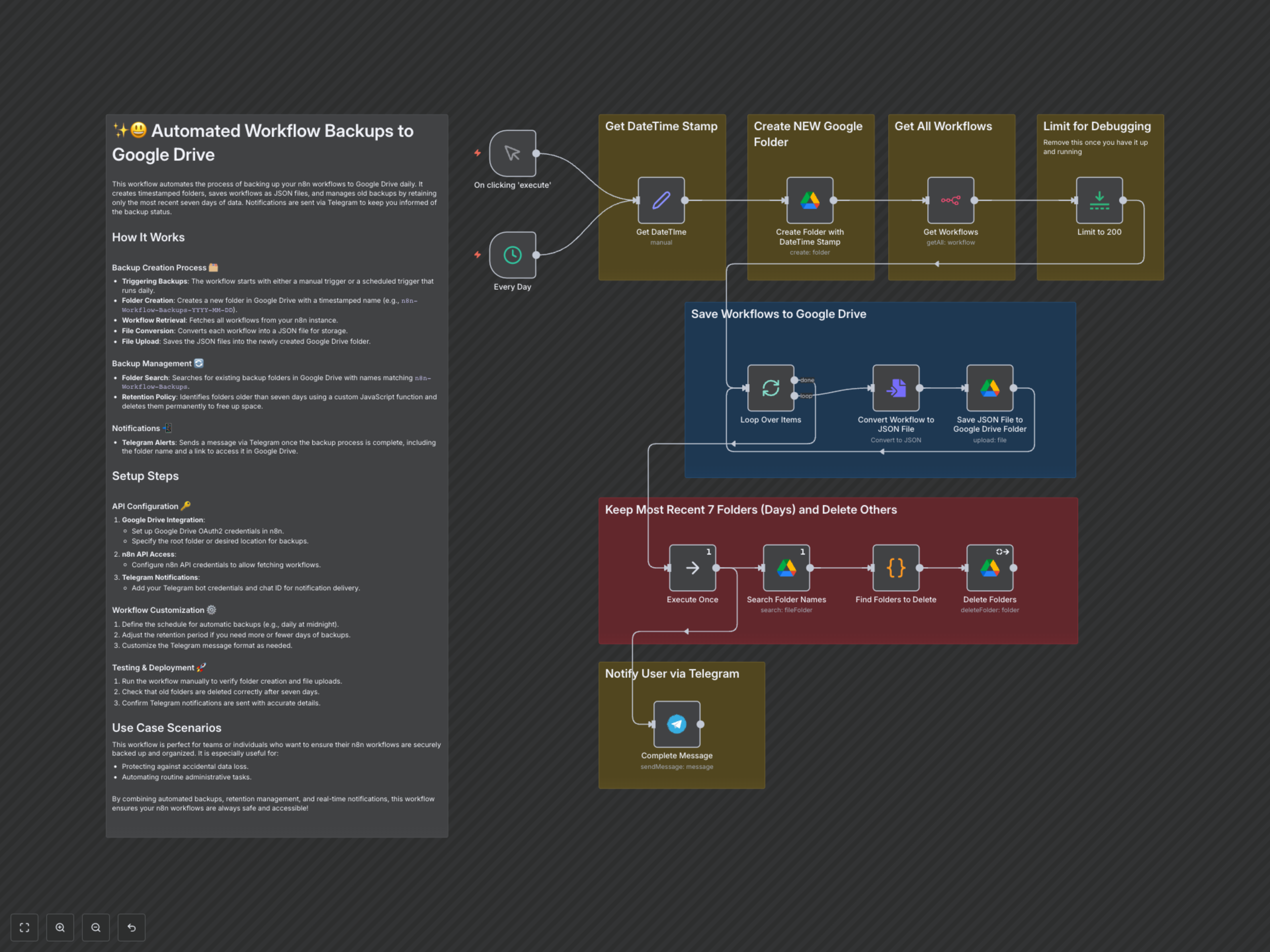
Preview - N8n

Documentation
Automated Daily n8n Workflow Backups to Google Drive
This workflow fully automates the process of backing up your n8n workflows to Google Drive on a daily basis. It ensures your critical automation logic is always safe, organized, and easily retrievable, protecting against accidental data loss.
Key Features
- Daily Automated Backups: Ensures your workflows are consistently saved without manual intervention.
- Timestamped Folder Organization: Automatically creates clearly named folders in Google Drive for easy navigation.
- Intelligent Retention Policy: Keeps the most recent seven days of backups, managing storage space efficiently.
- Instant Backup Notifications: Provides real-time updates via Telegram upon successful completion.
How It Works
- Trigger Activation: The workflow is activated either daily by a schedule or manually for immediate execution.
- Backup Folder Creation: It captures the current date and time, then creates a new Google Drive folder (e.g., n8n-Workflow-Backups-YYYY-MM-DD) to store the day's backups.
- Workflow Retrieval: The workflow connects to your n8n instance to fetch a list of all existing workflows.
- Conversion and Upload: Each workflow is individually converted into a JSON file, then uploaded to the newly created, timestamped Google Drive folder.
- Old Backup Management: The workflow searches for all existing "n8n-Workflow-Backups" folders. A custom code snippet then identifies and deletes any folders older than seven days, maintaining a clean and efficient backup history.
- Completion Notification: Upon successful completion of all backup and retention tasks, a Telegram message is sent, confirming the backup and providing a direct link to the new backup folder.
Workflow Details
Category:Productivity
Last Updated:Dec 16, 2025