
Query Supabase with AI: Automate Data Retrieval & Analysis
Automate complex SQL query generation in seconds, reducing manual data retrieval time by up to 90% and empowering non-technical users to access critical insights.
Interacting with PostgreSQL databases typically demands SQL expertise and manual query writing, often leading to time-consuming data retrieval. This workflow leverages an AI agent to generate dynamic SQL queries conversationally, simplifying data analysis and accelerating insights from your Supabase database.



Documentation
AI-Powered Database Interaction with Supabase
This workflow transforms how you interact with your PostgreSQL database on Supabase, moving beyond manual SQL queries to a conversational AI agent. It allows users to query, analyze, and retrieve data using natural language, making database interactions accessible to everyone.
Key Features
- Conversational data querying: Ask questions in natural language and receive instant database insights.
- Dynamic SQL generation: Automatically translate user requests into precise PostgreSQL queries.
- Comprehensive data analysis: Retrieve records, extract JSON data, and get summaries or aggregations.
- Simplified database interaction: Eliminate the need for deep SQL knowledge for routine data access.
How It Works
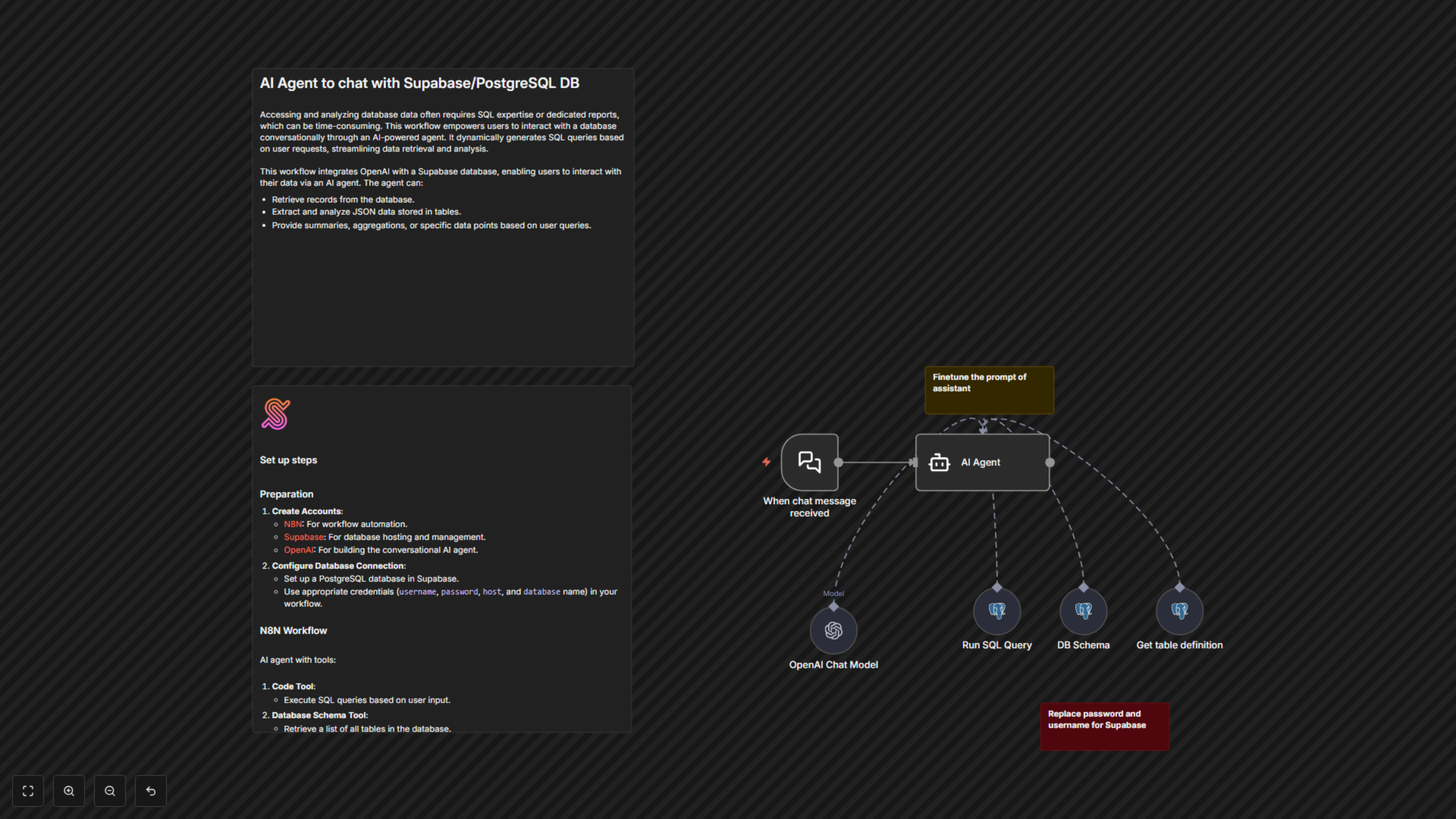
The workflow starts when a chat message is received, triggering an n8n AI Agent powered by OpenAI. This agent utilizes specialized tools: a "Run SQL Query" tool to execute dynamic SQL commands, a "DB Schema" tool to understand database structure, and a "Get table definition" tool for detailed column information. Based on the user's input, the AI agent intelligently selects and uses these tools to generate and execute the appropriate SQL queries against your Supabase PostgreSQL database, returning the requested data or insights.