
Monitor GitHub Repos & Get Instant Event Alerts via Webhooks
Automatically track unlimited GitHub repositories, reducing manual monitoring effort by 100% and ensuring instant notifications for critical development events.
Manually tracking changes across multiple GitHub repositories is time-consuming and prone to delays. This workflow automates real-time monitoring of unlimited GitHub repos using webhooks, ensuring instant notifications for push and pull request events.




Documentation
Monitor GitHub Repos & Get Instant Event Alerts via Webhooks
Manually tracking changes across multiple GitHub repositories is time-consuming and prone to delays. This workflow automates real-time monitoring of unlimited GitHub repos using webhooks, ensuring instant notifications for push and pull request events.
Key Features
- Real-time Event Monitoring: Get instant notifications for push and pull request events across all your watched repositories.
- Webhook-driven Efficiency: Leverage GitHub webhooks to eliminate manual polling, reducing API calls and ensuring immediate updates.
- Programmatic Repo Management: Easily add or remove repositories from your watchlist directly within the workflow.
- Flexible Notifications: Integrate with popular communication platforms like Telegram and Slack (extendable to others).
- Customizable Event Data: Extract and format specific details like author, commit message, modified files, and more.
How It Works
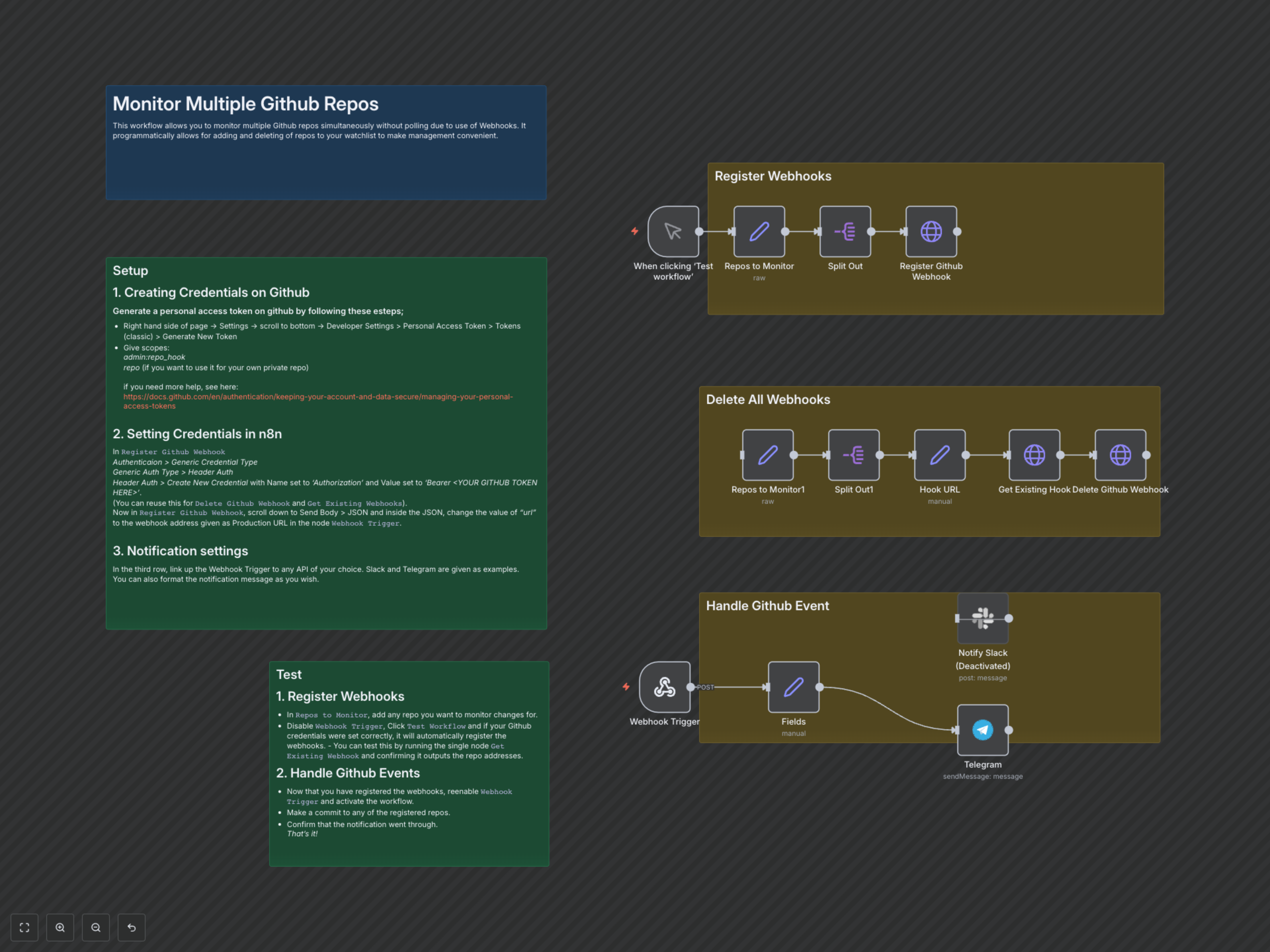
This n8n workflow operates in three main, distinct sections for comprehensive GitHub repository management and event handling:
- Repository Registration: You define a list of GitHub repository URLs. When triggered, the workflow programmatically creates webhooks on each specified repository. These webhooks are configured to send 'push' and 'pull_request' events back to your n8n instance.
- Event Handling & Notification: A dedicated Webhook Trigger in n8n listens for incoming events from GitHub. Upon receiving an event, it extracts relevant details (e.g., repository name, author, commit message, modified files) and formats them into a comprehensive notification, which is then sent to your chosen communication platform.
- Webhook Deletion (Optional): For convenient management, the workflow also includes a separate branch to programmatically delete existing webhooks from specified repositories.