
Automate Meeting-to-CRM Lead Enrichment & HubSpot Sync
Automate lead data enrichment and CRM synchronization, eliminating manual data entry by 100% and accelerating lead qualification from new meeting bookings.
Manually entering meeting attendee data and company details into the CRM is time-consuming and prone to errors, often resulting in incomplete records. This workflow automatically captures new meeting bookings, enriches contact and company data with detailed insights, and ensures your HubSpot CRM is always up-to-date with accurate, comprehensive lead profiles.


Documentation
Automate Meeting-to-CRM Lead Enrichment & HubSpot Sync
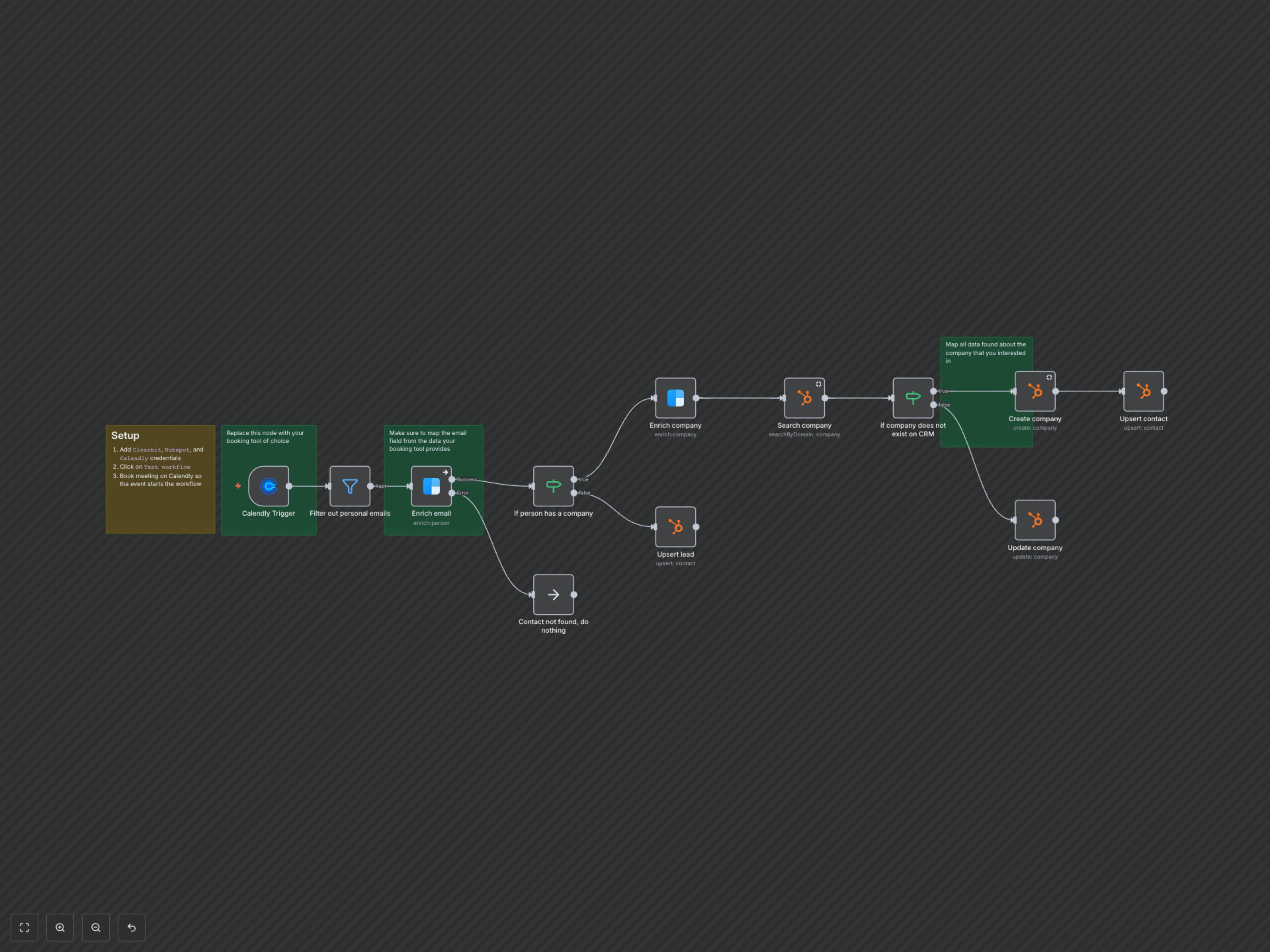
Automatically capture new meeting bookings from Calendly, enrich attendee and company data using Clearbit, and ensure your HubSpot CRM is always updated with the latest, most comprehensive lead and company profiles. This workflow is ideal for sales and marketing teams looking to streamline their lead management and data hygiene.
Key Features
- Instant Lead Capture: Automatically triggers upon new meeting bookings in Calendly, ensuring no lead slips through the cracks.
- Rich Data Enrichment: Leverages Clearbit to gather extensive personal and company data, including job titles, company size, revenue, and social profiles.
- Intelligent CRM Updates: Automatically creates new company and contact records in HubSpot or updates existing ones with enriched information.
- Smart Email Filtering: Filters out common personal email addresses to ensure only professional leads are processed, maintaining CRM data quality.
- Reduced Manual Effort: Eliminates the need for manual data entry and research, saving valuable time for sales and marketing teams.
How It Works
This workflow begins when a new meeting is booked in Calendly. It first filters out common personal email addresses (like Gmail or Yahoo) to focus on professional leads. For valid business emails, it uses Clearbit to enrich the individual's profile and identify their associated company. It then checks HubSpot to see if the company already exists. If not, it creates a new company record with detailed Clearbit data. If the company exists, it updates its profile with the latest information. Finally, it creates or updates the contact record in HubSpot, associating them with their respective company, ensuring all CRM data is accurate and comprehensive.