
Automate Jira Ticket Resolution: Boost Support Efficiency with AI
Automatically resolve up to 70% of long-lived Jira tickets, reducing backlog by hours weekly and improving customer response times.
Long-lived, unresolved Jira tickets consume valuable support team time and delay customer satisfaction. This AI-powered workflow proactively identifies stale issues, classifies their state, and automates resolution, reminders, or escalation to streamline your support operations.



Documentation
AI-Powered Jira Ticket Management for Enhanced Support
This n8n workflow revolutionizes how support teams handle Jira issues. It proactively identifies long-lived, unresolved tickets, intelligently classifies their status using AI, and takes automated actions ranging from auto-resolution and knowledge base lookups to sending smart reminders or escalating to human agents.
Key Features
- Proactive Issue Identification: Automatically finds Jira issues stuck in "To Do" or "In Progress" for over 7 days.
- Intelligent Issue Classification: Uses AI to determine the current state of a ticket (resolved, pending info, or still waiting for first response).
- Automated Resolution & Feedback: If resolved, performs sentiment analysis to either request feedback or escalate negative experiences.
- AI-Driven Knowledge Base Solutions: For unaddressed tickets, an AI agent searches Jira for similar issues and queries Notion for knowledge base articles to generate solutions.
- Smart Reminders & Engagement: Generates and posts concise AI-summarized reminder messages to re-engage users on blocked tickets.
- Streamlined Backlog Management: Significantly reduces manual effort in clearing stale tickets, allowing support teams to focus on complex issues.
How It Works
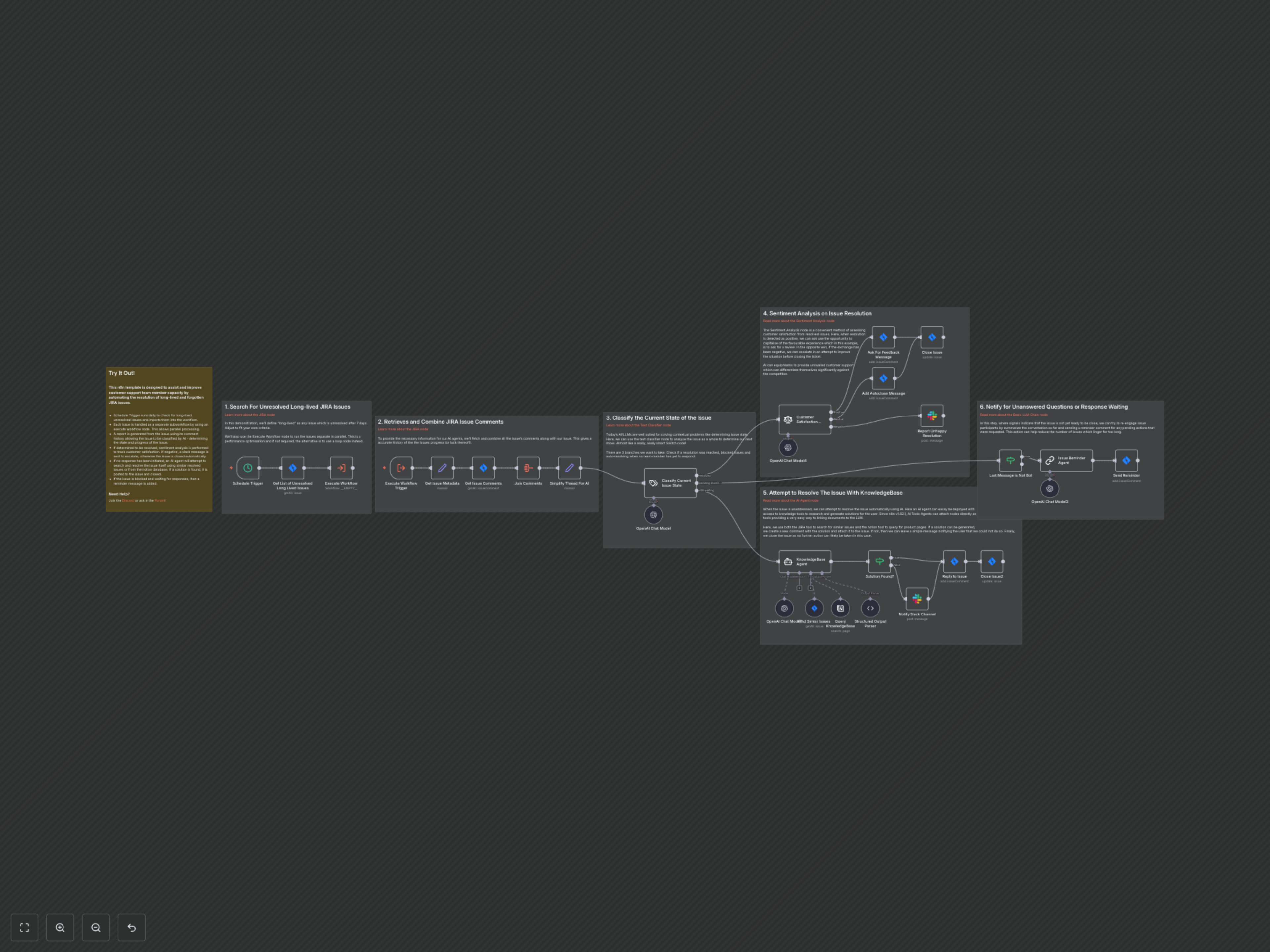
1. Scheduled Scan: The workflow runs on a schedule (e.g., daily) to find unresolved Jira issues that have been open for a defined "long-lived" period (e.g., 7 days). 2. Parallel Processing: Each identified issue is processed independently via a sub-workflow for efficient, parallel execution. 3. Contextual AI Analysis: The issue's metadata and all comments are retrieved, aggregated, and simplified into a clear thread for AI processing. 4. Issue State Classification: An AI Text Classifier analyzes the entire thread to determine if the issue is "resolved," "pending more information," or "still waiting" for an initial response. 5. Resolved Issue Handling: If classified as "resolved," a Sentiment Analysis AI assesses customer satisfaction. Positive sentiment triggers a feedback request and ticket closure. Negative sentiment triggers a Slack notification to a team channel for follow-up before closing the ticket. 6. Unaddressed Issue Automation: If the issue is "still waiting" for a response, an AI Agent attempts to resolve it by searching for similar Jira issues and querying a Notion knowledge base. If a solution is found, it's posted as a comment, and the ticket is closed. If not, a Slack notification is sent to the support team, and the ticket is closed with an automated message. 7. Pending Information Reminders: For issues "pending more information" (i.e., blocked on a user's response), the workflow checks if the last message was from a human. If so, an AI LLM Chain generates a summary and reminder comment, which is then posted to the Jira ticket to prompt further action. This comprehensive approach ensures that no Jira ticket goes unnoticed, enhancing efficiency and customer satisfaction.