
Automate Document Sync to Qdrant & Build AI Q&A with Mistral
Reduce manual document synchronization by 100% and enable instant AI-powered Q&A on local files, improving data accessibility and insight generation.
Keeping local documents synchronized with a vector database and leveraging them for AI queries can be complex and time-consuming. This workflow automatically monitors a local folder, synchronizes document changes (add, modify, delete) with a Qdrant vector store, and creates an AI Q&A agent using Mistral AI for instant insights.



Documentation
Automate Local File Sync & Build an AI Q&A Expert
This n8n workflow provides a comprehensive solution for managing local documents, ensuring they are always synchronized with a Qdrant vector store, and accessible through an intelligent AI Question & Answer agent powered by Mistral AI. Ideal for creating an expert system over your private document collection.
Key Features
- Automated local file monitoring for additions, changes, and deletions.
- Real-time synchronization of file content with a Qdrant vector database.
- Dynamic updating and deletion of vector points to maintain data relevance.
- AI-powered Question & Answer agent using Mistral AI for natural language queries.
- Seamless integration with LangChain for robust document processing and Retrieval Augmented Generation (RAG).
How It Works
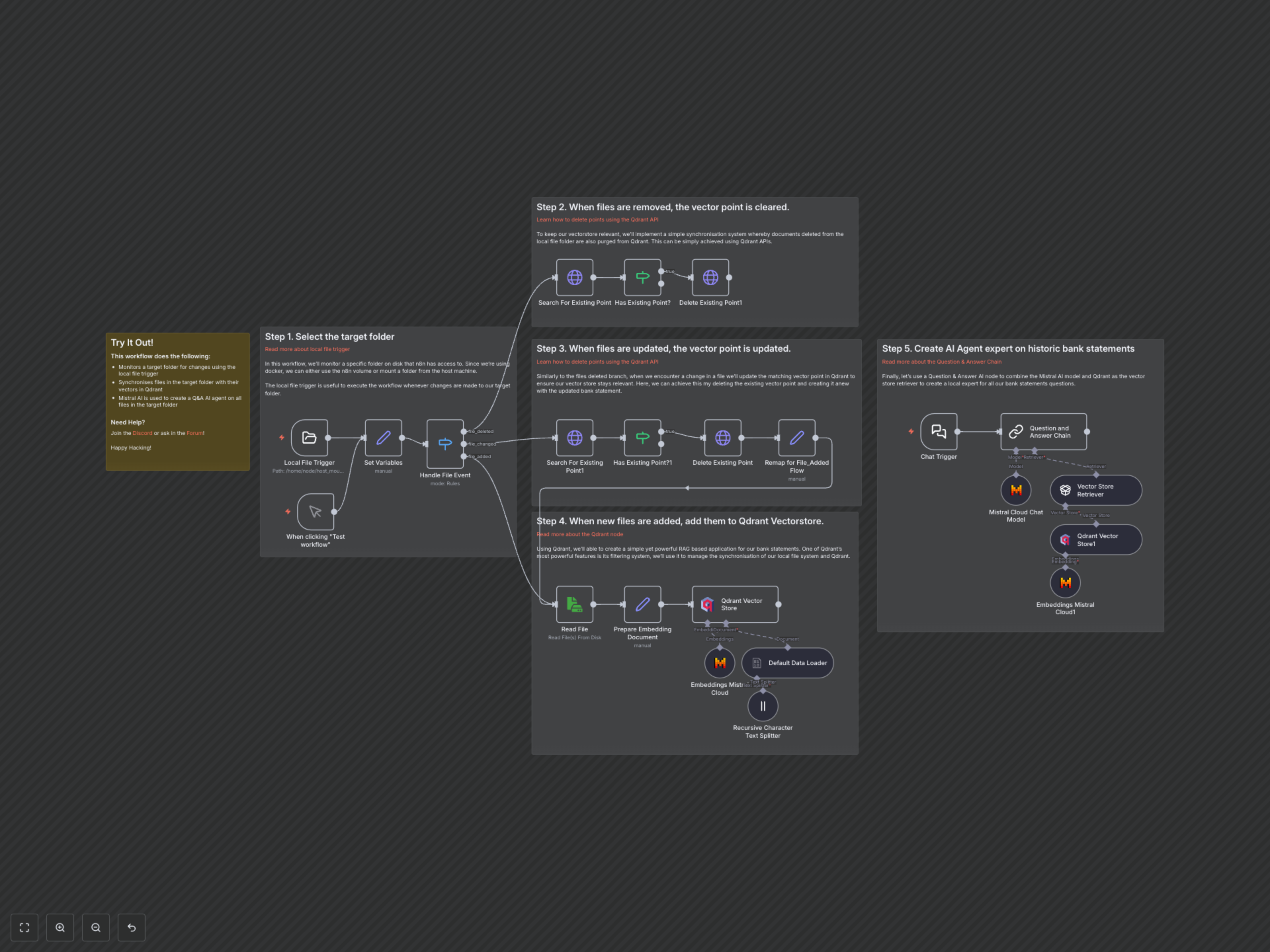
The workflow is initiated by any changes (add, modify, delete) detected in a specified local folder by the Local File Trigger. When a file is added, its content is read, processed, split into manageable chunks, and vectorized using Mistral AI embeddings before being stored in Qdrant. For changed files, the workflow first deletes the existing vector point in Qdrant and then recreates it with the updated content. If a file is deleted, its corresponding vectors are purged from Qdrant to maintain data relevance. Independently, a Chat Trigger initiates an AI agent that uses Mistral AI for conversational responses and Qdrant as a vector store retriever to fetch relevant document segments based on user questions, enabling intelligent Q&A over your synchronized documents.