
AI-Powered Web Scraping to Google Sheets: Instant Data Capture
Automatically extract and organize detailed product information from any webpage into Google Sheets, reducing manual data entry time by over 90%.
Manually extracting product data from websites is a time-consuming and error-prone process. This workflow automates web scraping and leverages AI to accurately extract product details, seamlessly organizing them into a Google Sheet for effortless data management.


Documentation
AI-Powered Web Scraping to Google Sheets: Instant Data Capture
This powerful workflow automates the tedious process of extracting product information from websites. It intelligently scrapes web pages, uses AI to identify key details, and then neatly organizes all the collected data directly into your Google Sheets, saving valuable time for market research, competitive analysis, or inventory updates.
Key Features
- Automated Web Scraping: Utilizes Jina AI to efficiently fetch clean, readable content from any target webpage, overcoming common scraping challenges.
- Intelligent Data Extraction: Leverages OpenAI and LangChain to accurately identify and extract specific product details like title, price, availability, image, and product URL from unstructured text.
- Structured Data Output: Transforms raw scraped data into a consistent, usable JSON format for easy downstream processing.
- Seamless Google Sheets Integration: Automatically appends all collected product data directly into your specified Google Sheet for centralized storage and analysis.
- No-Code Automation: Set up and customize complex web scraping tasks without writing any code, making advanced data collection accessible.
How It Works
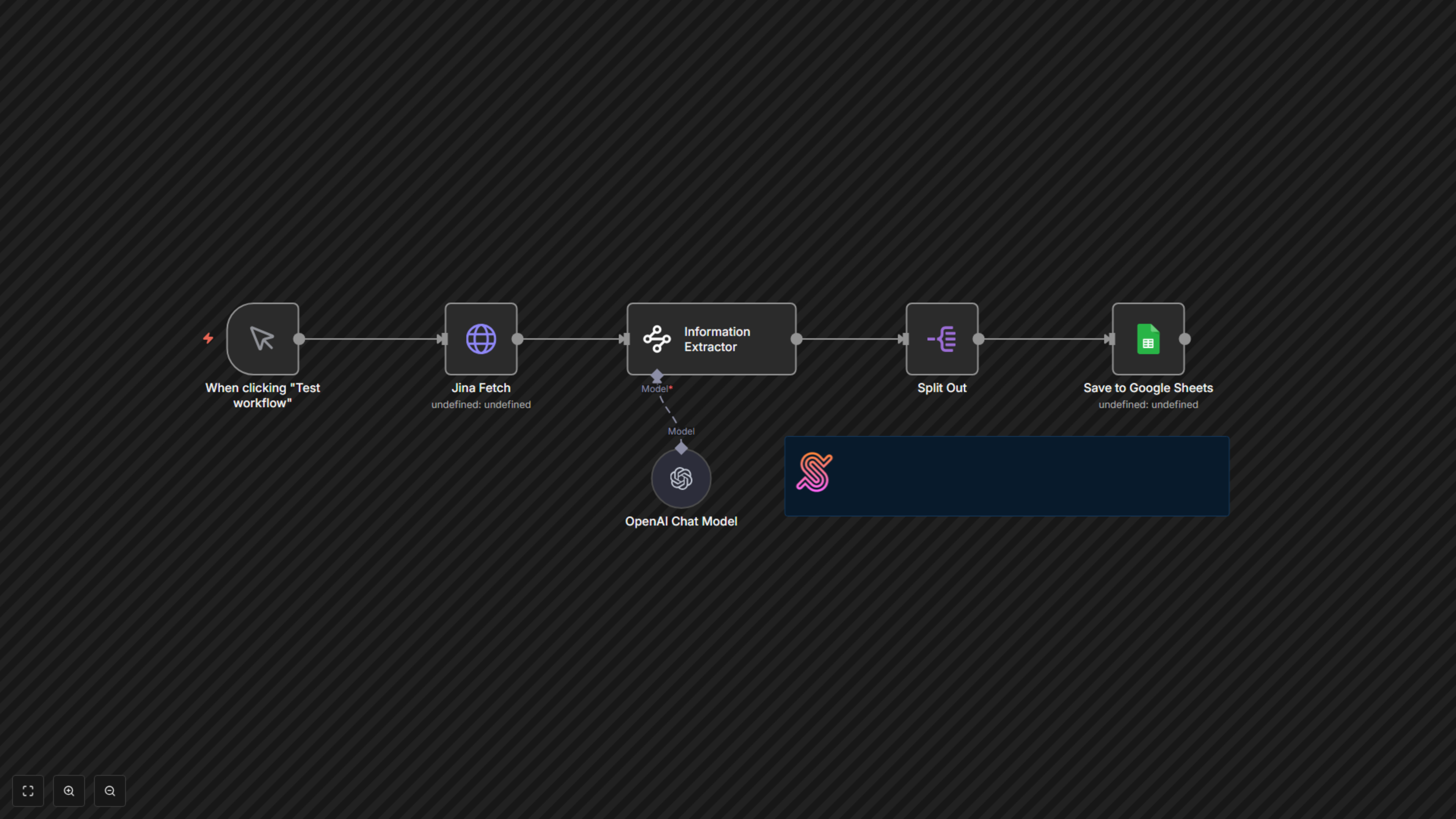
This workflow begins with a manual trigger, allowing you to initiate the scraping process on demand. First, the Jina Fetch node retrieves the content of the target webpage, providing a clean, AI-ready version. Next, the Information Extractor node, powered by an OpenAI language model (connected via the OpenAI Chat Model node), intelligently analyzes the webpage content based on a predefined schema to pull specific details like book title, price, availability, image URL, and product URL. The extracted data, which is an array of results, is then processed by the Split Out node, ensuring each product's information is handled individually. Finally, the Save to Google Sheets node appends this structured product data into your chosen Google Sheet, providing you with a continuously updated and organized dataset.