Scheduler Chatbot Using Google Calendar and Telegram
Effortlessly manage your Google Calendar events through natural language commands within Telegram, streamlining scheduling and boosting productivity.
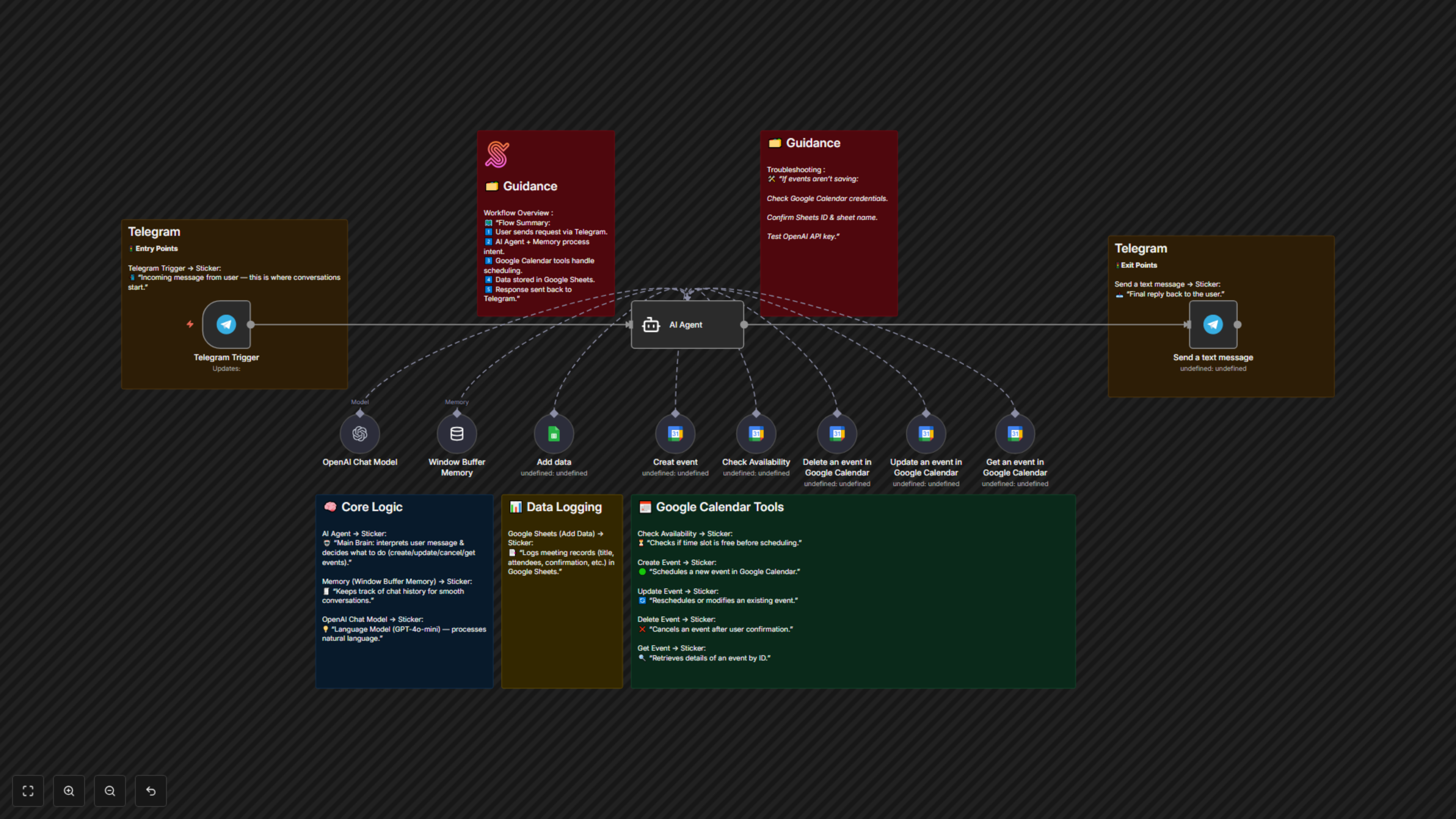
An n8n automation that turns a Telegram bot into a natural-language calendar assistant. Users chat with the bot to create, update, cancel, and retrieve Google Calendar events. The workflow uses an AI Agent (OpenAI) to interpret user requests, checks availability, manipulates Google Calendar, logs events to Google Sheets, and replies back to the user on Telegram.


Documentation
Workflow Steps
Telegram Trigger (Start Chat)
- Starts when a user sends a message to the Telegram bot.
- Captures chat ID and user input as the workflow entry point.
AI Agent (LangChain + OpenAI Chat Model)
- Interprets the user’s intent (create, update, delete, get event).
- Applies scheduling rules: default 1h duration, 15-minute buffer, confirmation before changes.
- Extracts event details (date, time, attendees, summary, description).
Window Buffer Memory
- Stores short conversation history per user (linked to Telegram chat ID).
- Allows the chatbot to handle follow-up messages naturally.
Google Calendar – Check Availability
- Looks up free/busy slots for the requested time window.
- Ensures new events don’t overlap with existing ones.
Google Calendar – Create Event
- Creates a new calendar event using the details parsed by the AI Agent.
- Adds a Google Meet link automatically.
Google Calendar – Update / Delete / Get Event
- Update: Reschedules or modifies an existing event.
- Delete: Cancels an event (after confirmation).
- Get: Retrieves event details for user queries.
Google Sheets – Add Data
- Logs meeting details (title, attendees, date/time, confirmation) for audit and tracking.
- Keeps a historical record of events created through the bot.
Telegram – Send Message
- Sends a reply back to the user with confirmation, suggestions, or event details.
- Uses AI-generated natural language for human-like responses.
Data Sources & Tools
- Telegram → Conversational interface for users.
- OpenAI (GPT-4o-mini) → Natural language understanding & event detail extraction.
- LangChain Agent → Maps user intent to actions and manages tool calling.
- Google Calendar → Event creation, updates, cancellations, and availability checks.
- Google Sheets → Logging and auditing of meetings.
Key Benefits
- Hands-free scheduling — manage your calendar directly through chat.
- Reduced errors — AI enforces buffers, confirmations, and avoids double-booking.
- Automatic record-keeping — logs all events in Google Sheets for future reference.
- Natural conversation — users interact in plain language, no technical skills needed.