Office Maintenance Request Bot
Streamline office maintenance by automating requests, generating tickets, logging details, and sending instant notifications for faster issue resolution and improved workplace efficiency.
Automates the process of handling office maintenance requests. Generates unique ticket IDs, logs requests to Google Sheets, and sends notifications via Slack and Gmail for real-time visibility and management.



$29
Ready-to-use workflow template
Complete workflow template
Setup documentation
Community support
Preview - N8n

Documentation
Workflow Steps
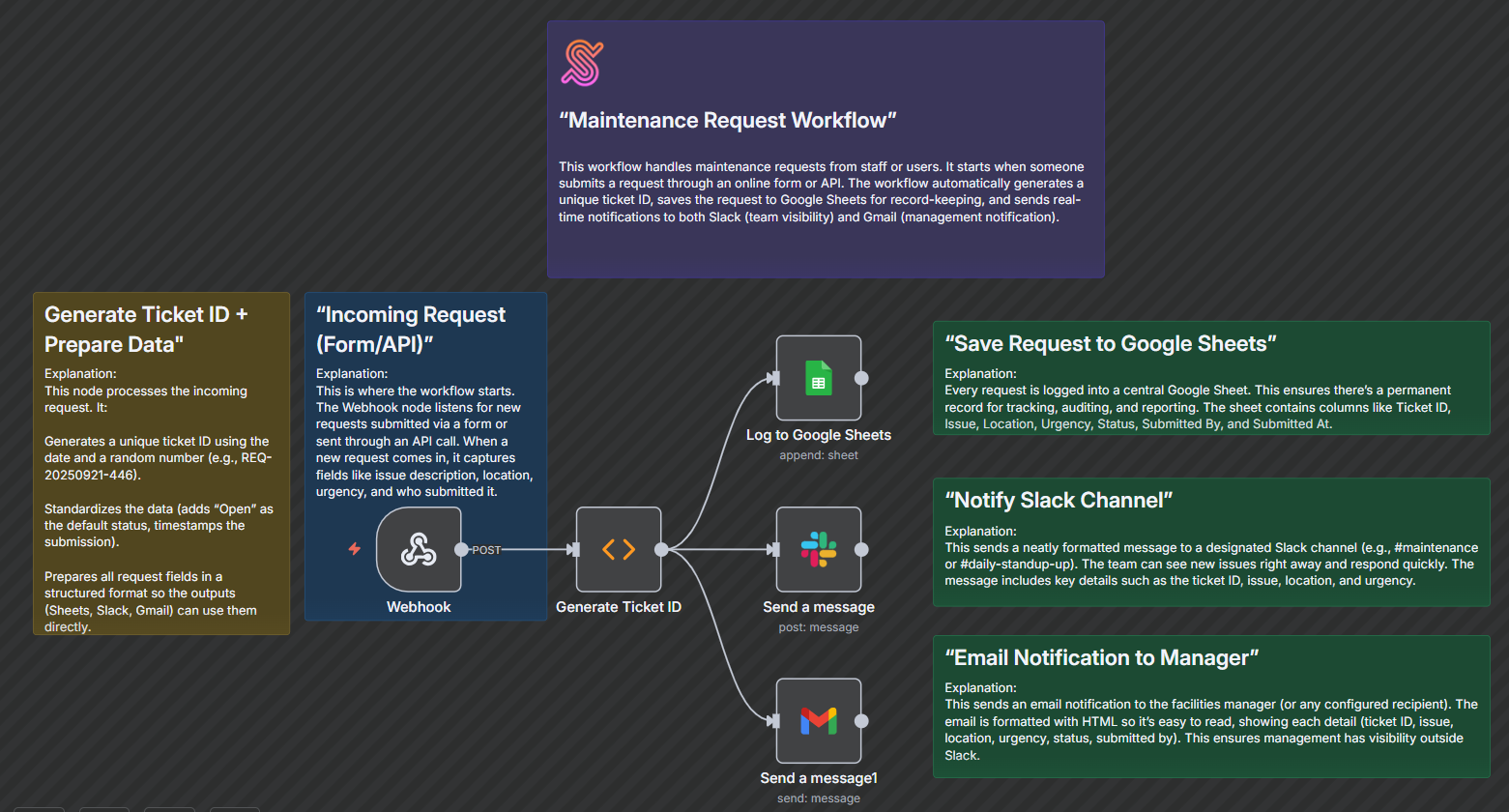
Incoming Request (Webhook)
- Starts when a new maintenance request is submitted via a form or API.
- Captures request details: Issue, Location, Urgency, and Submitted By.
Generate Ticket ID (Function)
- Generates a unique ticket ID in the format REQ-YYYYMMDD-XXX.
- Adds default status (Open) and submission timestamp.
- Structures the data for downstream nodes.
Log to Google Sheets
- Appends the maintenance request to a Google Sheet.
- Columns include Ticket ID, Issue, Location, Urgency, Status, Submitted By, and Submitted At.
- Ensures a permanent record for tracking and auditing.
Send a message (Slack)
- Sends a notification to a Slack channel (e.g., #daily-standup-up) with request details.
- Allows the team to respond quickly to new issues.
Send a message (Gmail)
- Sends an email notification to the manager or designated recipient.
- Provides all request details in a readable HTML format.
Data Sources & Tools
Google Sheets - Stores all maintenance requests for tracking and auditing
Slack - Real-time team notifications
Gmail - Email notifications to management
Key Benefits
- Centralised logging of all maintenance requests.
- Real-time notifications for faster response.
- Automated ticket ID generation and structured data handling.