
Google Sheets to Mailchimp Bulk Contact Import Automation
Reduce manual subscriber uploads by 100% through automated Google Sheets-to-Mailchimp syncing.
Marketing teams often waste hours manually exporting contacts from spreadsheets and uploading them into Mailchimp. This workflow eliminates that repetitive work by automatically pulling subscriber details from Google Sheets, formatting the data, and syncing every contact directly into your email list. It ensures clean records, fewer upload errors, and consistent list growth without human intervention. The result is smoother campaign execution and more time for strategy instead of admin tasks.

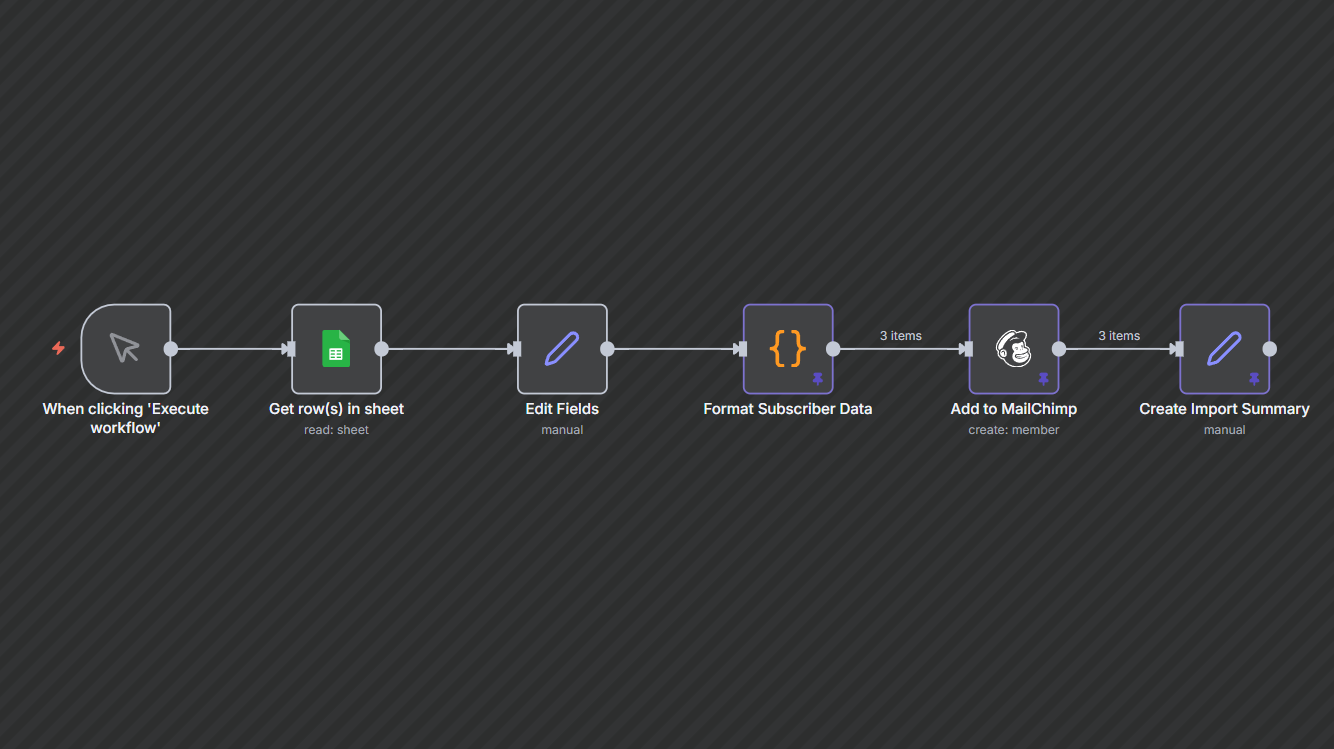

Documentation
Description
Marketing teams often deal with outdated or inconsistent subscriber lists because every update requires manual work. This workflow automates the entire import process by pulling customer details from Google Sheets, formatting them correctly, and syncing them directly to Mailchimp. The result is cleaner data, more accurate campaigns, and zero time wasted on repetitive list maintenance.
Workflow Steps
- Trigger from Google SheetsThe workflow starts when you manually execute it or integrate it with a scheduled trigger.
- Fetch customer rowsRetrieves names, email addresses, and phone numbers from your connected Sheet.
- Clean & format contact detailsSplits full names, standardizes phone numbers, and prepares Mailchimp-ready subscriber objects.
- Sync each contact to MailchimpAdds or updates the contact in the selected Mailchimp audience with proper merge fields (FNAME, LNAME, PHONE).
- Generate import summaryCreates a simple report showing how many contacts were processed and added.
🔑 Key Benefits
- Zero manual uploads: No more CSV imports or formatting issues.
- Up-to-date audiences: Mailchimp lists stay clean and accurate for every campaign.
- Faster campaign prep: Teams focus on messaging, not data cleanup.