
Empower AI Agents: Complete Gmail Automation & Control
Enable AI agents to independently process, respond to, and organize emails, reducing manual intervention by over 70% and accelerating email-centric task completion.
AI agents often struggle with direct, comprehensive interaction with email, leading to fragmented communication workflows. This n8n workflow equips your AI agent with a full suite of Gmail operations, enabling seamless email management, intelligent responses, and efficient organization.



Documentation
Empower AI Agents with Complete Gmail Control
This powerful n8n workflow transforms your AI agents into expert Gmail managers, providing a comprehensive set of tools for interacting with email messages, labels, drafts, and threads. Designed for seamless integration with AI agent frameworks, it enables sophisticated email automation and intelligent communication strategies.
Key Features
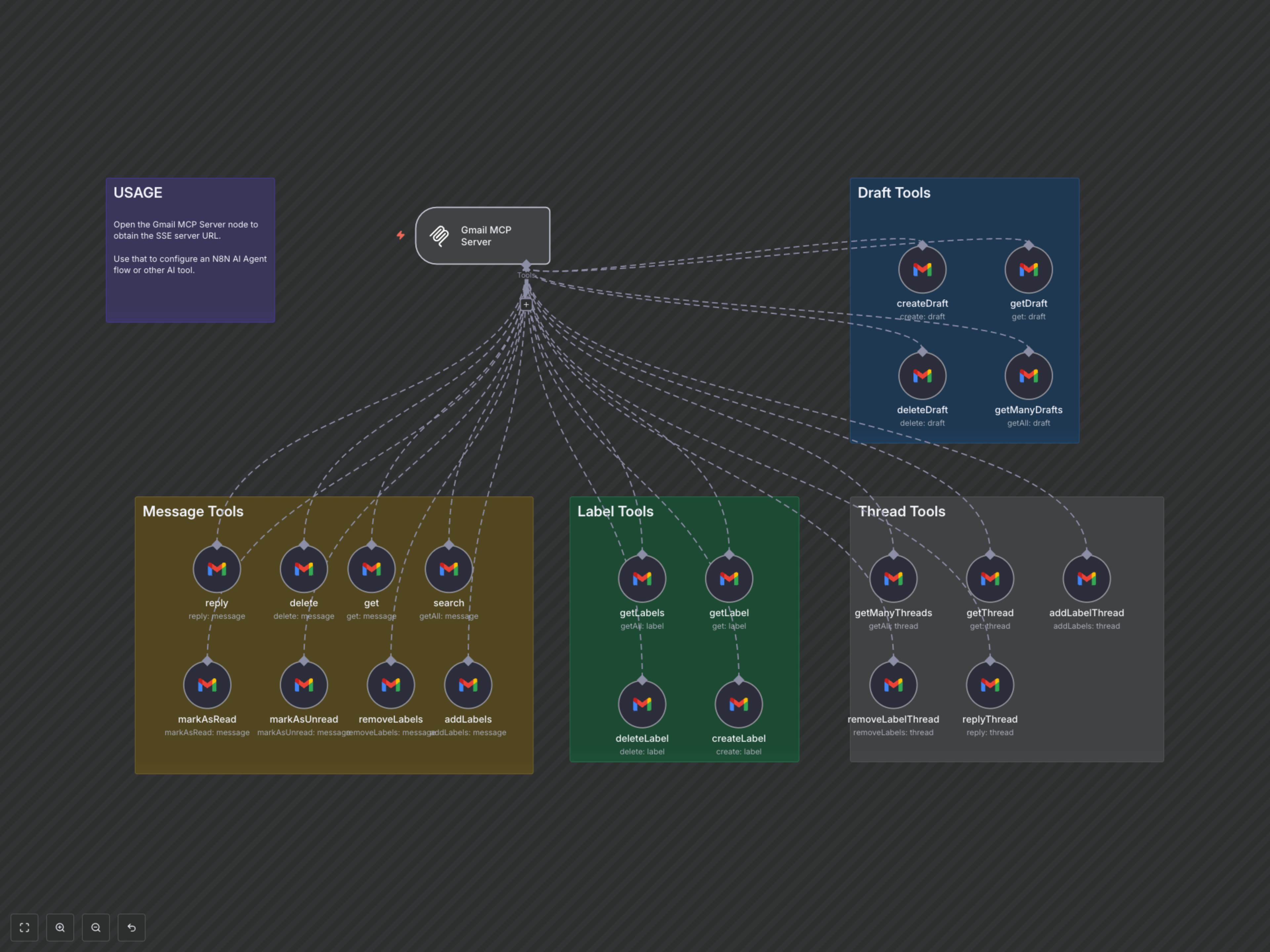
- Intelligent Message Management: Retrieve, search, delete, reply to, and modify individual email messages, including marking as read/unread and applying labels.
- Efficient Label Operations: Create, retrieve, and delete Gmail labels to categorize and organize emails programmatically.
- Draft Automation: Create, retrieve, and delete email drafts, allowing AI agents to prepare communications for later review or sending.
- Thread-Level Control: Access, manage, and respond to entire email threads, including adding or removing labels.
- AI-Native Integration: Designed as an n8n Agent Tool (MCP Server), making it easy to expose these capabilities to LangChain and other AI agent frameworks.
How It Works
The 'Gmail MCP Server' workflow acts as a centralized toolkit, exposing various Gmail operations as callable functions for your AI agent. An `mcpTrigger` node serves as the endpoint, allowing your AI agent to send requests for specific Gmail actions (e.g., 'search' for messages, 'reply' to a thread, 'addLabels' to a message) with dynamically provided parameters. Each Gmail Tool node within the workflow is pre-configured with AI-specific descriptions and parameters, ensuring that your AI agent can accurately understand and utilize each function to achieve desired email management outcomes.