
Automated Biannual Performance Review Tracking
Ensure timely completion of biannual performance reviews with automated tracking, reminders, and overdue notifications.
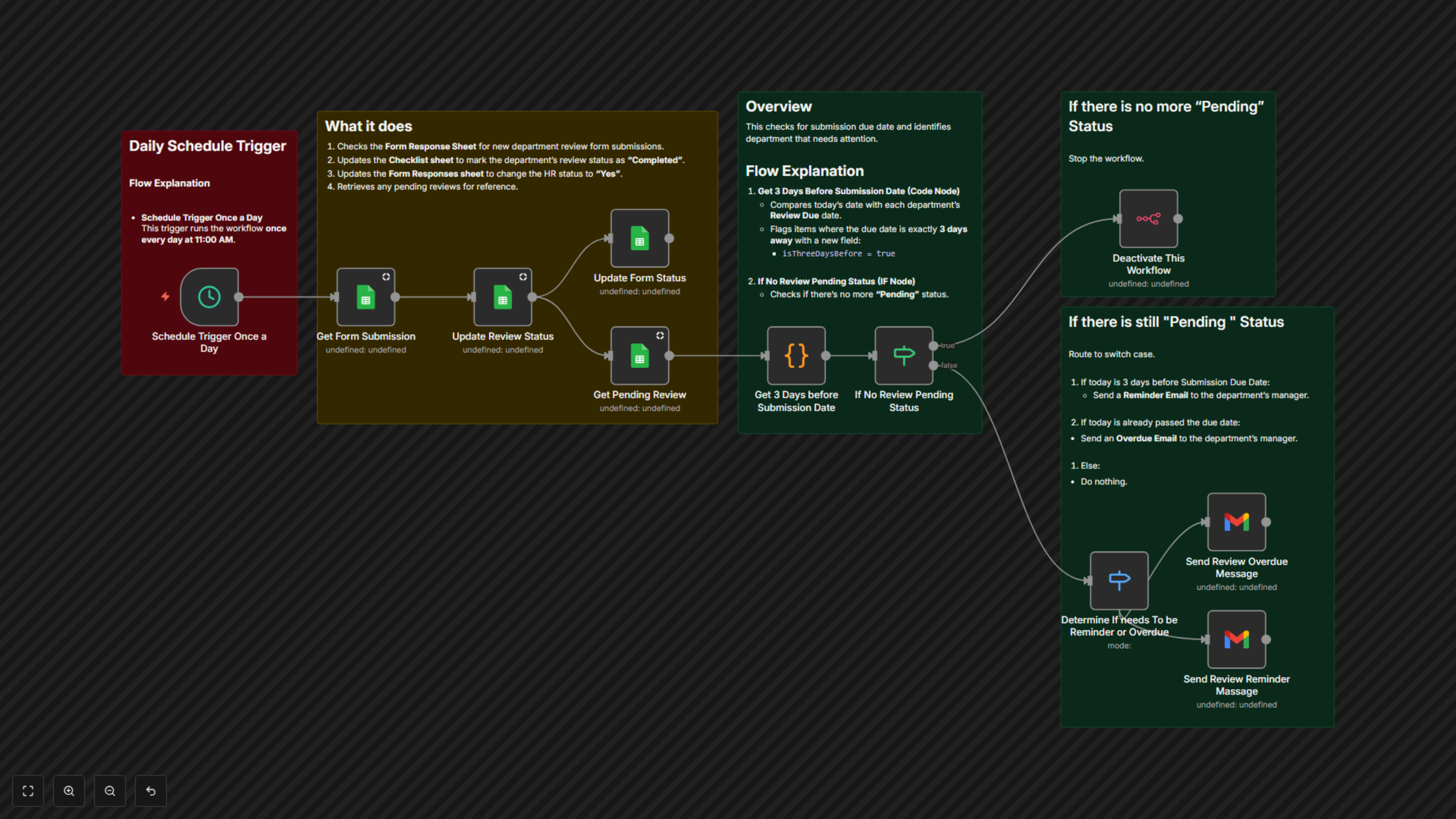
This workflow automates the tracking of biannual performance reviews. It monitors review statuses from Google Sheets, checks due dates, and sends reminders or overdue notifications to department managers to ensure timely completion.
Compatible with


$29
Ready-to-use workflow template
Complete workflow template
Setup documentation
Community support
Preview - Google
Documentation
Automated Biannual Performance Review Tracking
📌 OverviewThis workflow automates the tracking of biannual performance reviews. It monitors review assignments in Google Sheets, updates statuses in real time, and sends reminders to managers when reviews are approaching their due dates or overdue.Category: HR & People OperationsTrigger: Daily at 11:00 AM
⚙️ Workflow Steps
- Trigger Daily
- Runs every day at 11:00 AM.
- Starts the tracking process automatically.
- Get Review Assignments (Google Sheets)
- Reads assigned reviews and due dates from the HR checklist.
- Pulls manager details for follow-up.
- Check Review Status
- Compares today’s date with each review’s due date.
- Identifies reviews that are pending, due soon, or overdue.
- Send Reminder Emails (Gmail)
- Sends a reminder email 3 days before the due date.
- Includes review form link, due date, and HR contact info.
- Send Overdue Notifications (Gmail)
- Sends an escalation email if the review is overdue.
- Notifies managers to take immediate action.
- Update Status in Google Sheets
- Marks reviews as “Reminder Sent” or “Overdue.”
- Keeps the HR checklist accurate and up to date.
🗂️ Data Sources
- Google Sheets: Stores assignments, due dates, and review statuses.
- Gmail: Sends automated reminders and overdue notifications.
✅ Key Benefits
- Ensures no review deadlines are missed.
- Automates reminders and escalation emails.
- Keeps HR records updated in real time.
- Reduces manual follow-up for HR teams.