
Automate Stock Report Analysis & Generate AI-Powered Financial Reports
Generate comprehensive financial reports in minutes, reducing manual analysis time by over 90% and improving reporting accuracy.
Analyzing complex stock earnings reports and manually compiling financial summaries is time-consuming and error-prone. This workflow automates the extraction, AI-powered analysis, and structured report generation from earnings PDFs, delivering insights directly to Google Docs.




Documentation
Unlock AI-Powered Financial Analysis with RAG
This advanced n8n workflow revolutionizes how financial analysts, investors, and researchers digest complex stock earnings reports. By leveraging Retrieval Augmented Generation (RAG) with AI, it automates the laborious process of extracting key financial data from PDF documents, performing insightful analysis, and compiling detailed, structured reports, saving countless hours and enhancing decision-making.
Key Features
- Automated PDF data extraction from Google Drive sources.
- Semantic search and retrieval from a Pinecone vector store for context-rich data access.
- AI-driven financial analysis using Google Gemini and OpenAI to identify trends, outliers, and key metrics.
- Automatic generation of comprehensive, structured financial reports directly into Google Docs.
- Comparative analysis of earnings data across multiple quarters for deep insights.
How It Works
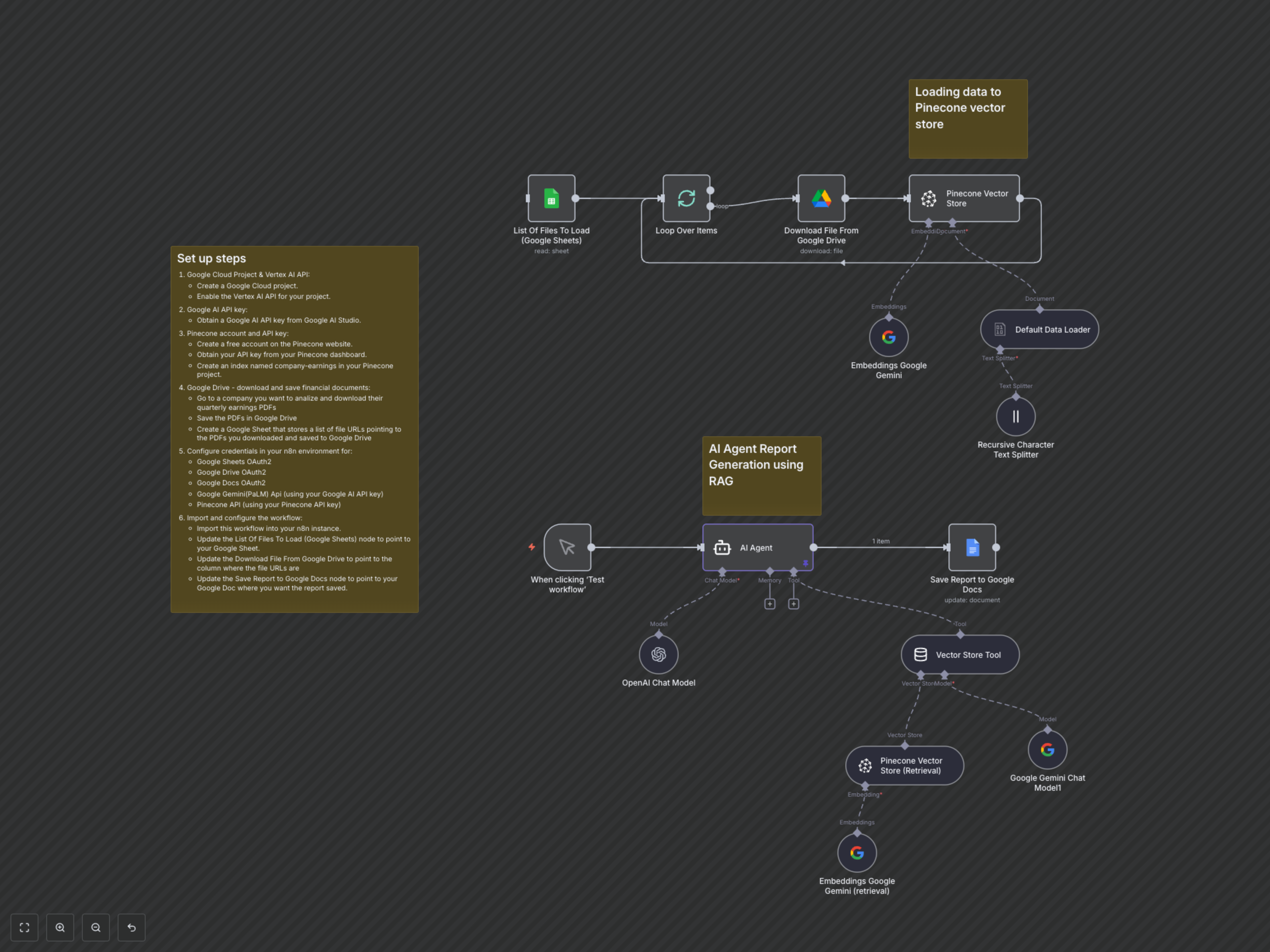
This workflow operates in two main phases: document ingestion and AI-powered report generation.
- The workflow begins by fetching a list of stock earnings report PDF URLs from a specified Google Sheet.
- Each PDF is downloaded from Google Drive, processed by a PDF data loader, and its content is split into smaller, manageable text chunks.
- Google Gemini Embeddings are generated for these text chunks and then efficiently stored in a Pinecone vector database. This forms a searchable knowledge base of your financial documents.
- Upon manual trigger, an AI Agent receives your specific query (e.g., "Give me a report on Google's last 3 quarter earnings").
- The AI Agent utilizes a "Vector Store Tool" to perform a semantic search against the Pinecone database, retrieving the most relevant financial passages to answer your query.
- Leveraging its analytical capabilities (powered by Google Gemini and OpenAI), the AI Agent synthesizes a comprehensive and structured financial report based on the retrieved data and the prompt's instructions.
- Finally, the generated report, formatted in markdown, is automatically saved or appended to a designated Google Doc, providing a ready-to-share financial summary.