
Automate Meeting Scheduling from Gmail with AI
Reduce time spent on scheduling emails by up to 80%, ensuring swift and accurate responses to all meeting requests within minutes.
Manually responding to meeting requests and checking calendar availability can consume valuable time and disrupt your focus. This workflow leverages AI to automatically detect appointment requests in your emails, check your Google Calendar availability, and craft intelligent, personalized replies, streamlining your scheduling process.



Documentation
AI-Powered Email & Calendar Scheduler
This powerful n8n workflow revolutionizes how you handle meeting and appointment requests directly from your Gmail inbox. By combining advanced AI with seamless calendar integration, it automatically processes inquiries, checks your availability, and sends professional replies, freeing you to focus on high-value tasks.
Key Features
- Automated Email Classification: Intelligently identifies appointment and meeting requests from incoming Gmail messages.
- Intelligent Calendar Availability Checks: Queries your Google Calendar to find suitable open slots, accounting for existing meetings and buffers.
- AI-Powered Reply Generation: Crafts personalized, professional email responses that propose meeting times or suggest alternatives.
- Seamless Gmail and Google Calendar Integration: Works effortlessly with your existing Google services.
How It Works
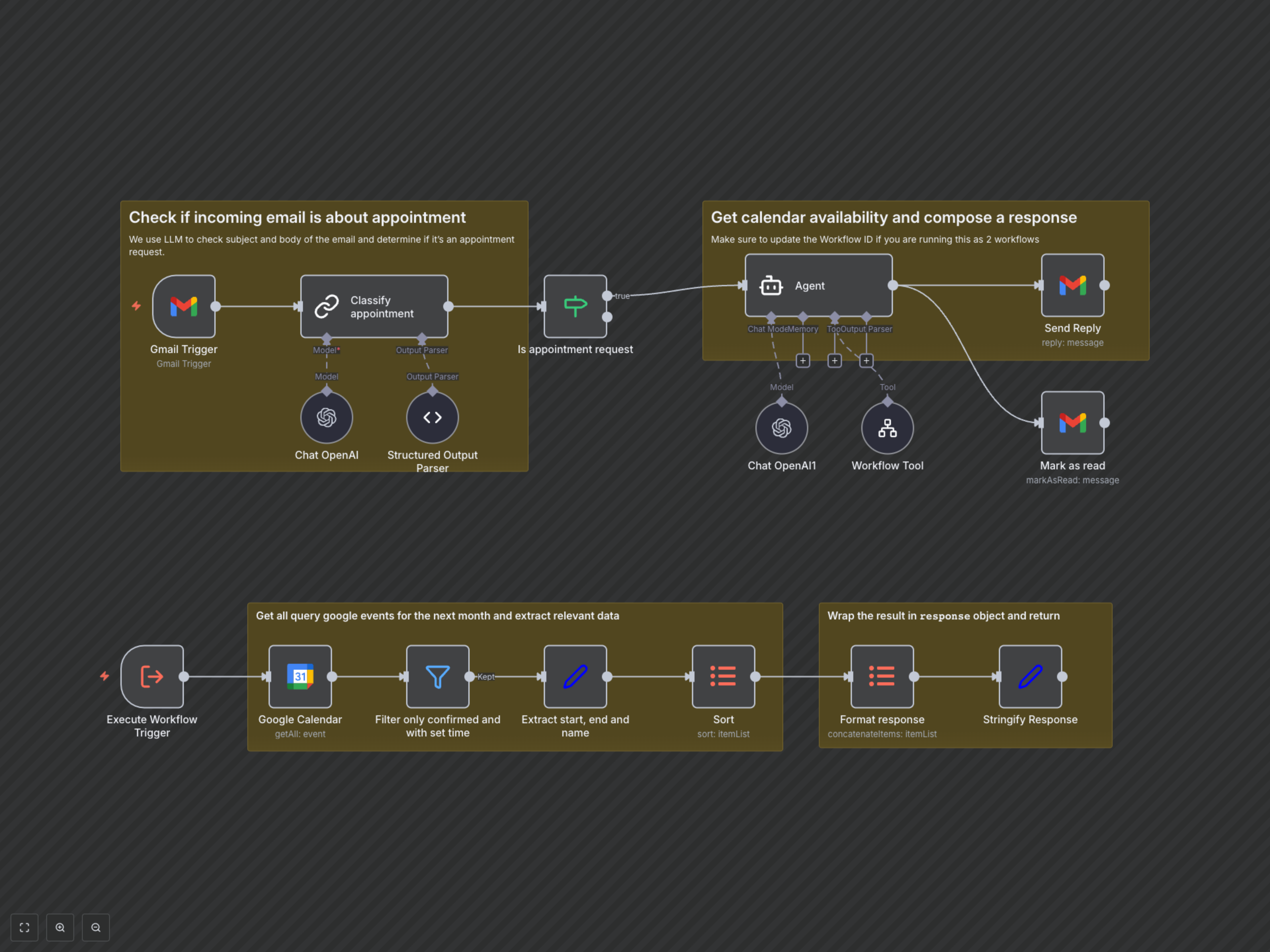
This workflow operates in a logical sequence to automate your scheduling: 1. Email Monitoring: The Gmail Trigger node continuously monitors your Gmail inbox for new, unread emails.2. AI Email Classification: An OpenAI Chat node, guided by a LangChain Chain LLM and Structured Output Parser, analyzes the email's subject and snippet to precisely determine if it's an appointment request. 3. Conditional Branching: An If node directs the workflow based on the classification. If it's an appointment request, the process continues; otherwise, it stops for that email. 4. Intelligent Scheduling Agent: An OpenAI Agent (powered by GPT-4) takes over. It receives the email context and uses a predefined Workflow Tool (a specific path within this very workflow, starting with the Execute Workflow Trigger node) to access your calendar. 5. Calendar Availability Check (Tool Execution): When the Agent calls its "Calendar_Availability" tool: * The Execute Workflow Trigger node initiates the calendar retrieval path. * The Google Calendar node fetches all confirmed events for the next month from your specified calendar. * Subsequent nodes (Filter, Set, Sort, Item Lists, Stringify Response) process and format this raw data into a consumable JSON array for the AI. 6. AI Response Generation: Based on the gathered calendar availability and its System Message (acting as an email scheduling assistant), the Agent intelligently formulates a personalized reply. It prioritizes finding specific times, adds buffer periods, and suggests alternatives if you're unavailable. 7. Send Reply & Mark Read: Finally, the Gmail nodes send the AI-generated reply to the original sender and mark the initial email as read, completing the automated cycle.