
Automate Blog Content & WordPress Publishing with AI
Generate, edit, and publish blog posts to WordPress 5x faster, freeing up marketing resources for strategic tasks.
Manually creating blog content and publishing it to WordPress is a time-consuming, multi-step process. This workflow leverages AI to automate content generation based on a Google Sheet schedule, then seamlessly publishes drafts to WordPress, significantly accelerating your content pipeline.


Documentation
AI-Powered Blog Automation for WordPress
This n8n workflow acts as a complete content factory, automating the generation and publishing of blog posts to WordPress. It leverages AI to brainstorm ideas, write content, and schedule publications, making it ideal for content creators, marketers, and businesses looking to scale their online presence.
Key Features
- Automated Content Generation: Uses AI (via OpenRouter/LangChain) to create blog post titles, outlines, and full drafts based on configurable prompts.
- Google Sheet Integration: Manages content schedules, configurations, and logs all activities directly within a Google Sheet.
- Scheduled & Manual Triggers: Run content generation and publishing on a defined schedule or initiate tasks manually as needed.
- Direct WordPress Publishing: Automatically creates and publishes new blog posts to your WordPress site using XML-RPC.
- Flexible AI Model Selection: Configure different LLMs for various content stages directly from your Google Sheet.
How It Works
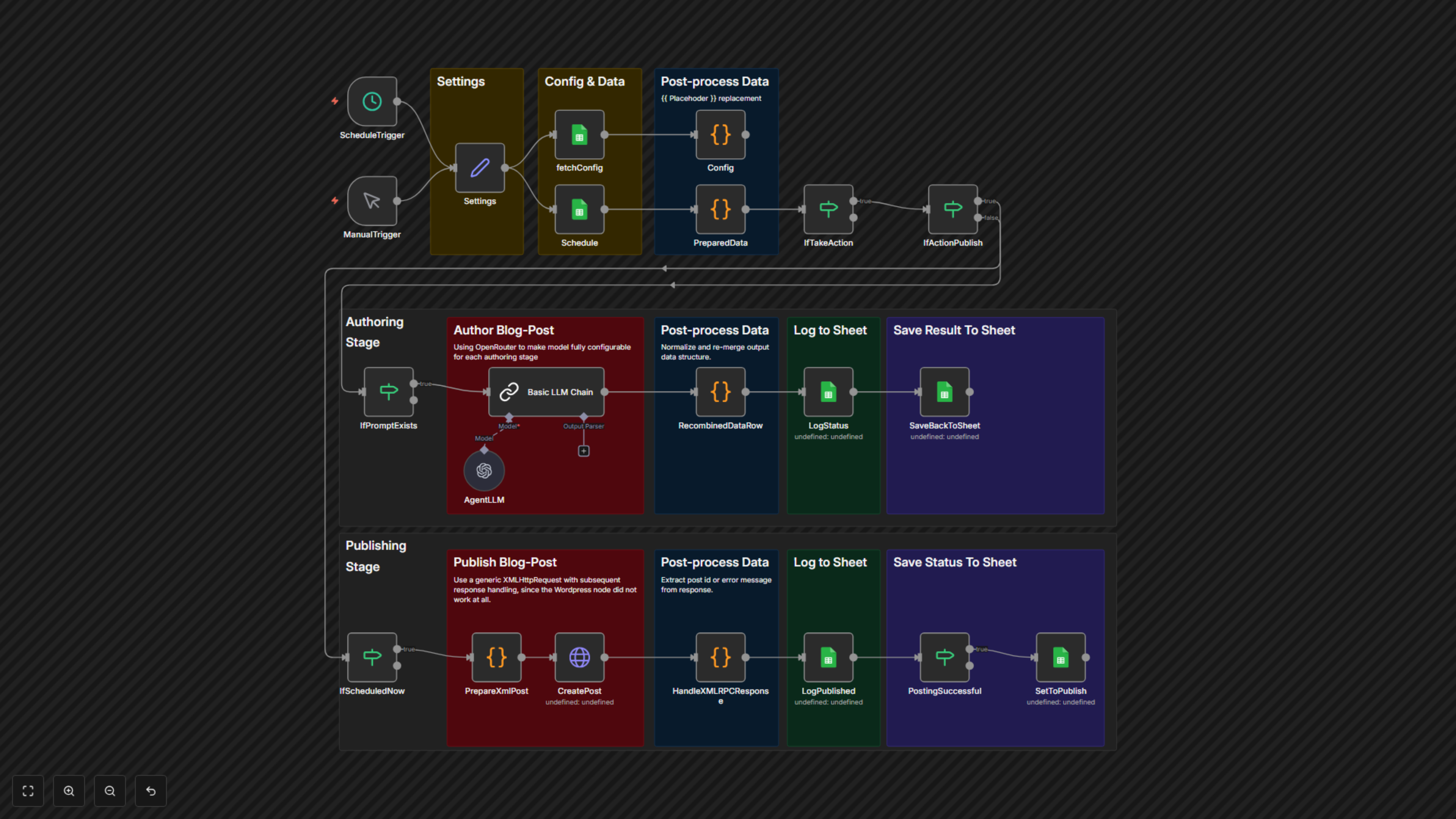
The workflow starts either on a schedule or manually. It fetches content ideas and configuration settings from a Google Sheet. For each scheduled item marked for action, it dynamically prepares an AI prompt. An LLM (configured via OpenRouter) then generates the required content (e.g., an outline, a draft, or final text). The generated content is saved back to the Google Sheet. If an item is marked for 'publish' and scheduled for now, the workflow formats the content into an XML-RPC request and sends it to your WordPress site. All actions and outcomes, including publishing status or errors, are logged back to a dedicated sheet.