
Automate AI Handoff & Customer Support with State-Based Routing
Reduce customer issue resolution time by up to 30% through intelligent bot-to-human handoffs, ensuring agents receive full conversation context for efficient resolution.
Fragmented customer support experiences and inefficient bot-to-human handoffs lead to frustrated users and lost productivity. This n8n workflow intelligently manages customer conversations using state-based AI agents, ensuring seamless transitions between bot and human support with full context.



Documentation
Intelligent AI Agent Handoff with State Management
This n8n workflow demonstrates a sophisticated approach to managing AI agent interactions, enabling seamless bot-to-human handoffs using a finite-state machine model. It controls conversation flow and ensures context preservation across different stages of customer engagement, from initial inquiry to after-sales support.
Key Features
- Dynamic State-Based Interaction: Guides users through distinct conversation stages (onboarding, human intervention, after-sales) using Redis for robust session management, ensuring focused and relevant responses.
- Context-Rich Human Handoffs: Transfers customer conversations to human agents with a comprehensive summary of interactions, eliminating repetitive questioning and speeding up issue resolution.
- Intelligent Onboarding & Information Extraction: Leverages AI to prescreen users, collecting essential details like name, address, and reason for inquiry through natural conversation flow, avoiding rigid forms.
- Seamless Bot Reactivation: Allows human agents to easily transfer control back to the AI, reactivating the bot with updated context from the human interaction for continuous support.
- Multi-Agent Support with Dedicated Memories: Employs specialized AI agents (Onboarding, After-Sales) with separate chat memories to maintain focus and accuracy within each conversation state.
How It Works
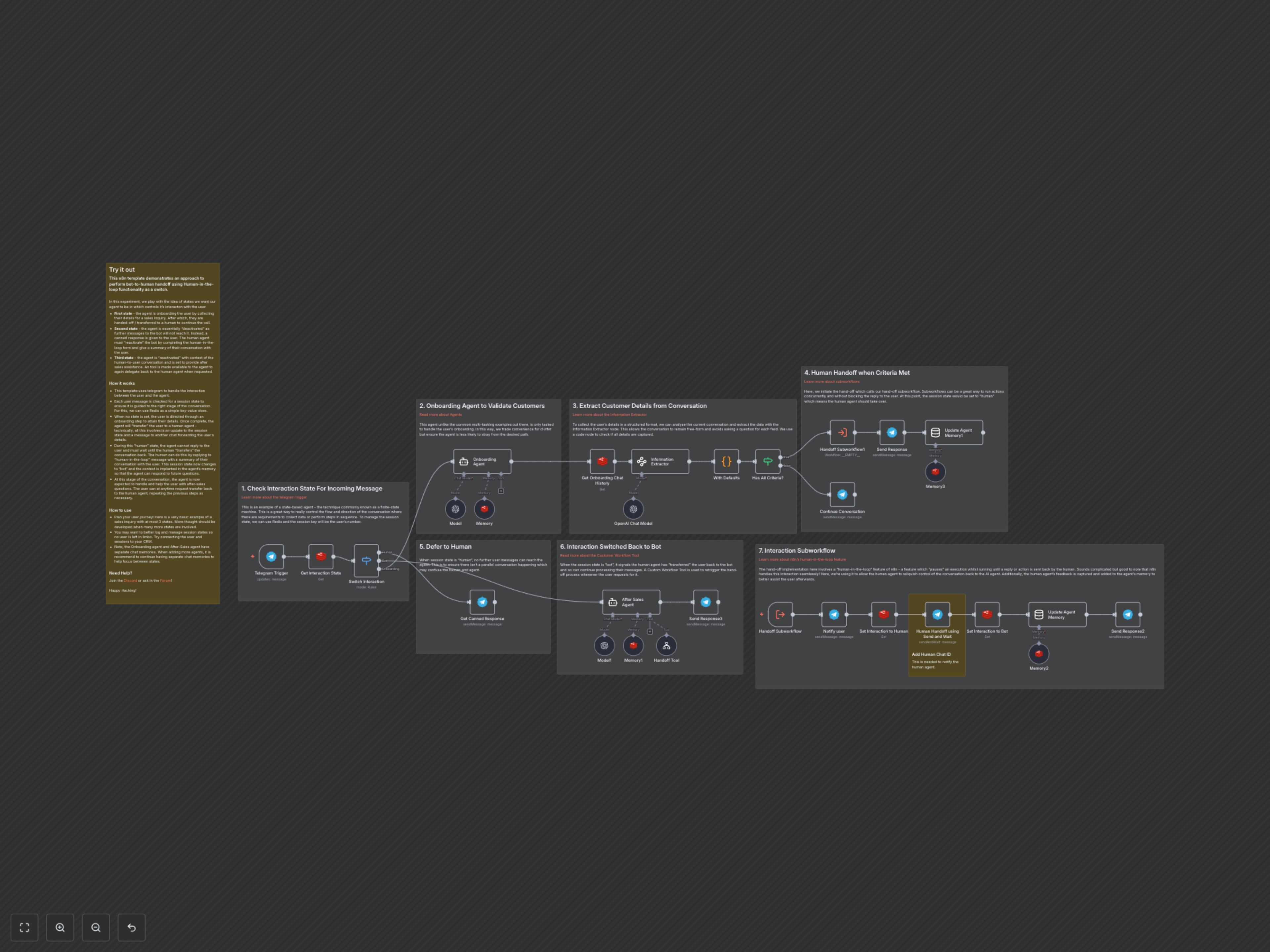
This template orchestrates sophisticated interactions between users, AI agents, and human agents via Telegram, driven by a Redis-managed session state. The workflow intelligently switches between three core states: onboarding, human intervention, and contextual after-sales support.
- Initial Interaction & State Check: Every incoming user message via Telegram is first checked against a Redis key-value store to determine the current session state (e.g., 'onboarding', 'human', 'bot').
- Onboarding Phase: If no state is set, the user enters an onboarding phase where a dedicated AI agent collects necessary details (name, address, reason for call) using an Information Extractor, ensuring data is captured efficiently without rigid questioning.
- Automated Human Handoff: Once all required details are gathered, the workflow automatically triggers a human handoff. This involves updating the session state to 'human' in Redis, sending a summary of the conversation to a designated human agent chat, and informing the user of the transfer.
- Human-in-the-Loop Intervention: During the 'human' state, the AI agent is "deactivated" and provides canned responses to the user. The human agent interacts directly with the user and, upon completion, uses n8n's human-in-the-loop feature to reply to the handoff message, providing a summary of their interaction and signaling the bot's reactivation.
- Bot Reactivation & Contextual After-Sales Support: The human agent's summary is then injected into the AI agent's memory, changing the session state back to 'bot'. A new AI agent, specialized in after-sales, is now active, capable of providing informed assistance with full context of the previous interactions.
- Flexible Re-Handoff: The after-sales agent is equipped with a Custom Workflow Tool, enabling it to initiate another human handoff at any point if the user requests it or if the query requires further human intervention.