
Audit AI Model Usage in n8n Workflows for Clear Oversight
Gain complete visibility into your n8n AI model usage in minutes, enhancing governance, resource management, and compliance efficiency.
Struggling to track which AI models are being used across your n8n workflows? This solution automatically scans all your n8n instances, identifies every AI model in use, and logs them into a Google Sheet for comprehensive oversight and simplified governance.

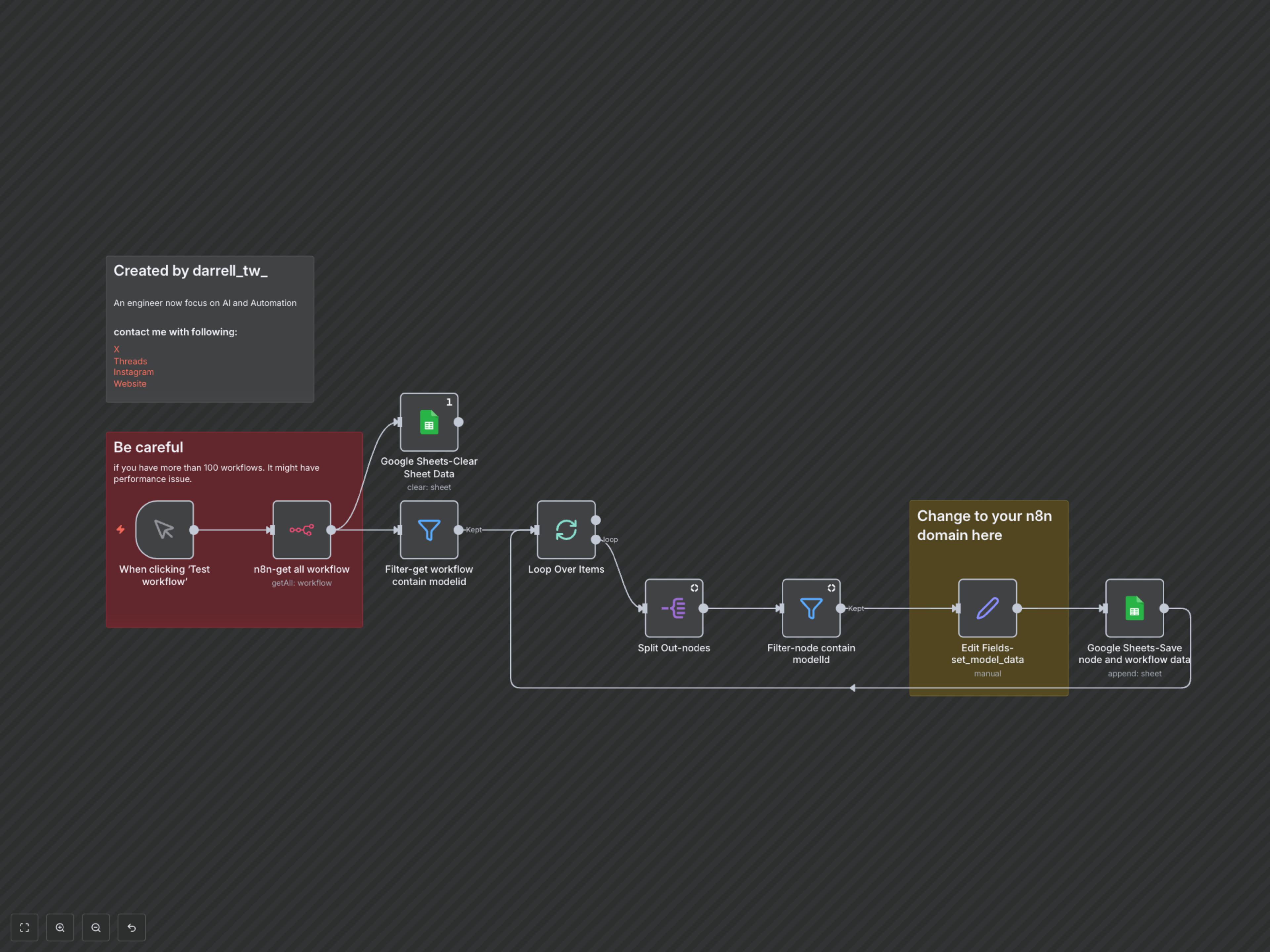

Documentation
Automated AI Model Usage Tracking for n8n
This powerful n8n workflow provides an automated solution for organizations to monitor and manage the deployment of AI models across all their n8n instances. It systematically scans every workflow, extracts details about the AI models configured within nodes, and compiles this crucial information into a single, easy-to-access Google Sheet, saving significant manual effort.
Key Features
- Automated AI Model Discovery: Efficiently scans all active n8n workflows to identify nodes utilizing various AI models (e.g., OpenAI, Gemini, custom models).
- Centralized Reporting: Consolidates model usage data, including node names, specific model IDs, workflow names, and direct links, into a Google Sheet for easy access.
- Enhanced Governance & Compliance: Provides a clear, up-to-date audit trail of AI model deployment, supporting compliance efforts, resource allocation, and internal policy enforcement.
- Streamlined Operations: Eliminates the need for manual review of workflows, freeing up valuable developer and operations time.
How It Works
1. The workflow is manually triggered to initiate the scanning process. 2. It connects to your n8n instance via the n8n API to retrieve a list of all existing workflows. 3. Workflows are then intelligently filtered to identify those that contain nodes with `modelId` or `model` parameters, indicating the presence of AI model integrations (the current workflow itself is excluded to prevent self-reporting). 4. For each identified workflow, the workflow iterates through its individual nodes. 5. Specific nodes are further filtered to pinpoint the exact AI model configurations. 6. Relevant data, including the node name, the AI model being used, the workflow's name and ID, and a direct URL link to the specific workflow node, is meticulously extracted. 7. Before appending new data, the designated Google Sheet is cleared to ensure your report always contains the most current and accurate information. 8. The extracted details are then appended as new rows to your Google Sheet, creating a dynamic and comprehensive inventory of your n8n AI model usage.