
Unlock Real-Time DEX Insights with CoinMarketCap AI Agent
Accelerate decentralized exchange (DEX) research by up to 90%, providing real-time and historical insights for data-driven market decisions.
Manually gathering, analyzing, and synthesizing decentralized exchange (DEX) data is complex and time-consuming. This n8n workflow leverages an AI agent to instantly query CoinMarketCap's DEXScan API, delivering real-time insights into liquidity, trading volumes, and market pair dynamics.



Documentation
CoinMarketCap DEXScan AI Agent: Real-Time Decentralized Exchange Insights
Navigate the complex world of decentralized exchanges (DEXs) with unparalleled ease. This powerful n8n workflow acts as an intelligent AI agent, connecting directly to CoinMarketCap's DEXScan API to provide real-time and historical data on liquidity, trading volume, spot pairs, and overall market activity.
Key Features
- Access real-time DEX liquidity and 24-hour trading volumes across multiple networks.
- Retrieve comprehensive metadata (logos, URLs, launch dates) for any decentralized exchange.
- Track live market pair quotes and detailed spot pair data, including security scans and taxes.
- Monitor historical OHLCV (Open, High, Low, Close, Volume) data for in-depth technical analysis and backtesting.
- Identify recent trades and granular pair-specific activity to stay ahead of market trends.
- Supports multi-currency conversion for all retrieved quote values.
How It Works
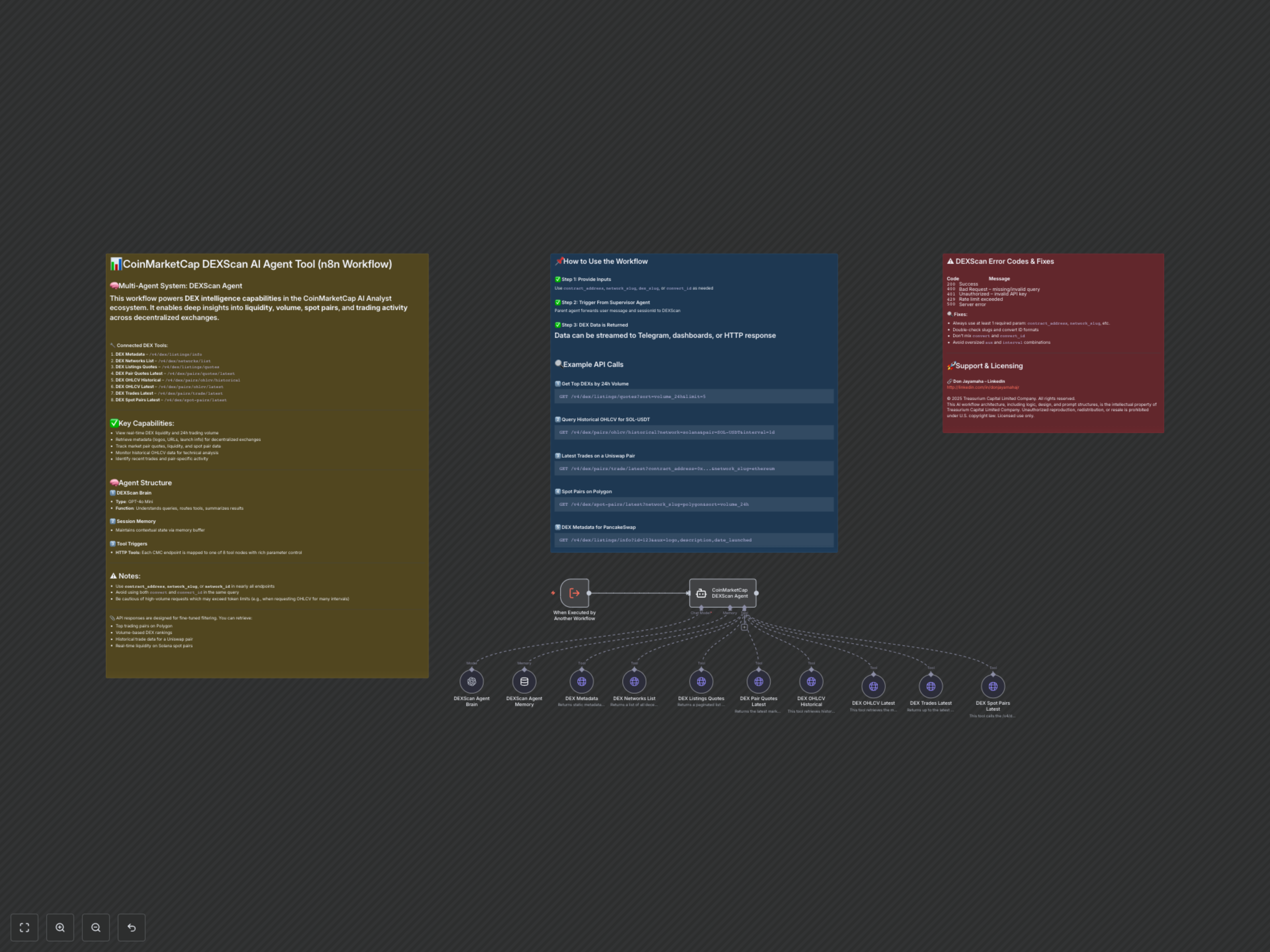
The workflow operates as a sophisticated multi-agent system. Upon receiving a message or query from a parent workflow, the CoinMarketCap DEXScan Agent (a LangChain agent) utilizes a GPT-4o Mini as its brain to interpret the request and determine the most appropriate CoinMarketCap DEXScan API tool to call. It maintains contextual state through Session Memory, executes the relevant HTTP tool to fetch precise data, and finally processes and summarizes the information before passing it back to the calling workflow.
Connected DEXScan API Endpoints
- DEX Metadata – /v4/dex/listings/info
- DEX Networks List – /v4/dex/networks/list
- DEX Listings Quotes – /v4/dex/listings/quotes
- DEX Pair Quotes Latest – /v4/dex/pairs/quotes/latest
- DEX OHLCV Historical – /v4/dex/pairs/ohlcv/historical
- DEX OHLCV Latest – /v4/dex/pairs/ohlcv/latest
- DEX Trades Latest – /v4/dex/pairs/trade/latest
- DEX Spot Pairs Latest – /v4/dex/spot-pairs/latest
Usage Examples
To effectively utilize this agent, simply provide clear prompts or parameters. The agent intelligently maps your request to the appropriate CoinMarketCap DEXScan API endpoint. Here are examples of typical questions or API-like queries the agent can handle:
1. Get Top DEXs by 24h Volume
GET /v4/dex/listings/quotes?sort=volume_24h&limit=52. Query Historical OHLCV for SOL-USDT
GET /v4/dex/pairs/ohlcv/historical?network=solana&pair=SOL-USDT&interval=1d3. Latest Trades on a Uniswap Pair
GET /v4/dex/pairs/trade/latest?contract_address=0x...&network_slug=ethereum4. Spot Pairs on Polygon
GET /v4/dex/spot-pairs/latest?network_slug=polygon&sort=volume_24h5. DEX Metadata for PancakeSwap
GET /v4/dex/listings/info?id=123&aux=logo,description,date_launchedImportant Considerations & Error Prevention
To ensure smooth operation and avoid common API errors, keep the following guidelines in mind:
- Always include at least one required identifier like contract_address, network_slug, or network_id in your queries.
- Avoid mixing convert and convert_id parameters in the same request.
- Be mindful of token limits and context window restrictions, especially when requesting large volumes of historical data.
- Ensure proper casing and valid slugs (e.g., "ethereum" not "Ethereum").
- Only use documented values for aux, sort, and interval fields.
Troubleshooting DEXScan Errors
Common error codes and their remedies:
- 400 Bad Request: Typically indicates missing or invalid query parameters. Verify your inputs match the tool descriptions.
- 401 Unauthorized: Your CoinMarketCap API key is invalid or missing. Ensure your credentials are correctly configured.
- 429 Rate Limit Exceeded: You have sent too many requests in a given timeframe. Implement delays or reduce query frequency.
- 500 Server Error: An issue on the CoinMarketCap API side. This is rare; try again later.