
OCR Document & Receipt Extractor to Google Sheets
Effortlessly track expenses and gain valuable insights by automatically extracting key data from receipts and documents directly into Google Sheets.
Automatically extract text and key details (Date, Reference Number, Supplier, Description, Amount) from uploaded receipts, invoices, and documents using Google Gemini OCR + AI, and log them directly into Google Sheets for seamless expense tracking.


Documentation
OCR Document & Receipt Extractor to Google Sheets
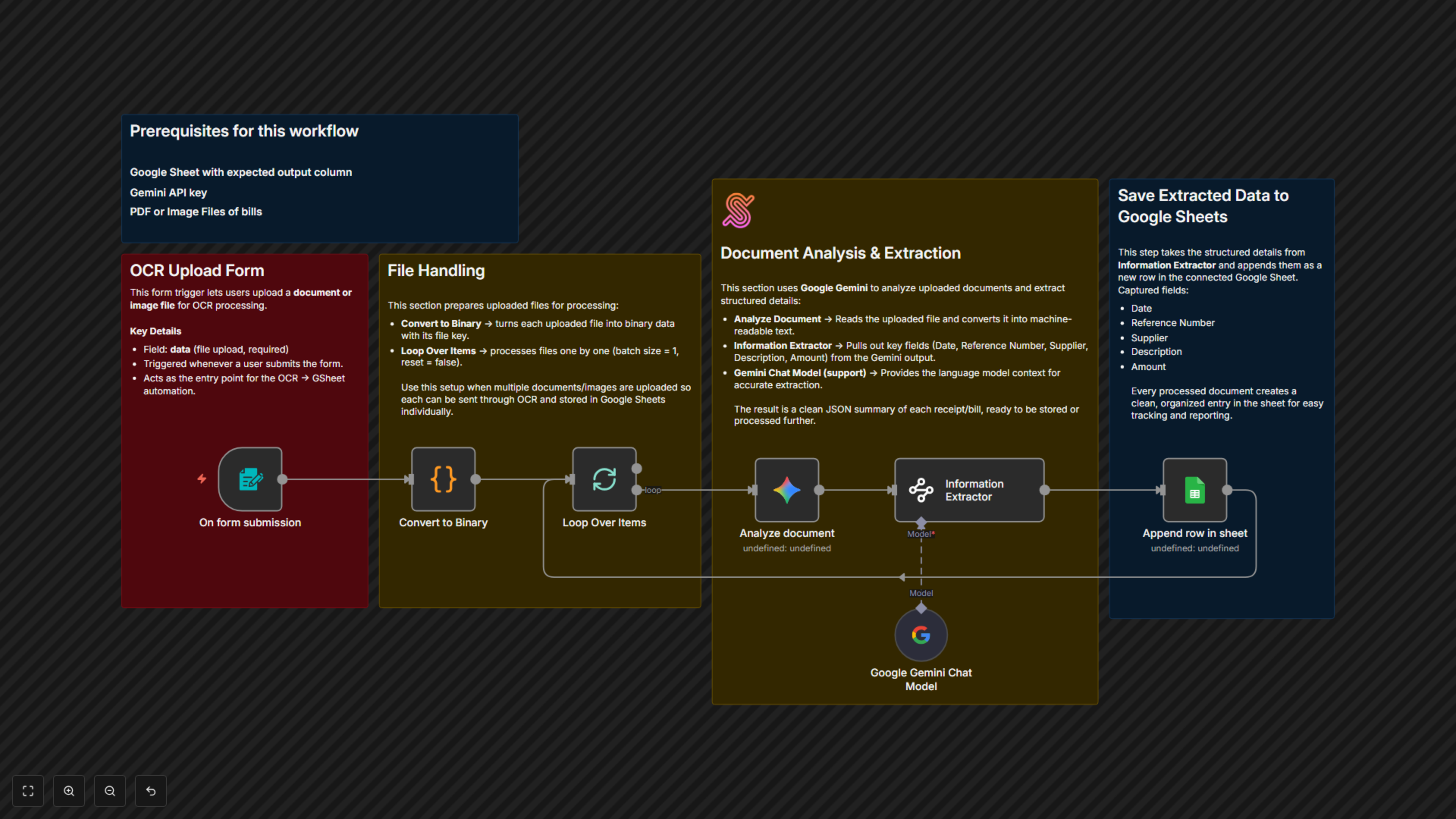
📌 Overview This workflow lets users upload documents or images (e.g., receipts, bills, invoices) through a form. It uses Google Gemini OCR + AI extraction to pull out structured details (Date, Reference Number, Supplier, Description, Amount) and automatically saves them into Google Sheets for easy tracking and reporting.
Category: Finance & Operations Trigger: File upload via n8n Form
⚙️ Workflow Steps
- Form Submission (n8n Form Trigger)
- Starts when a user uploads a document or image.
- Accepts required file input (data).
- Convert to Binary (Code Node)
- Converts uploaded files into binary format for processing.
- Ensures compatibility with OCR and AI models.
- Loop Over Items (Batch Processing)
- Processes uploaded files one by one.
- Useful when multiple receipts/documents are submitted at once.
- Analyze Document (Google Gemini)
- Reads the uploaded document/image.
- Extracts raw text using OCR and AI analysis.
- Information Extractor (Google Gemini + AI)
- Pulls structured fields from text:
- Date
- Reference Number
- Supplier
- Description
- Amount (numbers only)
- Converts into clean JSON output.
- Append Row in Google Sheets
- Saves extracted details into the connected Google Sheet.
- Each document = one clean row entry.
🗂️ Data Sources & Tools
- n8n Form → User uploads documents/images.
- Google Gemini API → OCR + AI extraction.
- Google Sheets → Stores structured receipt/bill data.
✅ Key Benefits
- Automates data entry from receipts, invoices, and bills.
- Eliminates manual typing errors.
- Supports multiple file uploads.
- Creates a clean, searchable expense log in Google Sheets.