
Automate WordPress Posts with AI & DALL-E Images
Generate publication-ready WordPress articles with featured images in under 5 minutes, boosting content output by over 500%.
Manually crafting SEO-friendly WordPress articles and sourcing relevant images consumes significant time and resources. This workflow leverages AI to generate full article drafts, including titles, structures, content, and DALL-E images, directly publishing them to WordPress.




Documentation
AI-Powered WordPress Content & Image Generation
Manual content creation and image sourcing can be a bottleneck for consistent publishing. This n8n workflow streamlines your content pipeline, automating the entire process from ideation to a complete WordPress draft, including a unique featured image.
Key Features
- Instantly generate full WordPress article drafts based on simple keywords.
- Leverage advanced AI (GPT-4) for SEO-friendly titles, subtitles, structured chapters, introductions, and conclusions.
- Automatically create engaging featured images using DALL-E 3 based on AI-generated prompts.
- Seamlessly post articles as drafts to your WordPress site with all content and the featured image integrated.
- Ensure data consistency with built-in checks before publishing.
How It Works
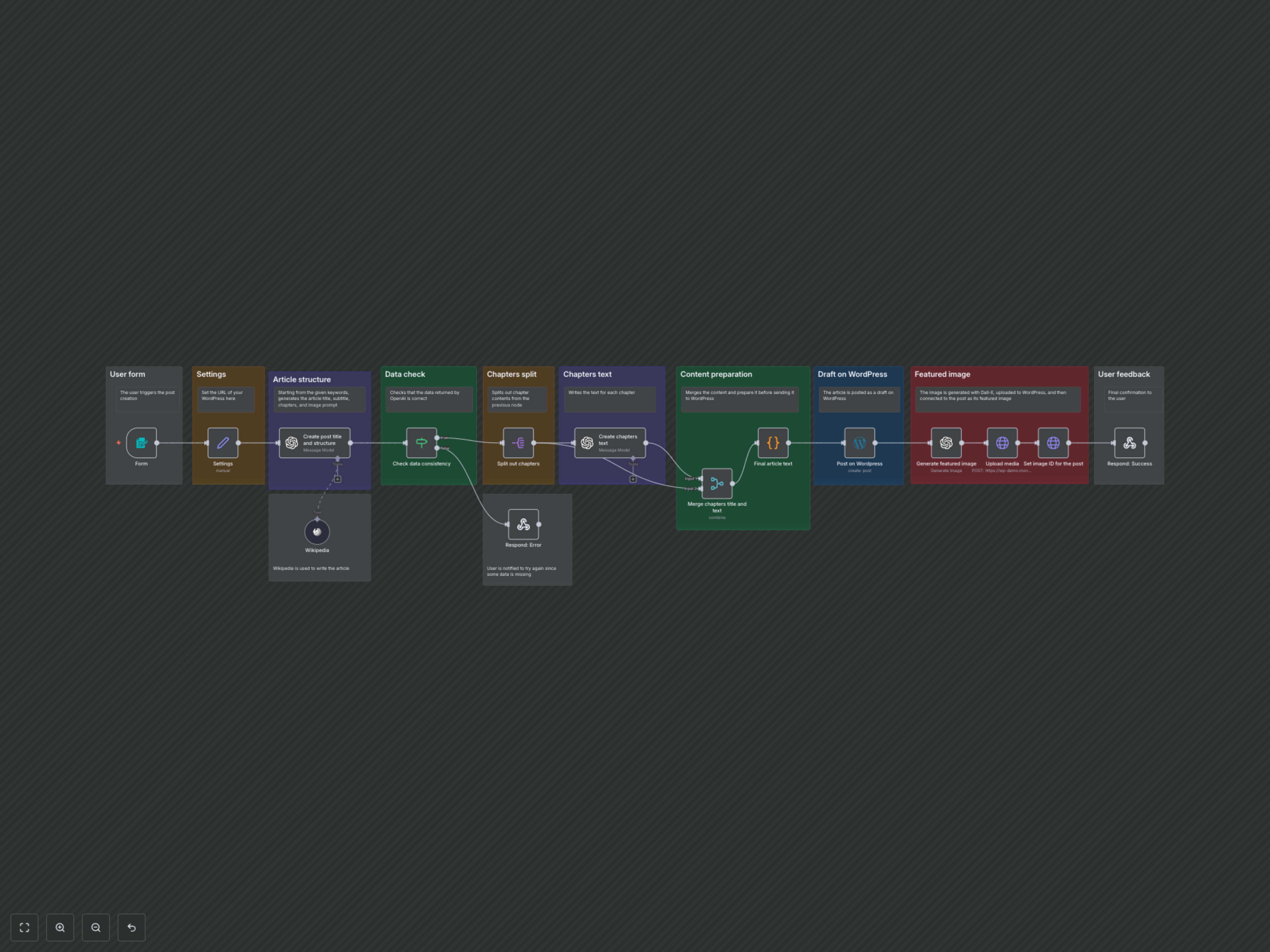
The workflow begins when a user submits keywords, desired chapter count, and max word count via a user-friendly n8n form.
1. Article Structure Generation: AI crafts the article's title, subtitle, introduction, conclusion, chapter outlines, and an image prompt. It uses Wikipedia as a tool for factual accuracy.
2. Data Consistency Check: The workflow verifies that all essential article components have been successfully generated by the AI. If any data is missing, the user receives an error notification.
3. Chapter Content Creation: For each chapter outline, the AI generates detailed, contextually aware chapter text, ensuring a coherent and fluent article flow.
4. Final Article Assembly: All generated parts — introduction, chapters, and conclusion — are combined into a single, HTML-formatted article ready for WordPress.
5. WordPress Draft Posting: The complete article is posted as a draft on your specified WordPress site.
6. Featured Image Generation & Upload: An AI-powered image generator (DALL-E) creates a unique featured image based on the earlier prompt. This image is then uploaded to WordPress and linked to the newly created post.
7. User Confirmation: The user receives a success message indicating the article has been drafted, or an error if a problem occurred.