
Automate n8n Workflow Auditing & Secure Backups to Airtable
Automate comprehensive n8n workflow auditing and backup processes, reducing manual oversight effort by over 80% and providing instant access to historical workflow configurations.
Manual tracking and auditing of n8n workflows, identifying active or CRON-based workflows, and maintaining secure backups is time-consuming and prone to errors. This workflow automatically extracts all n8n workflow details, backs up their JSON to Dropbox, and centralizes key metadata like status, node types, and CRON schedules in Airtable for easy management and auditing.



Documentation
Monitor and Backup Your n8n Workflows
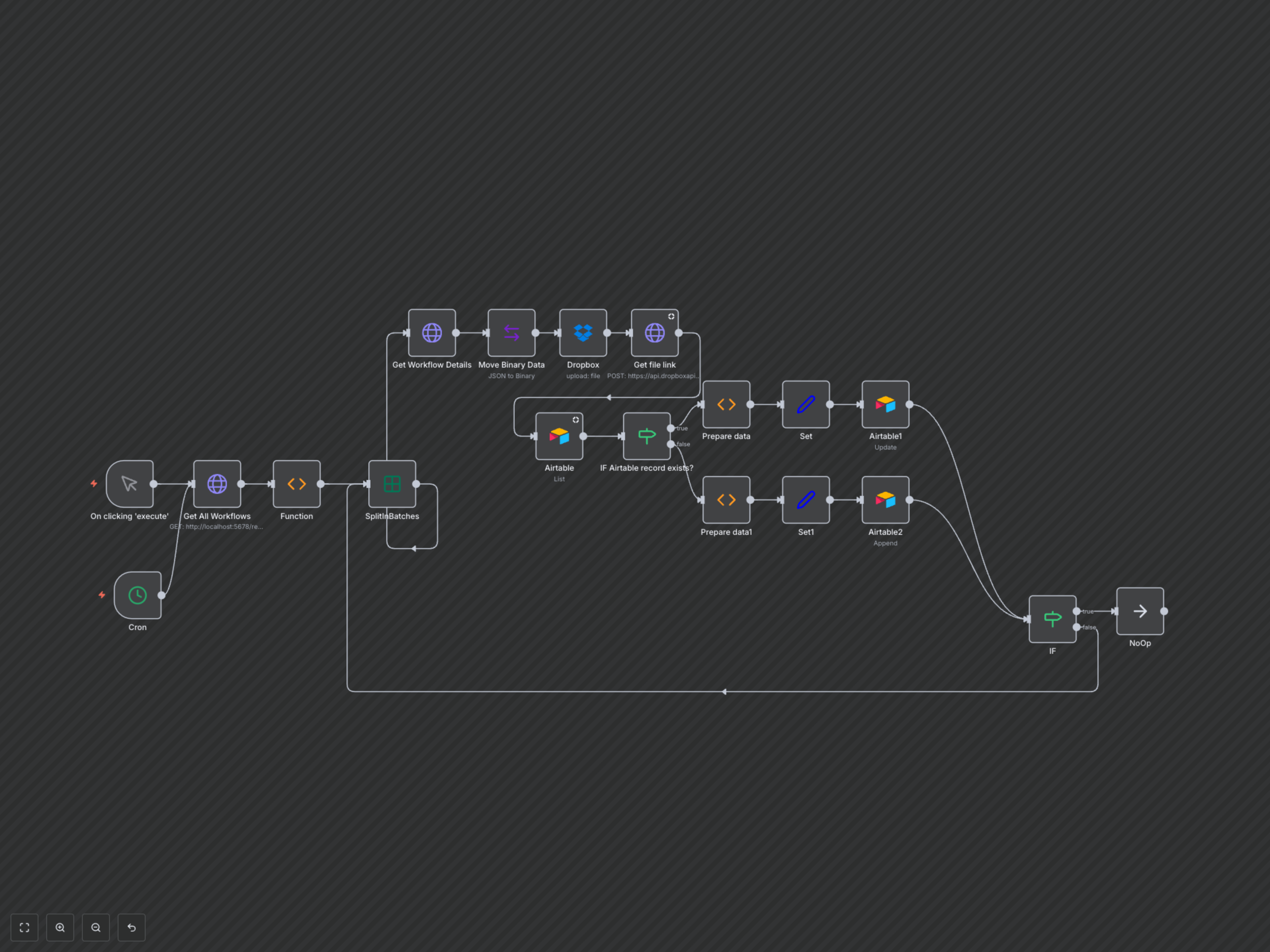
This robust n8n workflow provides a centralized solution for managing, auditing, and backing up all your n8n workflows. It periodically fetches workflow configurations, identifies key characteristics, and stores them in Airtable while maintaining secure JSON backups in Dropbox.
Key Features
- Automatic discovery and extraction of critical metadata from all active n8n workflows.
- Comprehensive metadata storage in Airtable, including workflow ID, name, status, creation/update times, error workflow settings, timezone, and node types.
- Intelligent identification of CRON-based and trigger-based workflows for better oversight.
- Secure, versioned JSON backup of each workflow's full definition to Dropbox, linked directly from Airtable.
- Automated synchronization with Airtable, updating existing records or creating new ones based on workflow ID.
How It Works
The workflow can be triggered manually or on a customizable schedule via the 'Cron' node. It begins by making an authenticated HTTP request to your n8n instance's REST API to retrieve a list of all workflows. This list is then split into individual items, allowing each workflow to be processed sequentially. For each workflow, detailed configuration data is fetched. This data is converted into a binary format and securely backed up as a JSON file to a designated Dropbox folder, with a unique filename including its ID and update timestamp for versioning. Simultaneously, a temporary shareable link to this backup file is generated from Dropbox. Next, the workflow analyzes the detailed configuration to extract key metadata such as its active status, name, creation/update dates, error workflow association, timezone, and a comprehensive list of all node types used. It specifically identifies if the workflow utilizes a CRON trigger or any other form of trigger node. Finally, an 'IF' condition checks if a record for the current workflow already exists in your Airtable base using its unique workflow ID. If a match is found, the existing Airtable record is updated with the latest metadata and Dropbox backup link. If no existing record is found, a new record is created. This ensures your Airtable base provides an accurate, up-to-date, and auditable overview of your entire n8n workflow ecosystem.