
Automate Fastmail Email Drafting with AI-Powered Replies
Generate AI-powered email drafts in seconds, reducing manual response time by up to 90% and freeing up staff for high-value tasks.
Manually crafting email responses consumes valuable time and impacts productivity, leading to delayed communication. This n8n workflow leverages AI to automatically draft personalized email replies, seamlessly integrating with your Fastmail inbox to save hours each week.



Documentation
AI-Powered Fastmail Email Drafting Workflow
This n8n workflow revolutionizes email management by automating the drafting of personalized replies for your Fastmail inbox using advanced AI. It's designed to significantly reduce the time spent on routine email correspondence, allowing you to focus on more critical tasks.
Key Features
- Automated Email Monitoring: Continuously scans your designated IMAP inbox for new, unread emails.
- Intelligent Data Extraction: Automatically pulls crucial details like sender, subject, and body content from incoming messages.
- AI-Powered Reply Generation: Leverages OpenAI's GPT-4o to craft contextually relevant and personalized draft responses.
- Seamless Fastmail Integration: Securely interacts with the Fastmail JMAP API to manage session and mailbox IDs, placing drafts directly into your 'Drafts' folder.
- Personalized Tone Adaptation: AI generates responses with appropriate greetings and sign-offs, adapting formality based on the original email.
How It Works
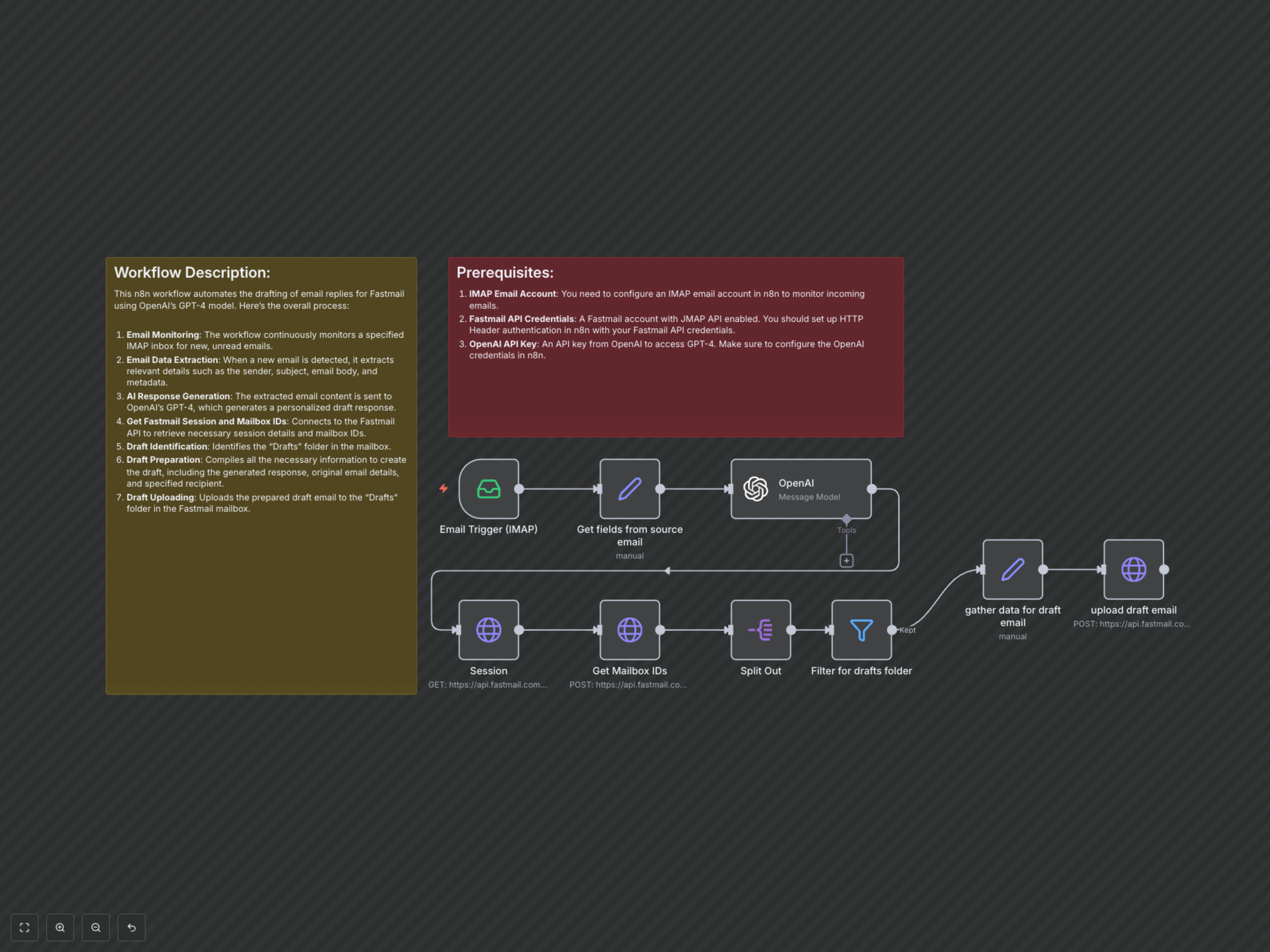
The workflow initiates by monitoring a specified IMAP inbox for new emails. Upon detection, it extracts key information (sender, subject, email body) from the incoming message. This data is then fed into OpenAI's GPT-4o model, which generates a tailored draft response based on the email's content and specified linguistic nuances. Concurrently, the workflow establishes a secure session with the Fastmail JMAP API to retrieve necessary mailbox identifiers. It filters for the 'Drafts' folder and then compiles all the generated and extracted information to create a new draft email, which is finally uploaded to your Fastmail 'Drafts' folder, ready for review and sending.