
Automate Event Registrations & Streamline Attendee Onboarding
Automate event attendee onboarding and communication, reducing manual setup time by 90% and ensuring instant access to event resources and communities.
Manually managing event registrations, onboarding attendees, and coordinating communication across platforms is time-consuming and error-prone. This workflow fully automates attendee registration from Typeform, instantly creating Mattermost accounts, managing session access, and sending personalized welcome emails, saving hours of administrative work.



Documentation
Automate Event Registrations & Streamlined Attendee Onboarding
Effortlessly manage your event attendees from initial registration to full engagement with this powerful n8n workflow. Designed for event organizers, conference hosts, and workshop facilitators, it eliminates manual data entry and ensures a seamless onboarding experience across multiple platforms.
Key Features
- Instantly capture attendee details and session preferences through Typeform.
- Automatically provision new user accounts in Mattermost and add them to the main event team.
- Dynamically enroll attendees into specific Mattermost channels and Google Calendar events based on their chosen sessions.
- Deliver personalized welcome emails with all necessary login credentials and event access instructions.
- Minimize administrative overhead and prevent errors associated with manual attendee management.
How It Works
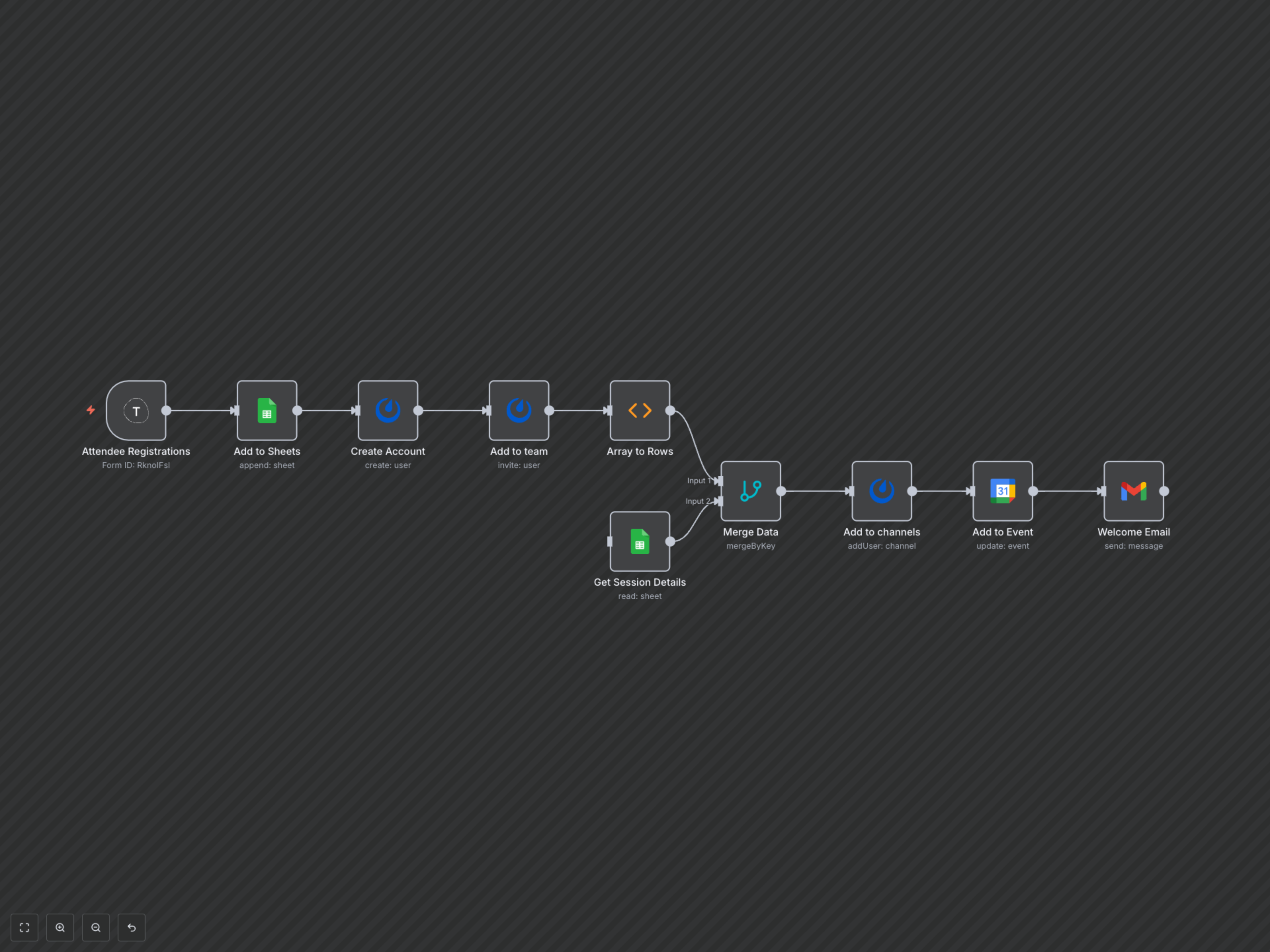
This workflow orchestrates a multi-platform attendee journey. It begins when an attendee submits your Typeform registration. Their details are immediately logged in Google Sheets, and simultaneously, a Mattermost account is created, and they are added to your event's main team. The workflow then intelligently parses their session selections, retrieves relevant details from your 'Sessions' Google Sheet, and automatically adds them to the correct Mattermost channels and sends Google Calendar invitations for each chosen session. The final step is a personalized welcome email, providing all necessary Mattermost login credentials, session confirmations, and direct links to join their events.