
Automate AI Image Generation, Google Drive Storage & Cost Tracking
Generate, organize, and track AI image creations automatically, reducing manual processing time by 90% and eliminating human error in cost logging.
Manually generating, saving, and tracking AI image costs is a time-consuming and error-prone process that hinders productivity. This workflow automates AI image generation from chat prompts, stores images in Google Drive, and meticulously logs all usage and costs in Google Sheets, dramatically streamlining your creative pipeline.



Documentation
AI Image Generation, Storage, and Cost Tracking with Google Workspace
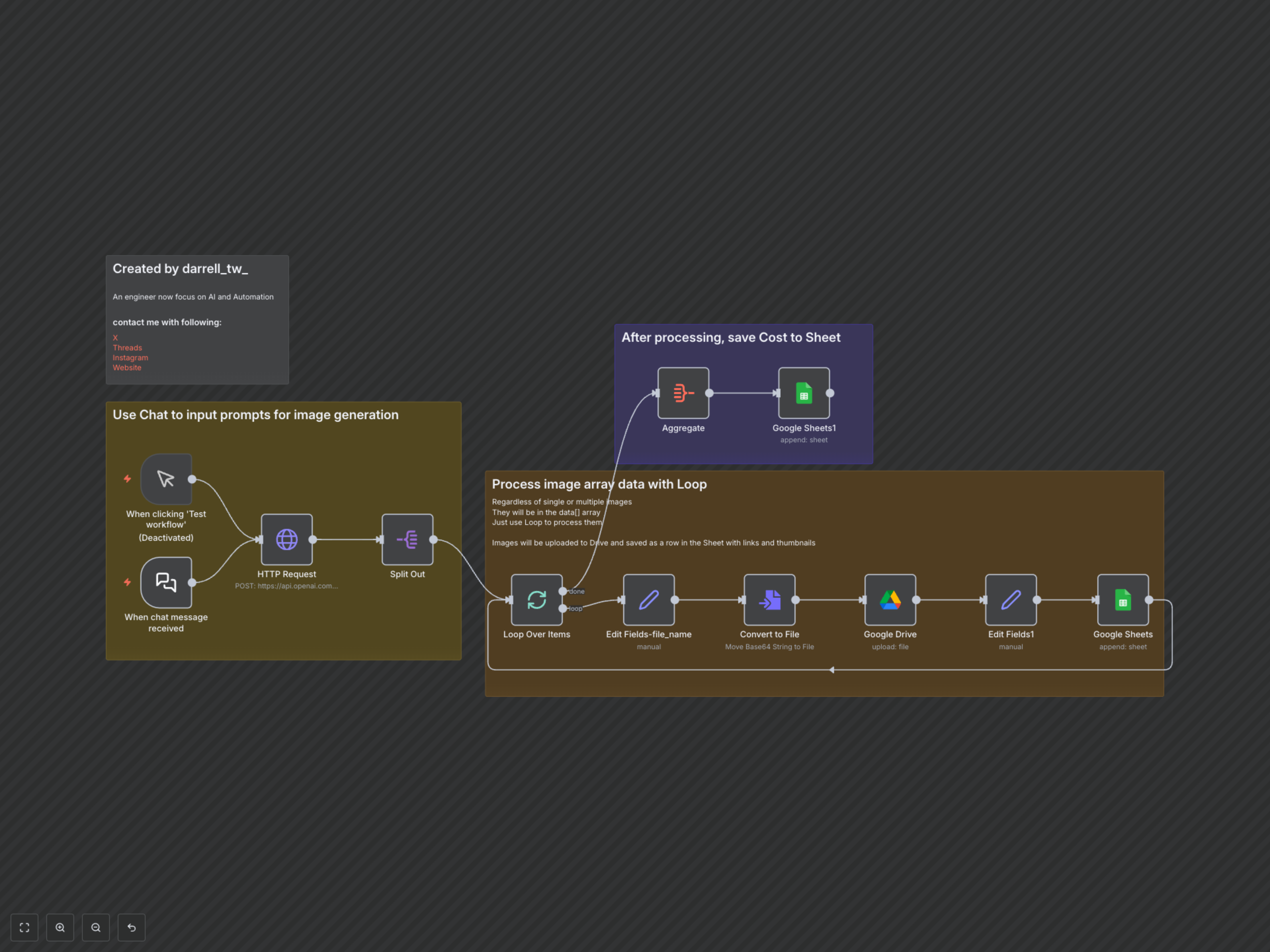
This n8n workflow provides a comprehensive solution for generating AI images from simple chat prompts, automatically organizing them in Google Drive, and meticulously tracking associated costs in Google Sheets. It's ideal for marketers, content creators, and developers seeking to streamline their creative process and monitor AI expenditure efficiently.
Key Features
- Generate AI images instantly using OpenAI's DALL-E model from chat prompts.
- Automatically save all generated images to a designated Google Drive folder.
- Log image details, including prompt, Drive link, and thumbnail, into a Google Sheet.
- Track and calculate estimated OpenAI API usage costs (based on token metrics) for each generation in a separate Google Sheet.
- Seamlessly handles single or multiple image outputs from the AI model.
How It Works
Upon receiving a chat message with an image prompt, the workflow sends a request to OpenAI's DALL-E image generation API. The generated image(s) are then processed, converted into binary files, and uploaded to a specified Google Drive folder, named using a unique timestamp. Simultaneously, details such as the image's Drive link, thumbnail link, and the original prompt are logged in one Google Sheet. In parallel, the associated OpenAI API usage data (input/output tokens) and estimated costs are meticulously recorded in a separate 'usage' Google Sheet, providing a comprehensive audit trail for all your AI image generation activities.