
Automate Deep Research & Generate Notion Reports with AI
Accelerate research cycles by 80%, transforming hours of manual effort into minutes with AI-driven insights and automated report generation.
Manual deep research and report generation consumes excessive time and resources, hindering rapid decision-making. This n8n workflow leverages AI and robust web scraping to conduct multi-step, recursive research on any topic, delivering comprehensive, publication-ready reports directly into Notion.


Documentation
n8n DeepResearcher: AI-Powered Comprehensive Reports
This n8n workflow replicates OpenAI's DeepResearch feature, enabling advanced web searching, content scraping, and intelligent reasoning to generate detailed reports. It transforms complex research tasks into an automated process, significantly reducing manual effort and time.
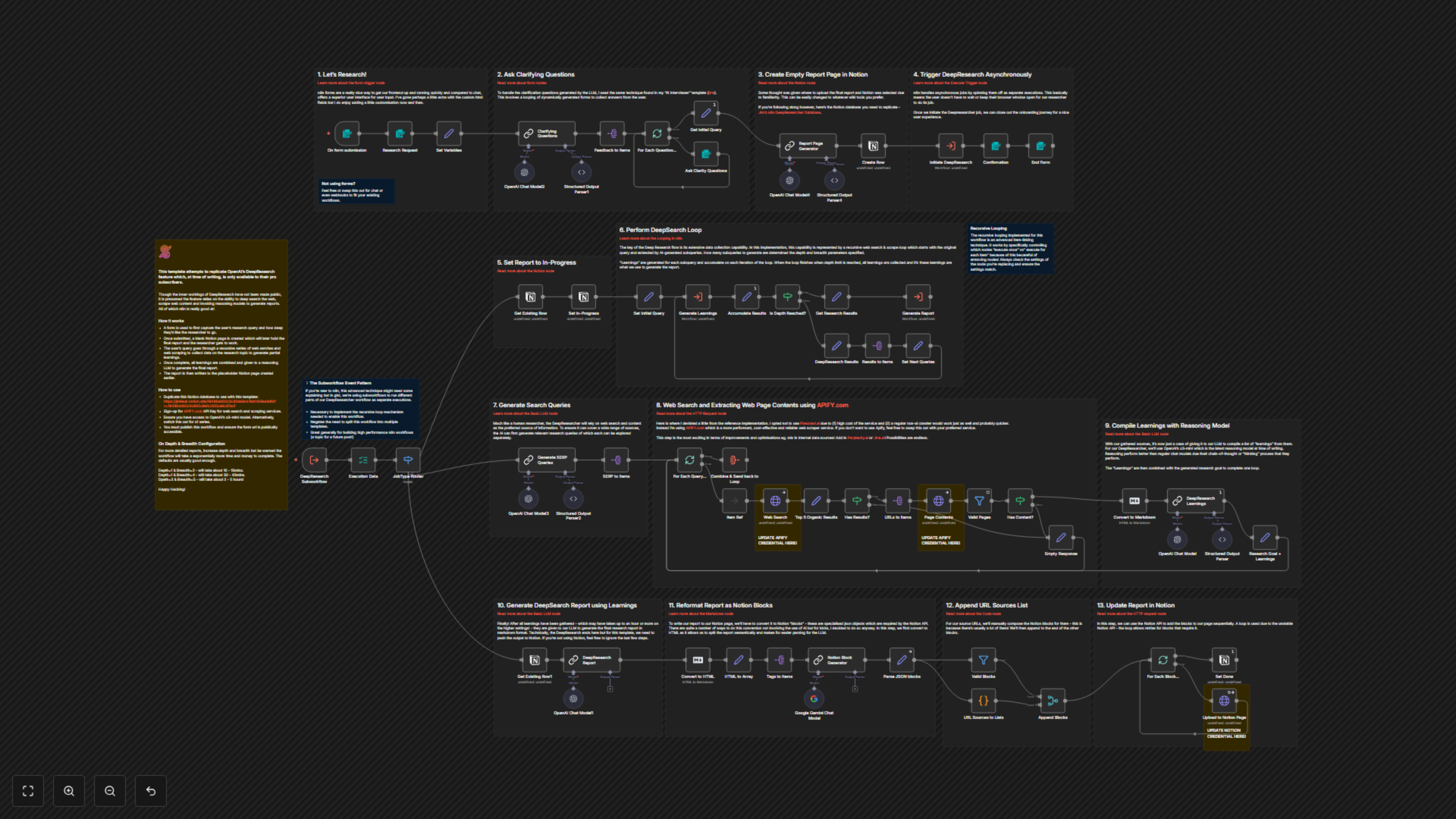
A user-friendly form initiates the process, capturing research queries, desired depth, and breadth. Upon submission, a dedicated Notion page is created for the final report. The workflow then embarks on a recursive series of web searches and content scraping, collecting data and generating iterative "learnings." Once the specified research depth is achieved, all gathered learnings are synthesized by a reasoning LLM to produce a comprehensive final report, which is then published to the pre-created Notion page.
1. Initiate Research with a User-Friendly Form
The journey begins with an n8n form designed for optimal user experience. This interface allows users to easily input their research query and define the desired 'depth' (number of sub-queries) and 'breadth' (number of sources per query) for the investigation. While forms offer a superior structured input, this step can be customized with chat interfaces or webhooks to integrate with existing workflows.
2. Dynamic Clarification for Precise Research
To ensure the AI researcher understands the exact scope, the workflow dynamically generates clarifying questions using an LLM. These questions are presented via a series of interactive n8n forms, allowing users to provide precise answers that guide the research direction. This technique, similar to conversational AI agents, refines the initial query for highly relevant results.
3. Prepare Your Report: Auto-Generated Notion Page
Before diving into research, the workflow automatically creates a dedicated, empty page in a specified Notion database. This placeholder will serve as the canvas for the final comprehensive report. The flexibility of n8n allows for easy adaptation if you prefer a different wiki or documentation tool.
4. Asynchronous Deep Research for Uninterrupted Workflow
To provide a seamless user experience, the core DeepResearcher process is triggered asynchronously as a separate n8n execution. This means users don't need to keep their browser window open; the research runs independently in the background. This advanced subworkflow event pattern is crucial for implementing the recursive looping mechanism that drives the deep research, ensuring high performance and efficient resource utilization.
5. Track Progress with Real-time Status Updates
As the deep research commences, the Notion page automatically updates its status to "In progress." This provides transparent tracking of the research's lifecycle within your Notion database.
6. The Recursive DeepSearch Engine: Uncovering Insights
The heart of the DeepResearcher is its powerful, recursive web search and scraping loop. Starting with the refined initial query, AI-generated subqueries are explored iteratively. The 'depth' and 'breadth' parameters dictate the extent of this exploration, guiding the generation of unique, specific queries. "Learnings" are generated for each subquery and continuously accumulated, forming a rich knowledge base that fuels the final report.
7. Intelligent Query Generation for Comprehensive Coverage
Mimicking an expert human researcher, the DeepResearcher uses an LLM to generate a diverse list of Search Engine Results Page (SERP) queries. These queries are crafted to thoroughly investigate the topic from various angles, ensuring a broad and deep information gathering process. The system dynamically adapts queries based on previously accumulated learnings, leading to highly specific and relevant results.
8. High-Performance Web Search and Content Extraction with Apify
This workflow leverages Apify for robust web search and content scraping. Apify provides a performant, cost-effective, and reliable service for extracting structured data from web pages. The workflow intelligently filters for relevant organic results and then scrapes their full content, preparing it for AI analysis. This step is highly extensible, allowing integration with internal data sources or other advanced crawling services.
9. Synthesize Information: AI-Powered Learnings Compilation
After gathering web sources, an advanced reasoning LLM (OpenAI's o3-mini or similar) processes the extracted content. It compiles concise, information-dense "learnings," including entities, metrics, numbers, and dates. These learnings, combined with the initial research goal, complete each iteration of the deep research loop, building an increasingly comprehensive understanding of the topic.
10. Generate a Comprehensive, Markdown-Formatted Report
Once all iterative learnings are collected, a powerful LLM synthesizes this extensive knowledge into a detailed, multi-page research report. The report is meticulously formatted in Markdown, utilizing headings, lists, and tables for clarity and structure. This final output represents the culmination of the deep research process.
11. Transform Report into Notion-Ready Blocks
To seamlessly integrate the generated report into Notion, the Markdown content is first converted to HTML. This conversion allows for semantic splitting of the report, making it easier for another LLM to then reformat each section into Notion-specific JSON "blocks." These specialized objects are essential for direct compatibility with the Notion API.
12. Document All Sources: Automated URL List Generation
For full transparency and traceability, the workflow automatically compiles all source URLs utilized during the research process. These URLs are formatted into Notion bulleted list items and appended to the final report, ensuring readers can easily reference the original information sources.
13. Publish to Notion: Seamless Report Delivery
The final step involves programmatically uploading all generated Notion blocks, including the report content and source list, to the designated Notion page. The workflow uses the Notion API for this, incorporating a retry mechanism within a loop to ensure reliable delivery of all blocks, even with potential API instabilities. Finally, the Notion page status is updated to "Done," marking the completion of the research.