
Outlook & Excel Automated Performance Review Reminder Workflow
HR teams can automate performance review reminders and tracking, ensuring timely completion and minimizing missed deadlines.
This workflow ensures HR never misses a performance review deadline by automatically updating review records, sending timely reminders, and escalating overdue notices via Outlook.


Documentation
📖 Documentation
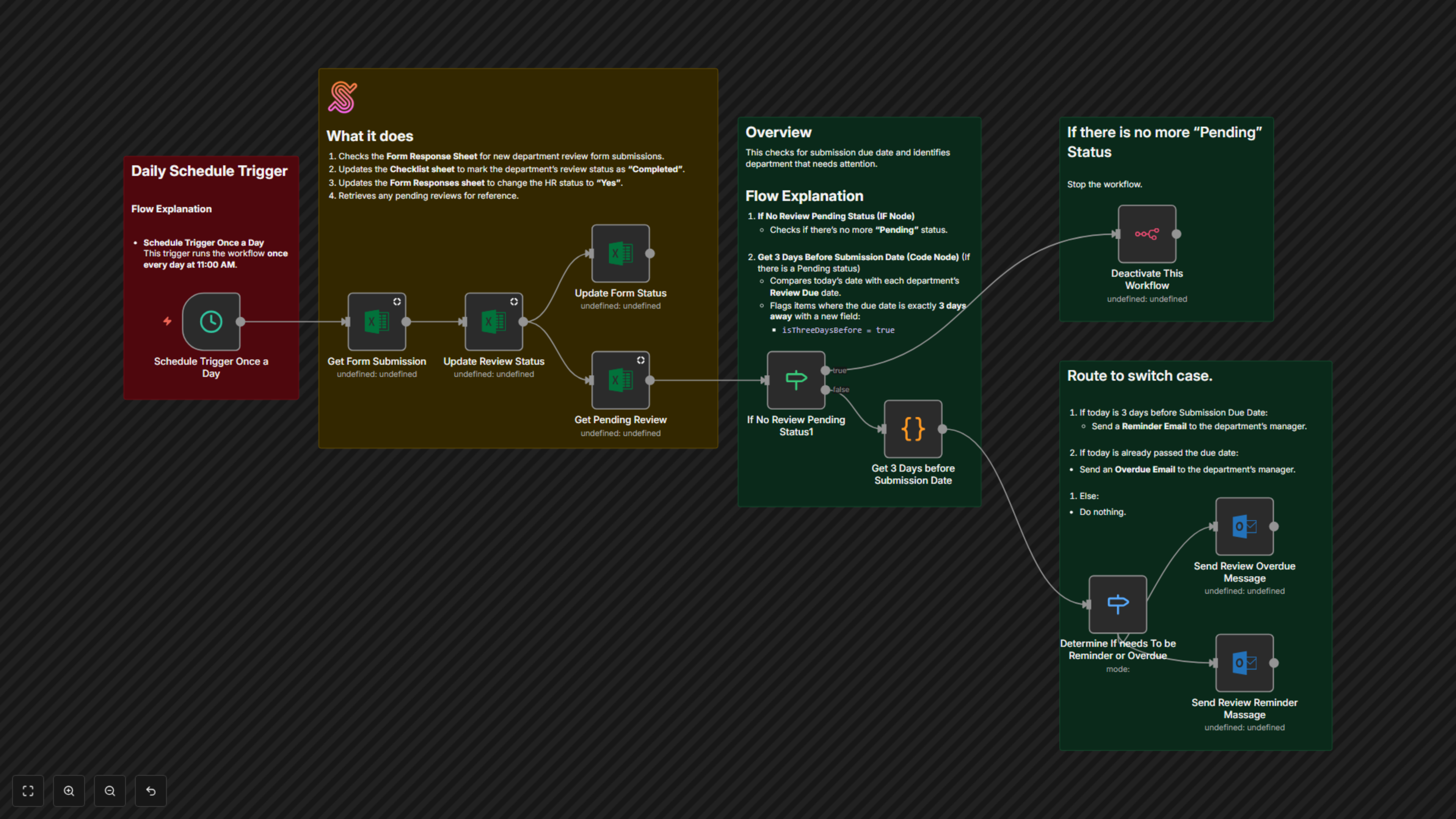
Managing biannual performance reviews can be a challenge—departments forget deadlines, HR wastes time following up, and data gets messy across spreadsheets. This workflow solves those problems by combining Microsoft Excel for record-keeping with Outlook for communication. Every day, it checks for pending reviews, updates the department’s status when forms are submitted, and automatically sends reminder emails three days before a due date. If the deadline passes, the system escalates with an overdue email. Once all reviews are complete, the workflow shuts itself off until the next cycle. This creates a smooth, reliable performance review process without manual chasing.
⚙ Workflow Steps
- The workflow triggers once per day at 11:00 AM.
- It checks the Excel “Response” sheet for any form submissions still marked as “No.”
- If a new submission is found, it updates the review status to “Completed” in both the “Biannual Review” sheet and the “Response” sheet.
- It then looks for any departments with pending reviews.
- If no pending reviews exist, the workflow automatically deactivates.
- If pending reviews remain, it calculates due dates.
- If today is three days before a due date, the department receives a reminder email.
- If the due date has already passed, the department receives an overdue notice.
✅ Key Benefits
- Save HR countless hours by eliminating manual reminders and follow-ups.
- Ensure departments never miss review deadlines with proactive reminders.
- Keep Excel records accurate and automatically updated for transparent reporting.