
Automated Order-to-Shopify Fulfillment Workflow for Online Sellers
Reduce manual order processing by 90% through automated Airtable-to-Shopify order creation and customer confirmation.
Many online sellers waste hours manually converting backend order entries into Shopify orders, updating statuses, and notifying customers. This workflow automates the entire order lifecycle—from receiving the Airtable record to generating a Shopify order and sending a confirmation email. By syncing customer details, line items, and fulfillment data automatically, teams eliminate repetitive tasks and reduce costly human errors. Expect faster order handling and consistent, error-free customer communication.





Documentation
Description
This workflow automates the complete process of converting internal Airtable order entries into fully created Shopify orders. It collects customer and product details, generates the order in Shopify, sends branded confirmation emails, and finally updates Airtable so no duplicate triggers occur. Designed for online sellers, fulfillment teams, and D2C brands, this automation ensures every order is processed quickly, consistently, and without manual effort.
Workflow Steps
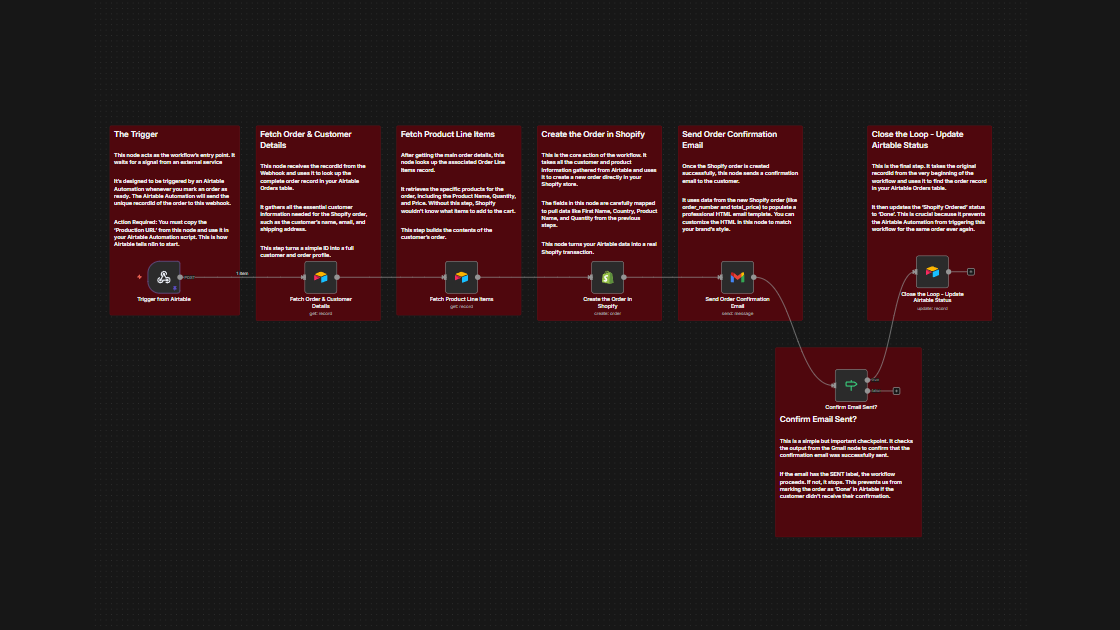
1. Trigger from Airtable
Airtable Automation sends a recordId to the webhook when an order is marked ready for processing. This begins the workflow.
2. Fetch Order & Customer Details
The workflow pulls full customer details—name, email, address, contact info—based on the incoming record ID.
3. Fetch Product Line Items
It retrieves all associated line items, including product names, quantities, and pricing required to create the Shopify order.
4. Create the Order in Shopify
Using all collected data, a complete Shopify order is created with mapped customer and item details.
5. Send Order Confirmation Email
A professionally formatted HTML confirmation email is sent to the customer immediately after the order is created.
6. Confirm Email Sent
The workflow checks if Gmail successfully delivered the email to ensure communication succeeded.
7. Update Airtable Status
If the email is confirmed sent, the workflow updates the Airtable order status to “Done”, preventing duplicates and closing the loop.
Key Benefits
⚡ Faster Order Processing
Fully automates Shopify order creation, reducing manual effort and fulfillment delays.
🛡️ Error-Free Customer Communication
Ensures customers always receive their order confirmation thanks to email delivery validation.
📦 Clean Operational Workflow
Updates Airtable automatically, keeping your order pipeline organized and free from duplicates.