
Mailchimp Subscriber Export & Reporting Automation
Reduce manual subscriber export work by 90% through automated weekly Mailchimp list formatting and Google Sheets logging.
This workflow automatically exports all Mailchimp subscribers every week and stores them in Google Sheets for clean reporting. It formats subscriber details into a structured dataset with names, tags, timestamps, and GDPR-friendly fields. Error checks ensure any issues during export are logged clearly for debugging.


Documentation
Description
This workflow automates weekly subscriber exports from your Mailchimp list and formats them into a clean, spreadsheet-ready dataset. It standardizes names, tags, timestamps, locations, email types, VIP flags, and more, ensuring every field is consistent and analysis-friendly. Once processed, all subscribers are appended to Google Sheets with proper formatting. Built-in checks detect errors and log either success or failure for full transparency.
Workflow Steps
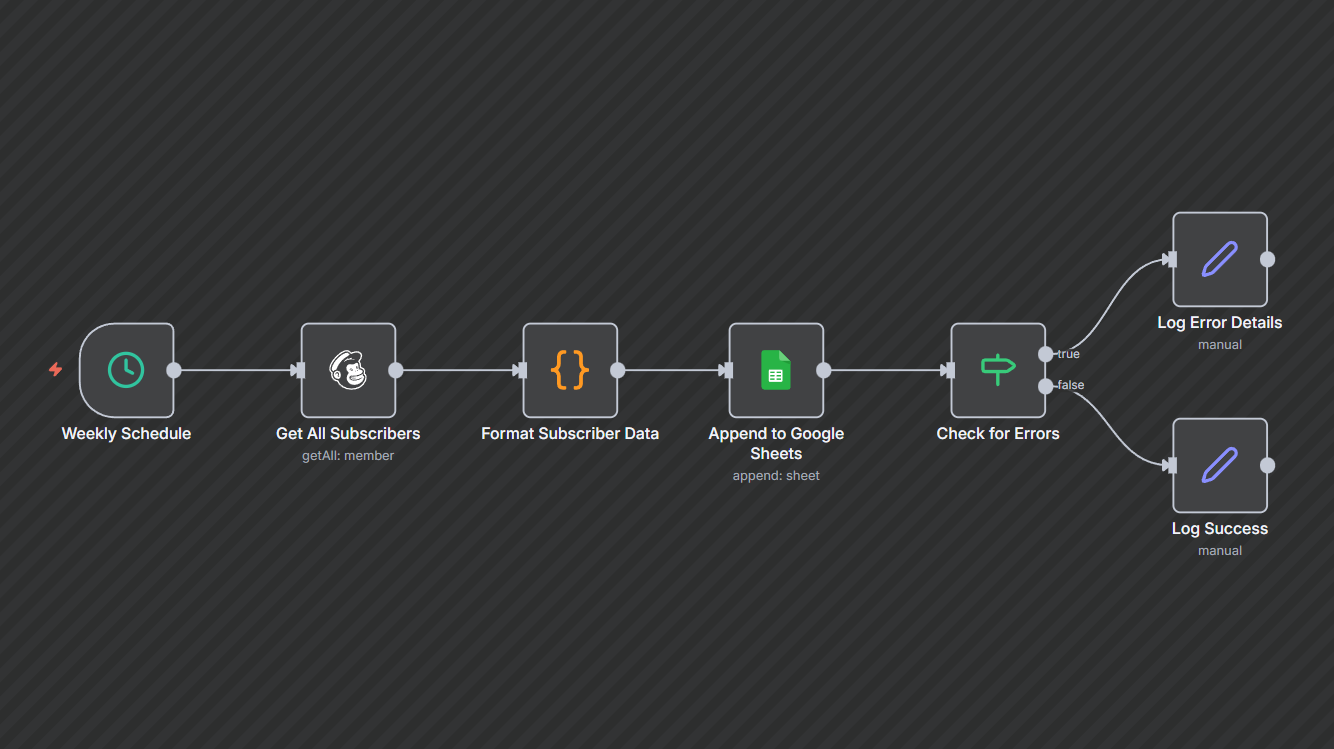
- Weekly trigger: Runs automatically every Monday at 2 AM.
- Fetch subscribers: Retrieves all active subscribers from the selected Mailchimp list.
- Format subscriber data: Cleans and structures email, name, tags, timestamps, IPs, locations, and other fields into a GDPR-friendly output format.
- Append to Google Sheets: Adds the formatted subscriber rows to your connected Google Sheet.
- Check for errors: Determines whether the sheet append operation failed.
- Log outcome:
- Success → Saves a short “export completed” message with timestamp.
- Error → Logs an error summary including message and processing count.
Key Benefits
- Zero manual exports: Automatically moves subscriber data into Sheets—no CSV downloads required.
- Cleaner reporting: Standardized names, timestamps, and tags make your spreadsheet analysis-ready.
- Reliable monitoring: Error and success logs ensure you always know if the export ran correctly.