
LINE AI Assistant: Automate Calendar & Gmail Tasks
Streamline daily tasks directly from LINE, reducing administrative effort by 60% and improving response times by over 50%.
Juggling calendar appointments and email management while communicating on LINE is inefficient. This workflow transforms your LINE chat into an intelligent AI assistant, automating event creation, email lookup, and information retrieval instantly.




Documentation
LINE AI Assistant for Smart Calendar & Email Management
Transform your LINE chat into a powerful personal assistant that intelligently manages your Google Calendar, retrieves Gmail information, and answers questions using AI. This workflow eliminates the need to switch between multiple applications, streamlining your daily productivity directly from your preferred messaging app.
Key Features
- AI-powered natural language interaction via LINE for intuitive task management.
- Effortless Google Calendar event creation and lookup directly from chat commands.
- Quick retrieval of Gmail information and message summaries.
- Contextual conversations with memory, providing a more coherent and helpful user experience.
- Access to real-time information and summaries via Wikipedia integration.
How It Works
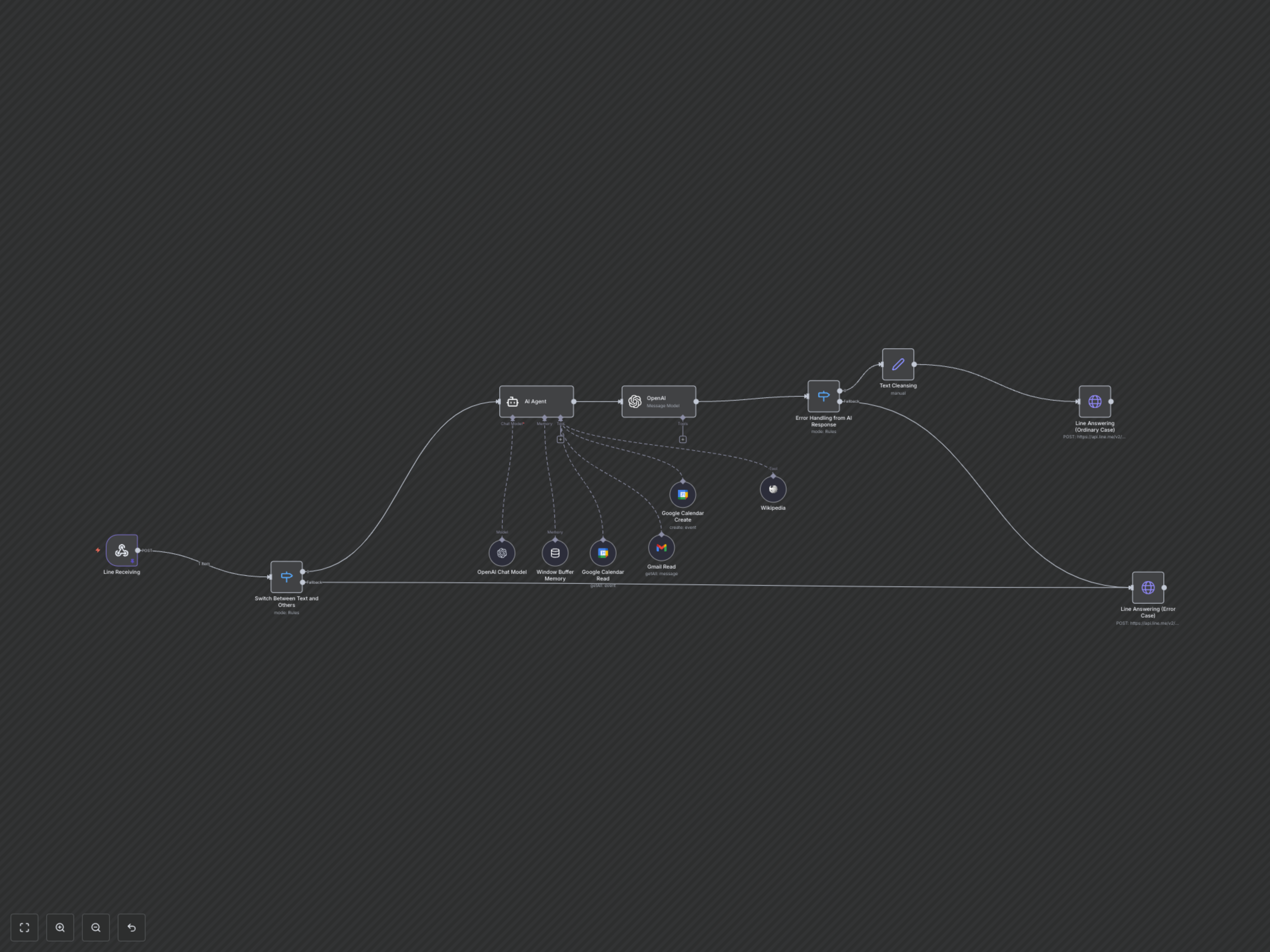
This workflow is triggered when a user sends a text message to your LINE bot. An initial switch node verifies the message type. If it's a text message, the powerful LangChain AI Agent processes the request. The AI Agent leverages an OpenAI Chat Model for intelligence, maintains conversation history using a Window Buffer Memory, and connects to specialized tools for specific actions: Google Calendar for creating and reading events, Gmail for reading emails, and Wikipedia for general knowledge retrieval. The AI's response is then passed through an OpenAI node for condensation and refinement before being sent back to the user via LINE. An error handling mechanism ensures that non-text messages or issues with the AI response are gracefully managed, providing an appropriate reply to the user.