
Instant AI Insights from Local Files via Qdrant & Mistral
Gain immediate access to information across all local documents, reducing manual search time by 90% and transforming unstructured data into actionable insights.
Manually searching through local files for specific information is time-consuming and inefficient. This workflow automatically synchronizes changes in a local folder with a Qdrant vector store, enabling an AI chat agent powered by Mistral AI to provide instant answers to your document-based queries.



Documentation
AI-Powered Document Search & Q&A with Real-time Local File Sync
This workflow revolutionizes how you interact with your local documents by automating their synchronization into a Qdrant vector database and enabling an intelligent Q&A agent powered by Mistral AI. It ensures your AI always has the most up-to-date information, providing instant, conversational access to your data.
Key Features
- Real-time monitoring of local file system for adds, changes, and deletions.
- Automatic synchronization of document content with a Qdrant vector store.
- Intelligent AI Q&A agent using Mistral AI for conversational insights.
- Seamlessly update and remove document vectors to maintain data relevance.
How It Works
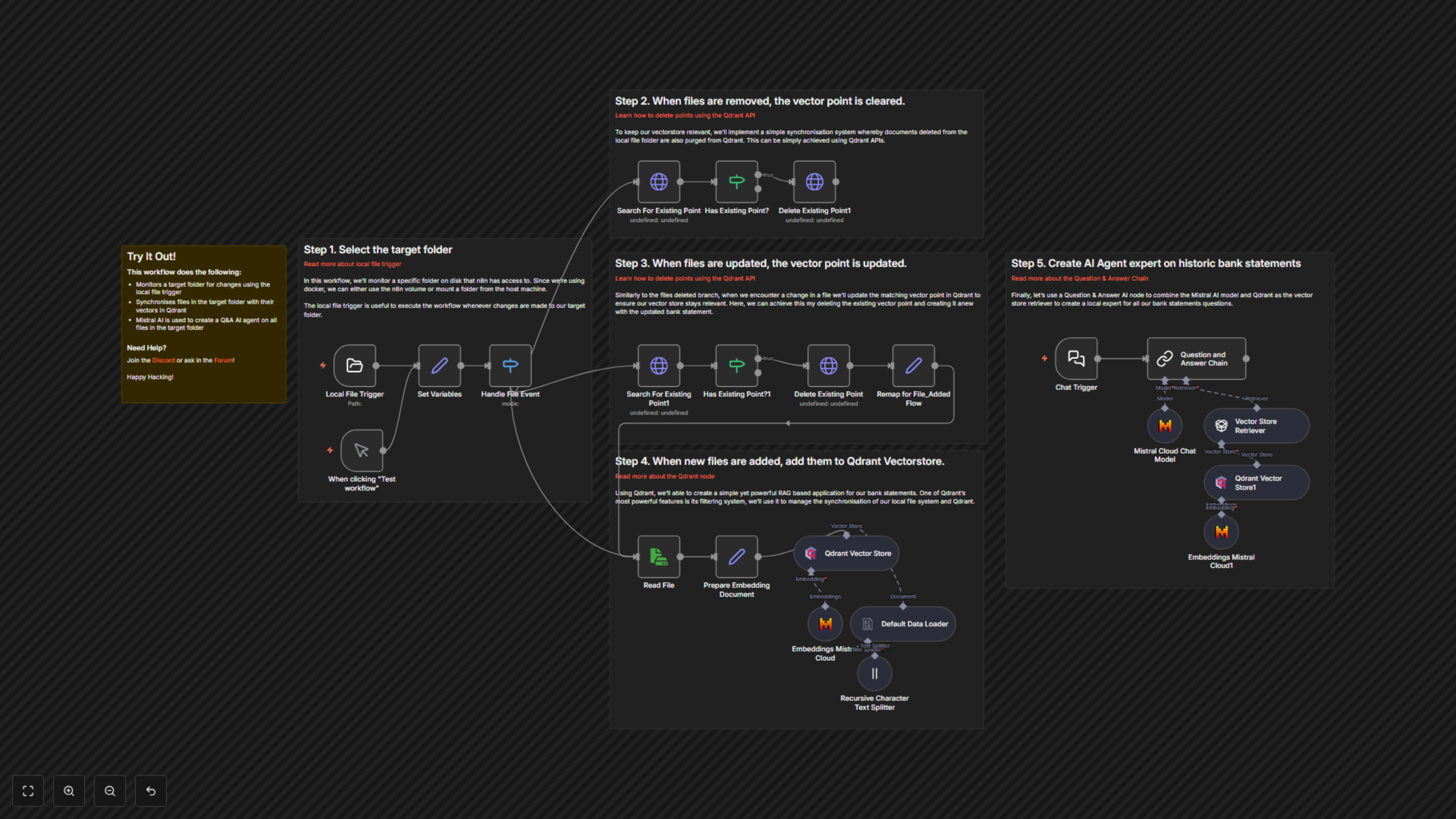
This workflow starts by monitoring a designated local folder for any file system events (add, change, delete). When a change occurs, it intelligently updates the corresponding vector embeddings in Qdrant using Mistral AI's embedding models. For newly added files, content is extracted, split, embedded, and stored. For updated files, old embeddings are removed and new ones are added. Deleted files trigger the removal of their corresponding vectors. Finally, a Chat Trigger node exposes an endpoint for users to ask questions, which are then answered by a Mistral AI-powered Question and Answer Chain leveraging the Qdrant vector store as its knowledge base.
Monitor Your Local Files
The workflow begins with a Local File Trigger node, which vigilantly watches a specified folder on your local disk for any file system events: new files being added, existing files being changed, or files being deleted. This ensures real-time responsiveness to your document library updates.
Smart Document Synchronization with Qdrant
Upon detecting a file event, the workflow intelligently handles the change. If a file is deleted, its corresponding vector embedding is efficiently purged from Qdrant, keeping your vector store clean and relevant. For updated files, the workflow first identifies and removes the old vector, then processes the new content to create and store fresh embeddings. New files are read, their content prepared and split, then converted into vector embeddings using Mistral Cloud Embeddings before being stored in Qdrant. This advanced synchronization uses Qdrant's powerful filtering system to manage vector points based on file location.
Create an Intelligent Q&A AI Agent
The core intelligence of this workflow is provided by a Question and Answer Chain powered by Mistral Cloud Chat Model. This AI agent leverages the Qdrant Vector Store as its knowledge retriever. When you send a query via the Chat Trigger webhook, the agent searches the vector database for relevant document segments, then uses Mistral AI to formulate a precise and conversational answer based on your local files. This transforms your collection of documents into an interactive, queryable knowledge base.