
Ecommerce Product Catalog Automation
Reduce product upload time by 90% through seamless data sync between Google Sheets and your online store.
Eliminate manual product uploads by automatically creating and updating product listings from a Google Sheet into your Shopify store. This automation ensures all titles, descriptions, tags, and product types are synced instantly, saving hours of repetitive work and preventing data mismatches.



Documentation
Description
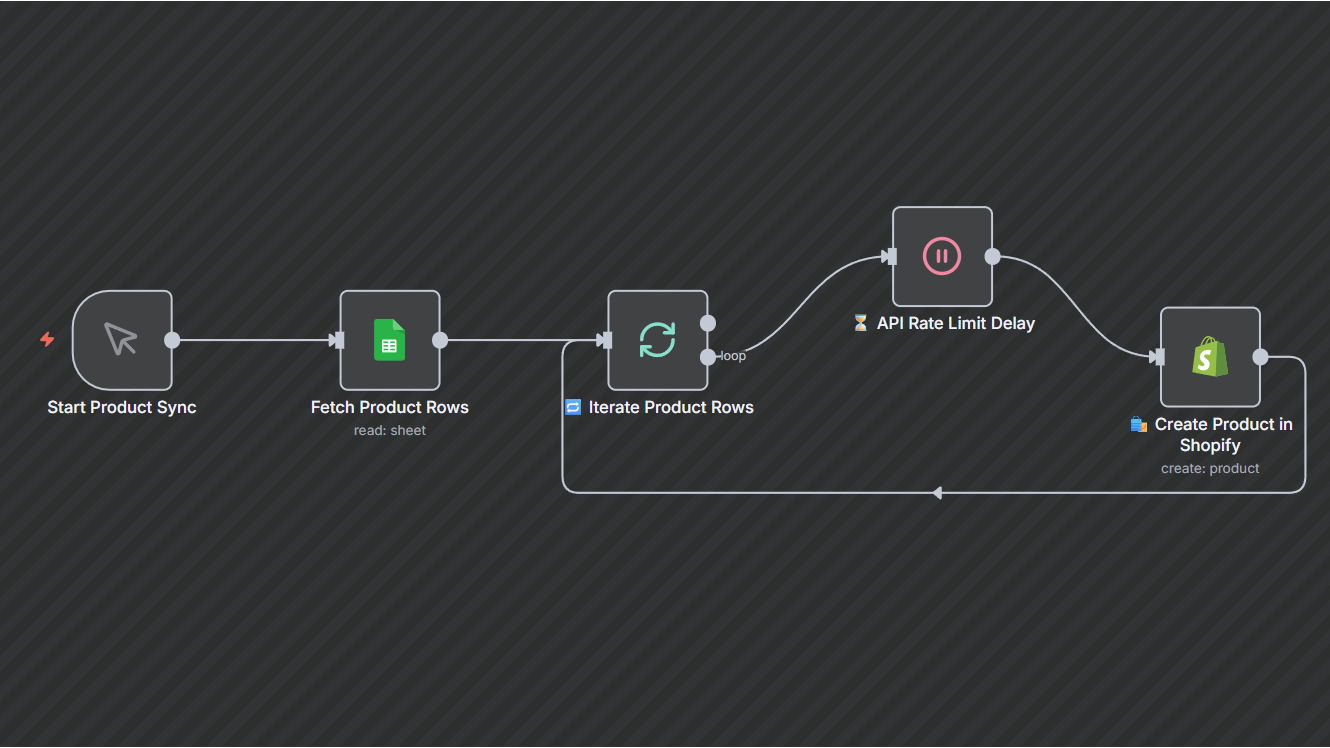
The Ecommerce Product Catalog Automation simplifies catalog management by converting structured data from Google Sheets into live Shopify products. Each row represents a product, containing fields such as Title, Description, Tags, Handle, Product Type, and Publish Date.The workflow batches uploads, respects API rate limits, and ensures each item is correctly mapped and published — perfect for teams managing large or frequently updated product lines.
Workflow Steps
- Manual Trigger: Start the workflow to initiate product creation.
- Fetch Product Data: Pull product details from the connected Google Sheet (products_list tab).
- Batch Processing: Loop through each row one at a time for reliable processing.
- API Delay: Add a short delay between uploads to comply with Shopify’s API limits.
- Create Products:Automatically send product details (Title, Description, Tags, Handle, Type, Publish Date) to Shopify to generate listings.
- Repeat Until Done: The workflow continues until all rows are successfully synced.
Key Benefits
1. Save up to 90% of time spent on manual uploads.2. Ensure accurate and consistent product data across systems.3. Prevent API overloads using batch and delay management.4. Scale easily for large product catalogs or frequent updates.