
Ecommerce Order Tracking and Notification Automation
Reduce order tracking delays by 90% through automated order logging and instant notifications.
Stay on top of every new order effortlessly. This workflow automatically logs Shopify orders into Google Sheets and sends instant notifications for high-value, COD, or delayed orders — keeping your sales and fulfillment teams always informed without manual checks.





Documentation
DescriptionOrder management can quickly get chaotic when new orders start flowing in from multiple channels. This automation ensures your team never misses an important update.Every new Shopify order is automatically added to Google Sheets for record-keeping, while notifications for key orders (like high-value or COD) are sent instantly via Slack or WhatsApp.This keeps your operations transparent, improves response time, and reduces manual data entry errors — all while giving real-time visibility into order activity.workflow Steps
- New Order Trigger (Shopify): Detects new orders as soon as they’re placed.
- Extract Order Data: Retrieves structured data including order number, customer info, and payment details.
- Add to Google Sheets: Logs the complete order details in a pre-defined Google Sheet.
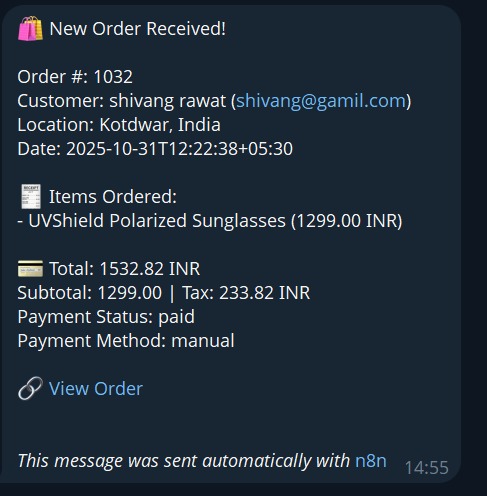
- Format Message: Generates a clean, readable summary of the order.
- Send Notification: Instantly alerts your team on Telegram/Slack/WhatsApp with the order summary.
Key Benefits
- Real-time visibility: Every order is tracked automatically in a single, centralized sheet.
- Instant alerts: Get immediate notifications for important order types (COD, high-value, delayed).
- Error-free data: Eliminate manual updates and ensure accurate order records.
- Better team coordination: Everyone stays informed and can take timely action.