
Ecommerce Fulfillment Notification & Tracking Email Automation
Reduce post-shipment support tickets by 40% with automated fulfillment emails and tracking links.
Customers often feel left in the dark after their order ships, leading to “Where is my order?” emails and support tickets. This workflow listens for new fulfillments from your ecommerce store, cleans the customer and tracking data, and sends a branded fulfillment email as soon as the order is marked fulfilled. It also logs every notification to a spreadsheet for auditing and analysis. The result is clearer communication, fewer support requests, and a smoother post-purchase experience.



Documentation
Description
This automation turns your fulfillment events into real-time customer communication. As soon as an order is fulfilled, it captures the shipping, tracking, and product details, formats a friendly HTML email, and sends it out automatically. At the same time, it records the key details—contact, product, tracking info, and status—in a reporting sheet so your team has a complete history of all notifications sent.
Workflow Steps
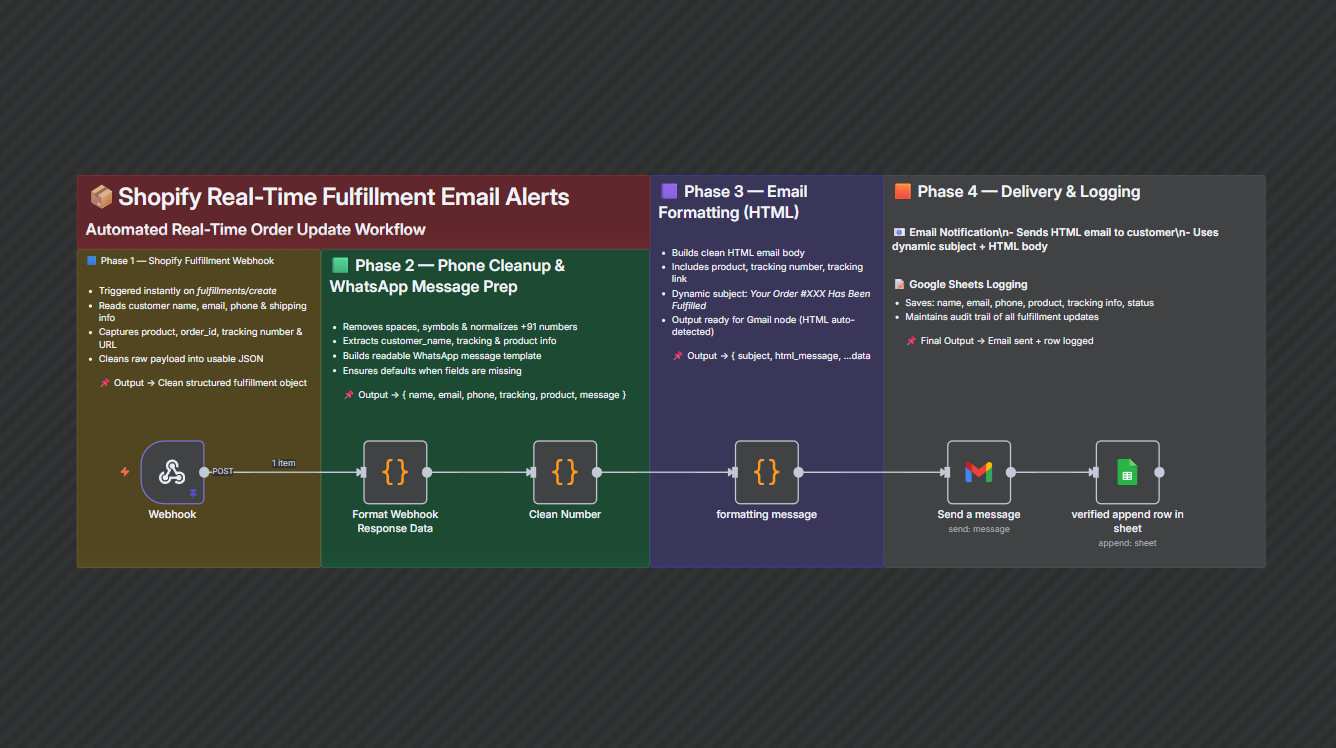
- Trigger on New FulfillmentThe workflow is triggered whenever a fulfillment event is received from your ecommerce platform via webhook.
- Clean and Structure Fulfillment DataIt extracts core details like customer name, email, phone, country, order ID, product title, tracking number, tracking link, and store domain into a clean JSON object.
- Normalize Customer Phone and Message TextThe phone number is cleaned (removing symbols and standardizing to country format), and a readable tracking message is prepared for WhatsApp-style communication if needed.
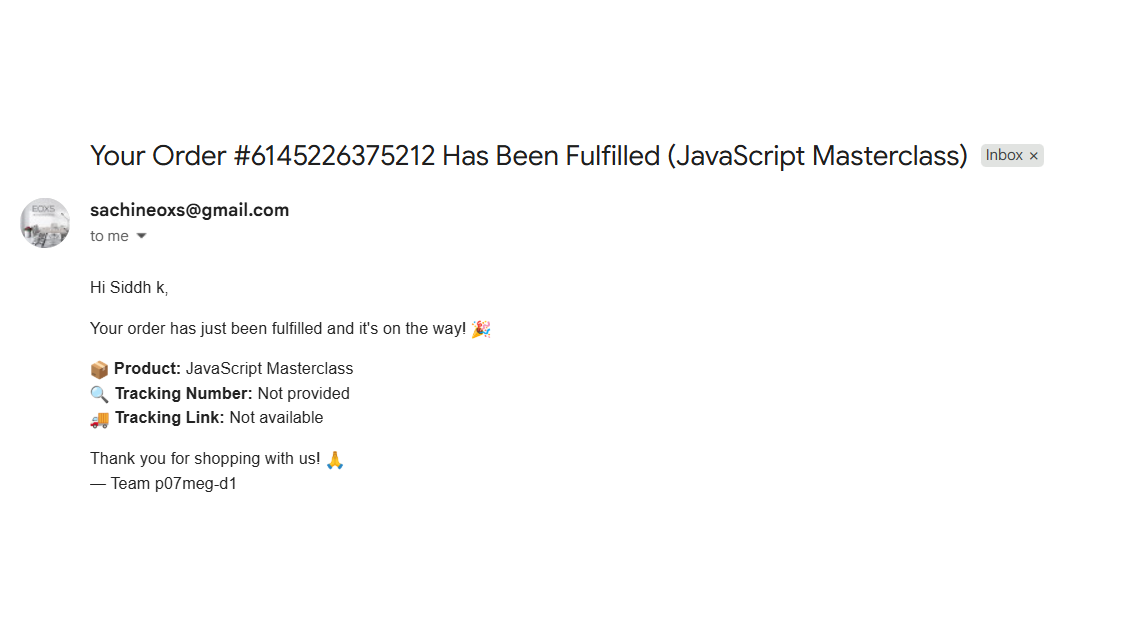
- Build Branded Email ContentThe workflow generates a dynamic subject line (including order number) and an HTML email body that highlights the product shipped, tracking number, and tracking link, with a friendly closing from your brand.
- Send Fulfillment Email to CustomerThe email node sends the prepared HTML message to the chosen recipient (typically the customer’s email address from the fulfillment data).
- Log Notification in Reporting SheetAfter sending the email, the workflow appends a row to a tracking sheet with the customer’s name, email, phone, product, tracking details, and a “mail sent” status.
- Maintain an Audit TrailOver time, the sheet becomes a complete log of all fulfillment notifications, making it easy to review communication history or troubleshoot issues.
Key Benefits
- Fewer “Where Is My Order?” TicketsCustomers receive clear tracking information immediately, reducing the need to contact your support team.
- Consistent, On-Brand CommunicationEvery fulfillment triggers the same well-structured, branded email, improving customer trust and post-purchase experience.
- Built-In Reporting and Audit TrailAll notifications are logged automatically, giving operations and support teams full visibility into what was sent and when.