
Automate Daily AI Paper Digests to Notion with OpenAI
Automatically identify, summarize, and categorize daily AI research papers, saving hundreds of hours of manual research and ensuring no critical insights are missed.
Staying updated with the latest AI research from Hugging Face Papers and manually summarizing each one is a time-consuming and inefficient task. This workflow automates daily discovery, AI-driven summarization and categorization, and structured storage of new papers directly into your Notion database, saving hours of manual research.


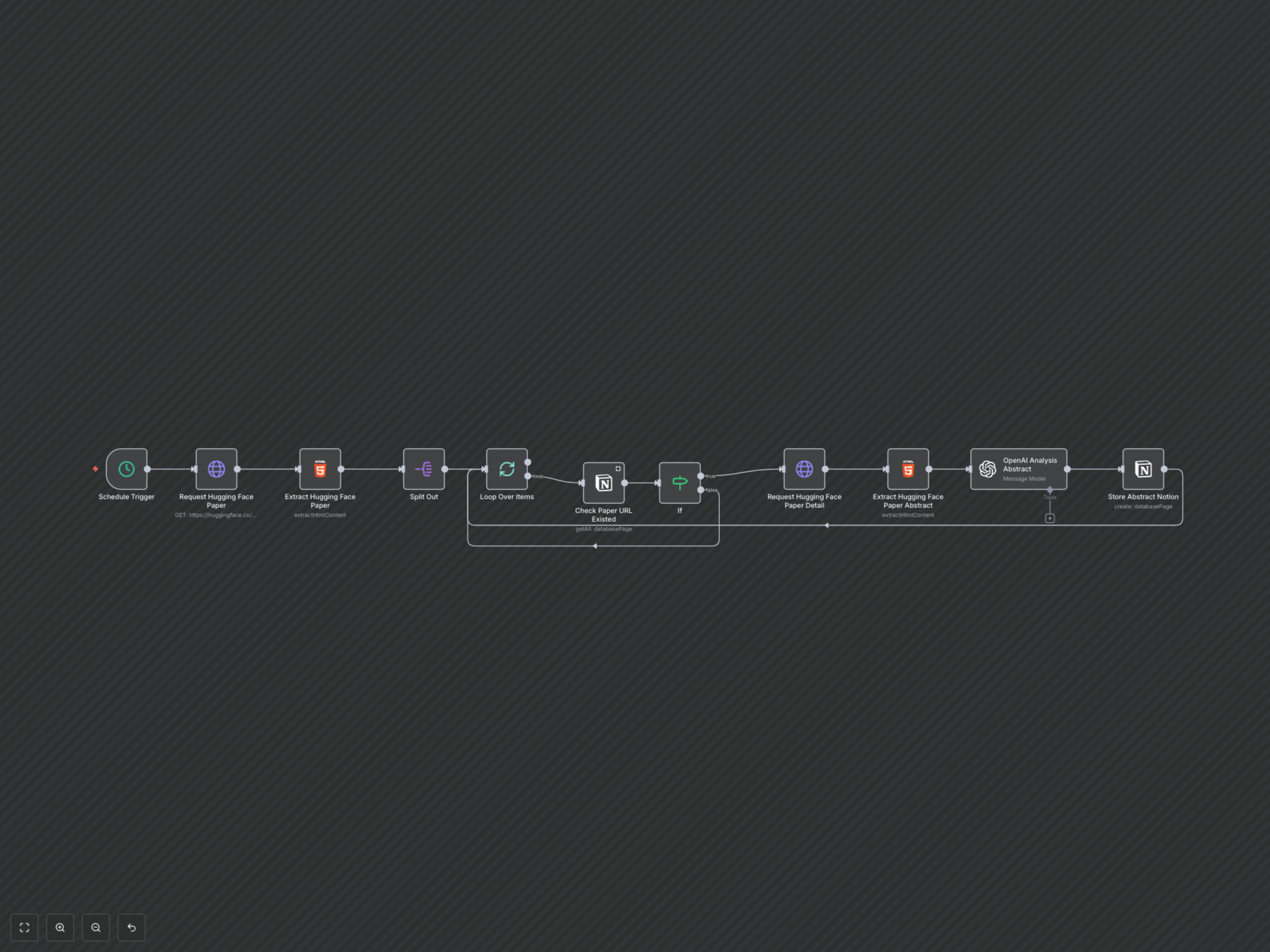

Documentation
Daily AI Paper Digests to Notion with OpenAI
This n8n workflow is designed for researchers, developers, and AI enthusiasts who want to stay effortlessly updated with the latest developments in AI and machine learning. It automates the process of discovering new papers from Hugging Face, extracting key information, and generating AI-powered summaries, all stored neatly in your Notion workspace.
Key Features
- Automated daily retrieval of new AI papers from Hugging Face.
- Intelligent duplicate checking to ensure only new papers are processed and stored.
- AI-powered abstract analysis using OpenAI to extract core introductions, keywords, data/results, technical details, and classifications.
- Structured storage of all paper details and AI-generated insights into a Notion database for easy access and organization.
- Eliminate manual research, saving countless hours and ensuring you never miss critical industry advancements.
How It Works
The workflow is triggered daily, fetching the latest AI papers from Hugging Face. It then extracts individual paper URLs and checks if each paper already exists in your designated Notion database. For new papers, the workflow proceeds to scrape the full abstract and title. This abstract is then sent to OpenAI, which acts as an intelligent agent to analyze and extract key insights like core introduction, keywords, technical details, and classification. Finally, all the raw data and AI-generated summaries are compiled and stored as a new page in your Notion database, providing a rich, searchable knowledge base.