Content Brainstorming Assistant – Automated Idea to Draft Workflow
Transform content ideas into collaborative drafts, shared via Telegram, with feedback automatically captured, accelerating your content creation process.
This workflow automates the process of generating content drafts from ideas submitted in Google Sheets, shares them via Telegram, and captures team feedback directly back into the sheet. It streamlines content brainstorming, drafting, and review in a collaborative, transparent manner.


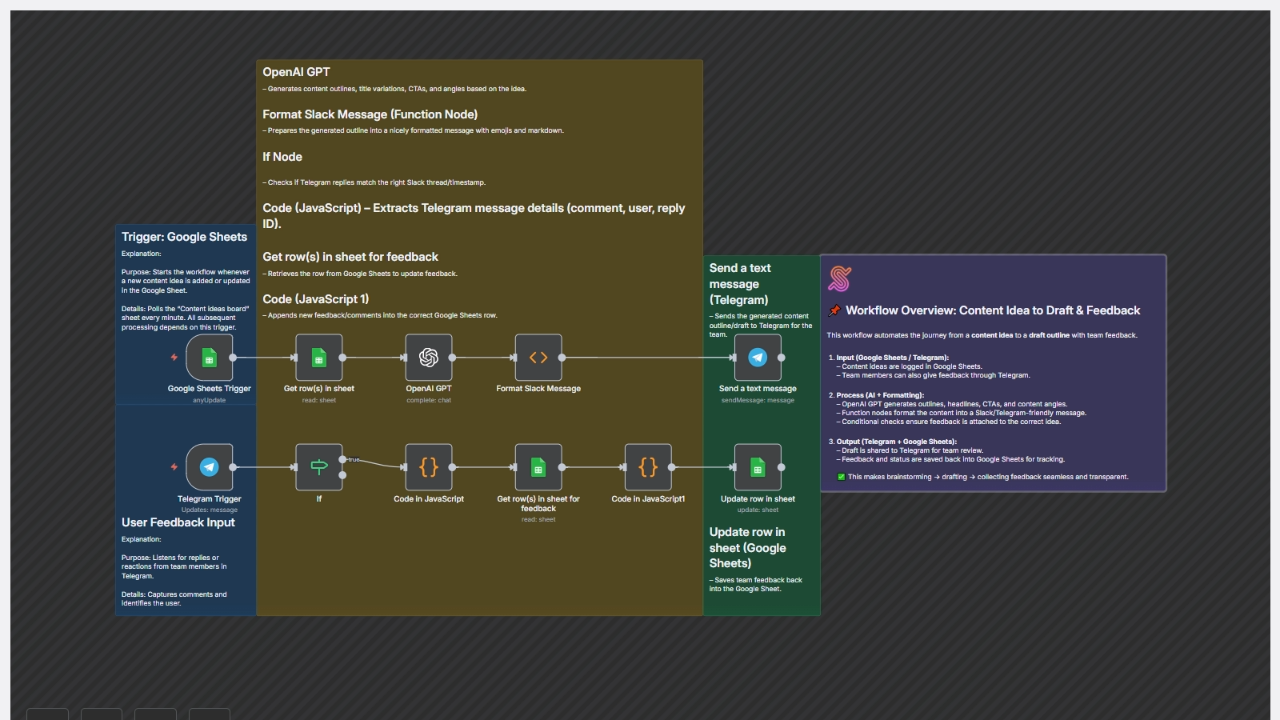

Documentation
Workflow Steps
Google Sheets Trigger (Content Idea Submission)
- Starts when a new content idea is added or updated in the "Content ideas board" sheet.
- Polls every minute to capture details such as Topic, Audience, and Format.
Get row(s) in sheet
- Retrieves the newly added or updated row from Google Sheets for processing.
OpenAI GPT
- Generates content outlines, 3 headline/title variations, call-to-actions (CTAs), and content angle suggestions based on the idea.
- Uses GPT-4o-mini for AI-powered content brainstorming.
Format Slack Message (Function Node)
- Prepares the AI-generated content into a structured, markdown-friendly message with emojis for Telegram/Slack sharing.
Send a text message (Telegram)
- Sends the formatted content draft to the team’s Telegram chat for review and feedback.
Telegram Trigger
- Listens for replies or reactions from team members in Telegram.
If Node
- Ensures that incoming Telegram messages correspond to the correct content idea (matching thread or timestamp).
Code in JavaScript (Extract Telegram Comment)
- Extracts comment text, user name, and reply-to ID from Telegram messages.
Get row(s) in the sheet for feedback
- Retrieves the corresponding Google Sheets row to update with feedback.
Code in JavaScript1 (Append Feedback)
- Appends new team comments into the Feedback column of the correct row.
- Maintains existing feedback history.
Update row in sheet (Google Sheets)
- Saves feedback and updated status back into the Google Sheet for tracking.
Data Sources & Tools
Google Sheets - Stores content ideas and tracks status & feedback
OpenAI GPT - Generates content outlines, headlines, CTAs, and angles
Telegram - Collects team feedback and shares AI-generated drafts
Key Benefits
- Automates the journey from idea submission → content draft → team feedback.
- Centralises brainstorming and feedback in Google Sheets and Telegram.
- Ensures transparency and traceability of content creation and review.