
Automate Syncro Alerts to OpsGenie for Swift Incident Management
Automatically create or close OpsGenie alerts based on Syncro RMM events, reducing manual alert management time by 90% and improving incident response speed.
Manually monitoring and managing critical IT alerts across systems like Syncro and OpsGenie leads to delayed responses and potential service disruptions. This workflow automatically transforms Syncro RMM alerts into OpsGenie incidents, ensuring immediate notification and streamlined incident resolution.


Documentation
Syncro RMM Alert to OpsGenie Automation
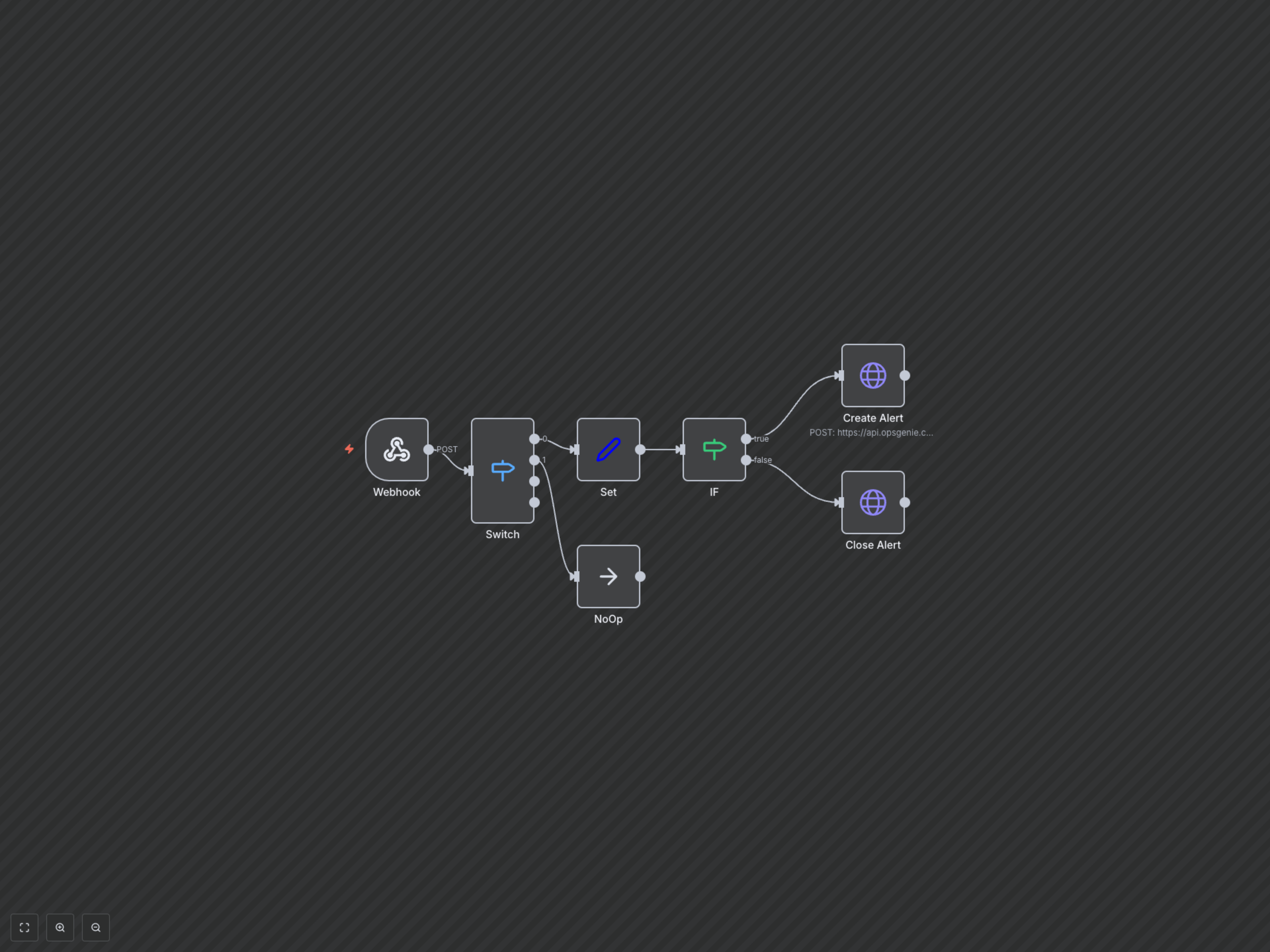
This n8n workflow bridges Syncro RMM and OpsGenie, automating the entire lifecycle of critical 'agent offline' alerts. It ensures that system issues detected by Syncro are immediately escalated in OpsGenie for prompt action and automatically closed once resolved.
Key Features
- Real-time Alert Synchronization: Instantly forwards critical Syncro RMM alerts (like 'agent offline' triggers) to OpsGenie.
- Automated Incident Creation: Creates new OpsGenie alerts with detailed information from Syncro, including computer name, customer, and alert output.
- Intelligent Alert Resolution: Automatically closes corresponding OpsGenie alerts when the issue is resolved in Syncro, preventing alert fatigue.
- Centralized Incident Management: Unifies alert handling, allowing teams to manage all critical incidents within OpsGenie.
How It Works
This workflow initiates when Syncro RMM sends an alert webhook to n8n. Upon receiving the alert, a Switch node first filters for specific critical triggers, such as an 'agent offline' event. If the alert matches, the workflow proceeds to a Set node, which extracts the Syncro alert ID and a concise description. An IF node then checks the 'resolved' status of the Syncro alert. If the alert is currently active (not resolved), it triggers an HTTP Request node to create a new incident in OpsGenie. If the alert has been resolved in Syncro, a separate HTTP Request node is executed to automatically close the corresponding OpsGenie alert, using the Syncro alert ID as an alias. Alerts that are not 'agent offline' triggers are ignored by a NoOp node.