
Automate Scaleway Server Info Retrieval & Filter Data Instantly
Gain immediate access to filtered Scaleway server data, reducing manual data compilation time by over 90% and improving operational efficiency.
Manually consolidating and filtering Scaleway server details across multiple regions and server types is time-consuming and prone to errors. This n8n workflow automates fetching comprehensive information for all Scaleway instances and baremetal servers, then dynamically filters results by tags, name, IP, or zone for instant, actionable insights.

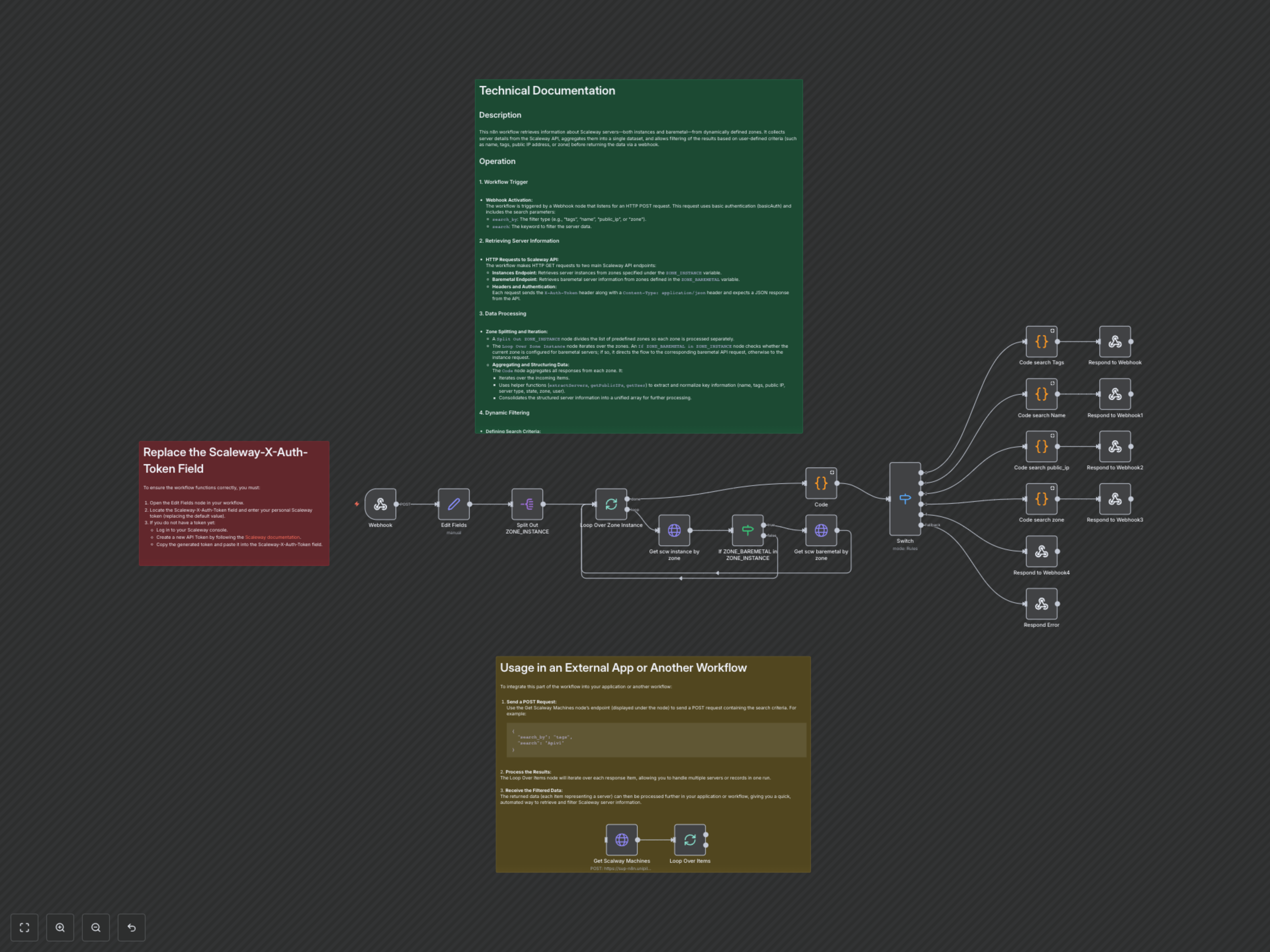

Documentation
Automated Scaleway Server Information & Filtering
This n8n workflow streamlines the retrieval of comprehensive data for all your Scaleway servers, including both Compute instances and Baremetal machines, from dynamically defined zones. It aggregates this information into a unified dataset and empowers users to filter results based on specific criteria such as name, tags, public IP address, or zone, all delivered through a secure webhook.
Key Features
- Comprehensive Data Collection: Gathers detailed information from both Scaleway Compute instances and Baremetal servers.
- Multi-Zone Support: Dynamically retrieves server data from predefined Scaleway zones (e.g., fr-par-1, nl-ams-1, pl-waw-1, etc.).
- Dynamic Filtering: Filter server lists by tags, name, public_ip, or zone using a simple API request.
- Standardized Output: Normalizes varied API responses into a consistent JSON format including name, tags, public_ip, type, state, zone, and user.
- Webhook Integration: Easily integrate into external applications or other workflows via a secure webhook endpoint.
- Error Handling: Provides clear error messages for invalid search criteria.
How It Works
This n8n workflow efficiently retrieves and processes Scaleway server data in a structured, automated manner.
1. Trigger the Workflow
The workflow is activated by an HTTP POST request to its webhook endpoint. This request must include basic authentication and a JSON payload specifying the 'search_by' criteria (e.g., "tags", "name", "public_ip", "zone") and the corresponding 'search' keyword.
2. Configure Parameters
A 'Set' node captures the incoming 'search_by' and 'search' parameters from the webhook. It also defines crucial configuration details, including your Scaleway authentication token ('Scaleway-X-Auth-Token') and lists of zones for both instance ('ZONE_INSTANCE') and baremetal ('ZONE_BAREMETAL') server retrieval.
3. Fetch Server Data Across Zones
The workflow intelligently processes server data by first splitting the predefined 'ZONE_INSTANCE' list and iterating through each zone. For every zone, it dynamically checks if baremetal servers are configured. It then executes HTTP GET requests to the relevant Scaleway API endpoints (Instance API and, if applicable, Baremetal API) using your 'X-Auth-Token' to fetch raw server data from each zone.
4. Process and Normalize Data
A 'Code' node aggregates all responses from the API calls. It employs custom JavaScript functions ('extractServers', 'getPublicIPs', 'getUser') to extract and standardize critical server details. This includes fields like 'name', 'tags', 'public_ip' (prioritizing IPv4), 'type' (handling both 'commercial_type' and 'offer_name'), 'state' (accommodating 'state' and 'status'), 'zone', and 'user' (from various potential sources). The output is a unified array of structured server objects.
5. Dynamically Filter Results
A 'Switch' node analyzes the 'search_by' parameter provided in the initial webhook request. Based on the specified filter type ('tags', 'name', 'public_ip', or 'zone'), the workflow intelligently routes the aggregated server data to a dedicated 'Code' node. These specialized 'Code' nodes then filter the list to return only servers that match the 'search' keyword.
6. Respond to Request
Finally, a 'Respond to Webhook' node sends the filtered list of server objects back to the requester as a JSON array. If an invalid 'search_by' value was provided, an informative error JSON message, listing the valid filter options, is returned instead, ensuring clear communication.
Example Usage
To trigger this workflow and retrieve filtered Scaleway server data, send an HTTP POST request to your webhook URL with basic authentication and a JSON body like the example below:
{ "search_by": "tags", "search": "Apiv1" }
The successful execution will return a JSON array, where each object represents a server with normalized fields such as 'name', 'tags', 'public_ip', 'type', 'state', 'zone', and 'user'.