
Automate Keyword Research: Discover & Track Top Google & YouTube Terms
Automatically discover and enrich thousands of high-potential Google and YouTube keywords every four hours, reducing manual research time by over 80% and providing continuously updated SEO insights.
Manually identifying high-value Google and YouTube keywords is tedious, time-consuming, and often leads to missed opportunities. This workflow automates the discovery of relevant autocomplete keywords and enriches them with search volume data, centralizing insights for effective content and SEO strategies.

Documentation
Find Top Keywords: Your Automated SEO Research Engine
This powerful n8n workflow eliminates the manual grind of keyword research, empowering marketers, content creators, and SEO specialists to efficiently discover, track, and manage high-value keywords for both Google and YouTube. By automating the entire process from suggestion generation to data storage, you gain a competitive edge with up-to-date and comprehensive keyword insights.
Key Features
- Automated Keyword Discovery: Generates extensive Google and YouTube autocomplete suggestions from your base seed keywords, uncovering new opportunities.
- Comprehensive Search Volume & CPC Data: Fetches real-time monthly search volume and Cost-Per-Click (CPC) data via DataforSEO, providing crucial metrics for keyword valuation.
- Smart Keyword Filtering: Automatically cleans and refines discovered keywords based on length, word count, and character validity, ensuring high-quality and relevant results.
- Persistent Data Storage: Stores all discovered keywords and their monthly performance metrics in a structured NocoDB database for easy access, analysis, and historical tracking.
- Scheduled & On-Demand Execution: Configured to run automatically every four hours, keeping your keyword data fresh, or triggered manually for immediate updates.
How It Works
This workflow orchestrates a series of steps to deliver comprehensive keyword insights:
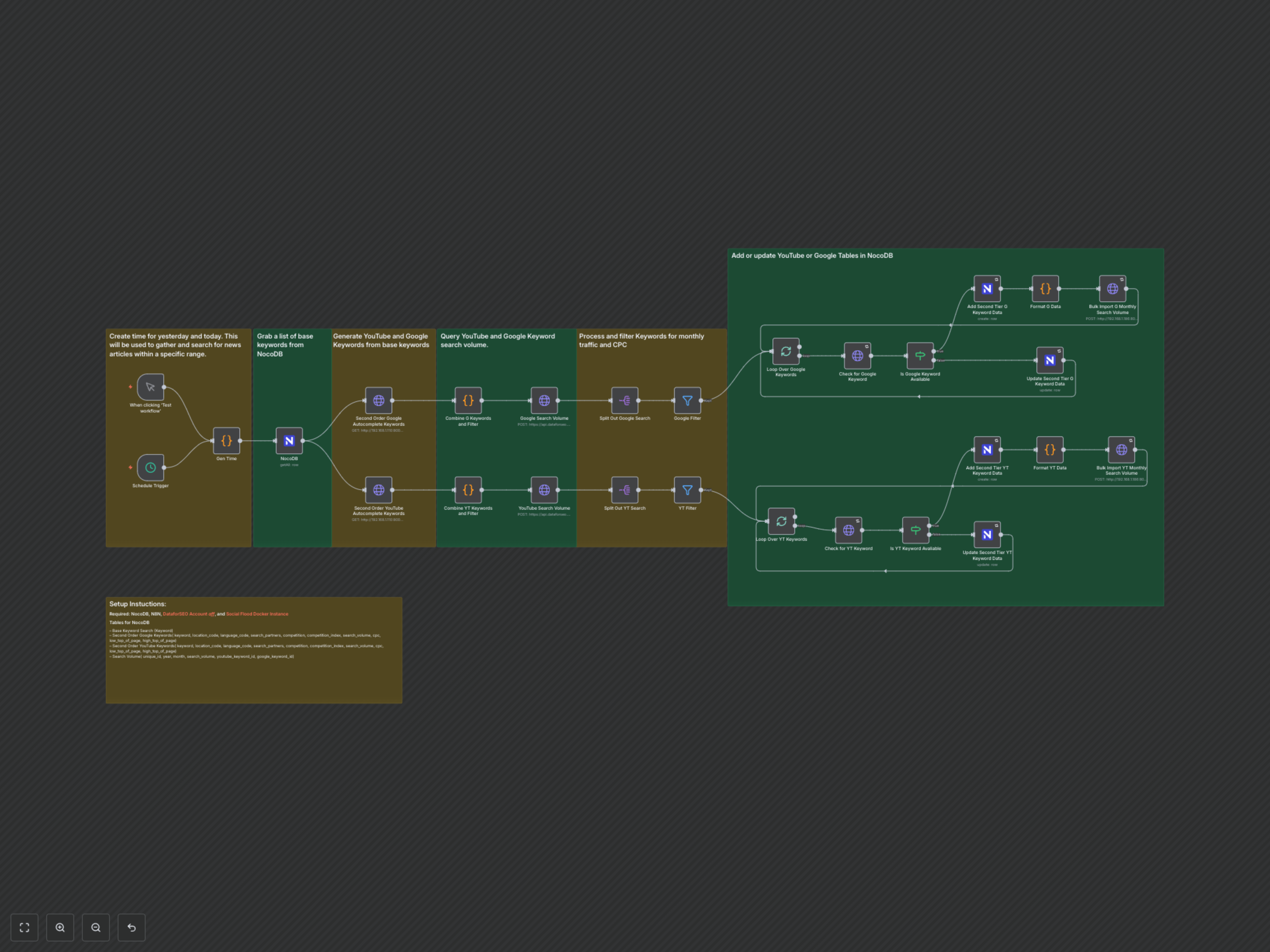
1. Trigger & Date Generation: The workflow initiates either on a defined schedule (every four hours) or via a manual trigger. It first generates a timestamp for the previous day, which can be utilized for date-specific data retrieval if needed.
2. Base Keyword Extraction: It connects to your NocoDB instance to retrieve a foundational list of base keywords, which serve as the starting point for expanding your research.
3. Autocomplete Keyword Generation: Leveraging a local Social Flood API instance, the workflow generates a vast array of 'second-order' autocomplete suggestions for both Google Search and YouTube, significantly expanding your keyword pool.
4. Keyword Cleaning & Batching: The raw autocomplete suggestions undergo a rigorous cleaning process. Keywords are filtered based on length (max 80 characters), word count (max 10 words), and cleaned of special characters. Duplicates are removed, and the remaining high-quality keywords are batched for efficient API processing.
5. Search Volume & CPC Retrieval: These batched keywords are then sent to the DataforSEO API. The workflow simultaneously fetches critical metrics such as monthly search volume and Cost-Per-Click (CPC) data for both Google and YouTube.
6. Data Filtering & Validation: The retrieved data is filtered to ensure only keywords with valid and available monthly search volume and CPC data are retained, maintaining data integrity.
7. NocoDB Integration (Add/Update): Each validated keyword is checked against its respective NocoDB table (one for Google keywords, one for YouTube keywords). New keywords are added, and existing ones are updated with the latest metrics, ensuring your database remains current.
8. Monthly Search Volume Logging: Finally, detailed historical monthly search volume data (including year, month, and search volume) for each keyword is formatted and bulk imported into a separate NocoDB table, building a comprehensive historical record for trend analysis.