
Automate AI Media Analysis: Extract Insights from Images & PDFs
Rapidly extract detailed insights from diverse media formats, accelerating content understanding and decision-making by up to 90%.
Manually extracting information from various media formats like images and PDFs is often time-consuming and inefficient. This workflow automates intelligent analysis of diverse media using AI, providing instant insights and streamlining content understanding with Google Gemini.



Documentation
AI Media Analysis with Gemini & LangChain
Unlock powerful insights from your visual and document content with this versatile n8n workflow. It presents five distinct, pre-configured methods to leverage Google Gemini's advanced AI capabilities, enabling intelligent analysis of both images and PDF files to suit various operational needs.
Key Capabilities
- Effortless single image analysis with automatic binary data passthrough, simplifying quick evaluations.
- Dynamic processing of multiple images, each with customizable prompts for targeted and nuanced AI responses.
- Robust batch image processing using n8n's standard item handling, directly integrating with the Gemini API.
- Comprehensive PDF document analysis, extracting key information and insights through direct API interaction.
- Granular control over image analysis, providing advanced users the flexibility for highly customized direct API calls.
How It Works
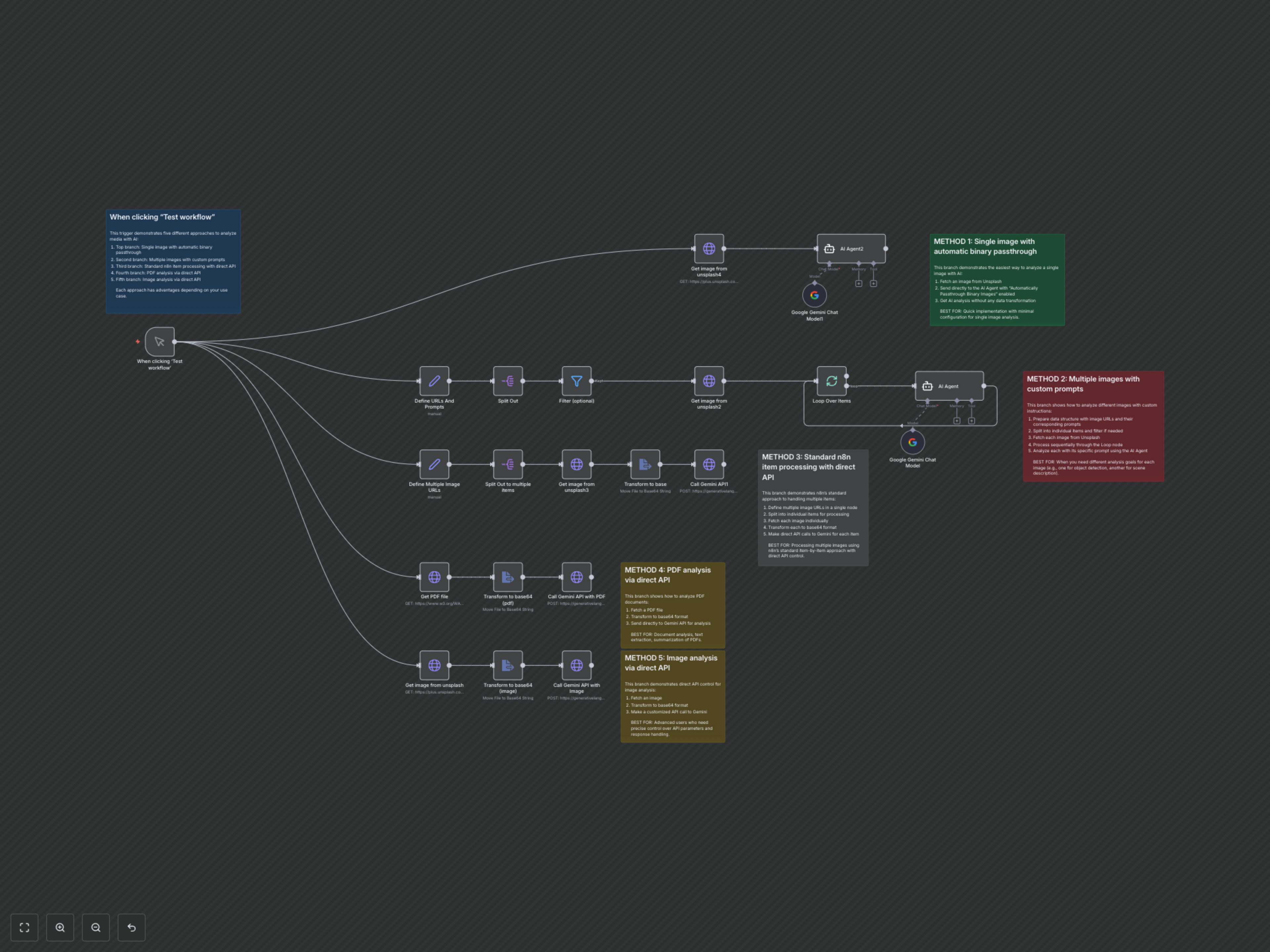
The workflow is activated via a manual trigger and intelligently branches into five independent pathways, each showcasing a unique and effective strategy for integrating with Google Gemini's multimodal AI. This modular design allows you to quickly adopt the most suitable method for your specific media analysis requirements, from simple image descriptions to in-depth document content extraction.
Method 1: Streamlined Single Image Analysis
This path optimizes for speed and simplicity. It fetches a single image and routes it directly to an AI Agent with automatic binary passthrough enabled. This eliminates the need for manual data transformation, providing immediate AI-generated insights for individual images.
Method 2: Tailored Multiple Image Analysis with Custom Prompts
Ideal for scenarios requiring varied analysis across multiple images. This method begins by defining a structured list of image URLs, each paired with a specific prompt. The workflow then processes each image individually, fetching it, and sending it to the AI Agent with its unique, custom instruction for highly precise analysis.
Method 3: Standard Batch Image Processing via Direct API
Leveraging n8n's core item-by-item processing, this approach defines multiple image URLs, fetches each, converts them into a base64 format, and then makes direct API calls to Gemini. This provides a robust solution for batch processing images while maintaining direct control over the API interaction.
Method 4: Automated PDF Content Extraction
Designed for document intelligence, this pathway fetches a specified PDF file. It then transforms the PDF's binary data into a base64 string, which is subsequently sent to the Gemini API. This enables the AI to analyze the document's content, facilitating summarization, information extraction, or question-answering.
Method 5: Advanced Direct Image API Control
This method offers maximum flexibility for advanced users. It fetches an image, converts it to base64, and then constructs a fully customized HTTP request to the Gemini API. This allows for fine-tuning of API parameters and payload structure, providing precise control over the AI analysis process and response handling.