
Smart Leave Approval Automation (Google Workspace)
Automate employee leave requests with real-time balance checks and instant email notifications, saving time and improving HR efficiency.
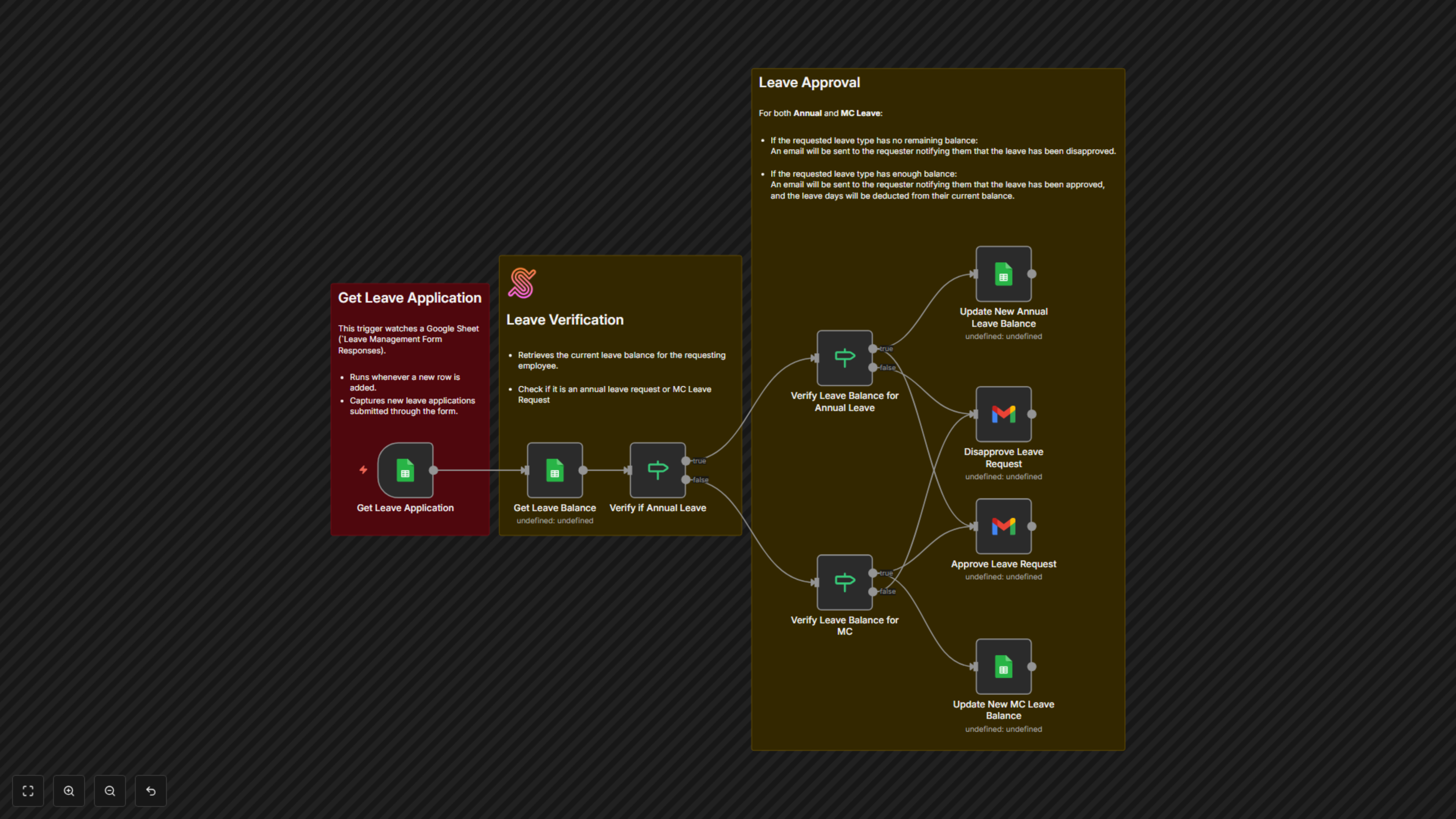
This workflow streamlines employee leave management by automatically verifying requests against available balances in Google Sheets and sending instant approval or rejection emails via Gmail.


Documentation
📖 Documentation
Managing leave requests manually can be slow and prone to mistakes. With Smart Leave Approval Automation for Google Workspace, every request is checked against real-time balances in Google Sheets, and employees are immediately notified by Gmail. HR no longer needs to cross-check records or draft emails — the system handles it instantly, ensuring faster responses, accurate records, and a smoother employee experience.
⚙ Workflow Steps
- A new leave application is logged in Google Sheets.
- The workflow checks the employee’s leave balance.
- If enough days remain, an approval email is sent and balances are updated.
- If insufficient, a rejection email is sent with guidance on next steps.
✅ Key Benefits
- Faster HR processing — Decisions are instant and automated.
- Clear communication — Employees always know the status of their leave.
- Accurate tracking — Balances update in real time within Google Sheets.