
Automate Vision Model Comparison for Detailed Image Analysis
Streamline image analysis by comparing multiple Ollama Vision Models, reducing manual effort by 90% and delivering structured insights for better decision-making.
Extracting detailed, comparable insights from images using multiple vision models is time-consuming and complex. This workflow automates image download, processes it with various local Ollama Vision Models, and saves comparative, markdown-formatted analyses directly to Google Docs.


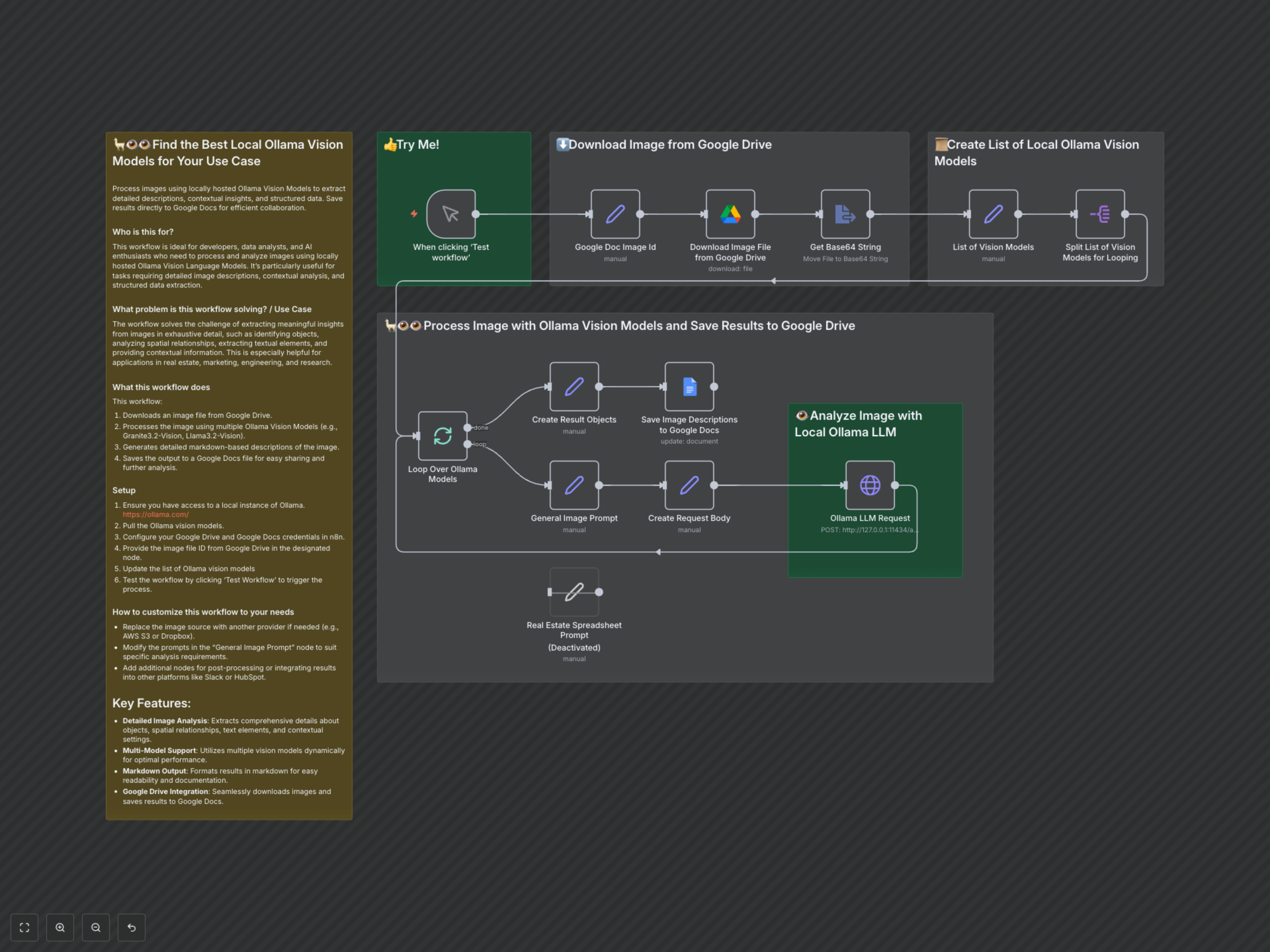

Documentation
Automate Vision Model Comparison for Detailed Image Analysis
Process images using locally hosted Ollama Vision Models to extract detailed descriptions, contextual insights, and structured data. This workflow enables you to compare the outputs of different models for the same image and save the results directly to Google Docs for efficient collaboration and analysis. It's ideal for developers, data analysts, and AI enthusiasts needing to process and analyze images using local Vision Language Models for tasks requiring comprehensive image descriptions, contextual analysis, and structured data extraction.
Key Features
- Detailed Image Analysis: Extracts comprehensive details about objects, spatial relationships, text elements, and contextual settings from images.
- Multi-Model Comparison: Utilizes multiple local Ollama Vision Models (e.g., Granite3.2-Vision, Llama3.2-Vision) dynamically for comparative analysis.
- Structured Markdown Output: Formats analysis results in markdown for enhanced readability, easy documentation, and further processing.
- Google Drive & Docs Integration: Seamlessly downloads images from Google Drive and saves comparative analysis results to Google Docs.
How It Works
This workflow is initiated manually. It first takes a specified Google Drive file ID, downloads the corresponding image, and converts it to a Base64 string. A list of local Ollama Vision Models is then defined, and the workflow iterates through each model. For every model, it constructs a detailed user prompt (e.g., for general image analysis or specialized tasks like spreadsheet analysis) and sends the image along with the prompt to your local Ollama API endpoint. The generated descriptions from each model are then collected, formatted, and saved sequentially into a designated Google Docs file, allowing for direct comparison of the outputs.