
Automate Outlook Email Categorization & Prioritization with AI
Reduce manual email processing time by up to 80% daily, allowing you to focus efforts on high-impact tasks.
Manually sorting and prioritizing a flood of emails is time-consuming and prone to errors, leading to missed opportunities or delayed responses. This workflow leverages AI to automatically categorize and prioritize your Microsoft Outlook emails, ensuring critical communications are always highlighted and addressed promptly.



Documentation
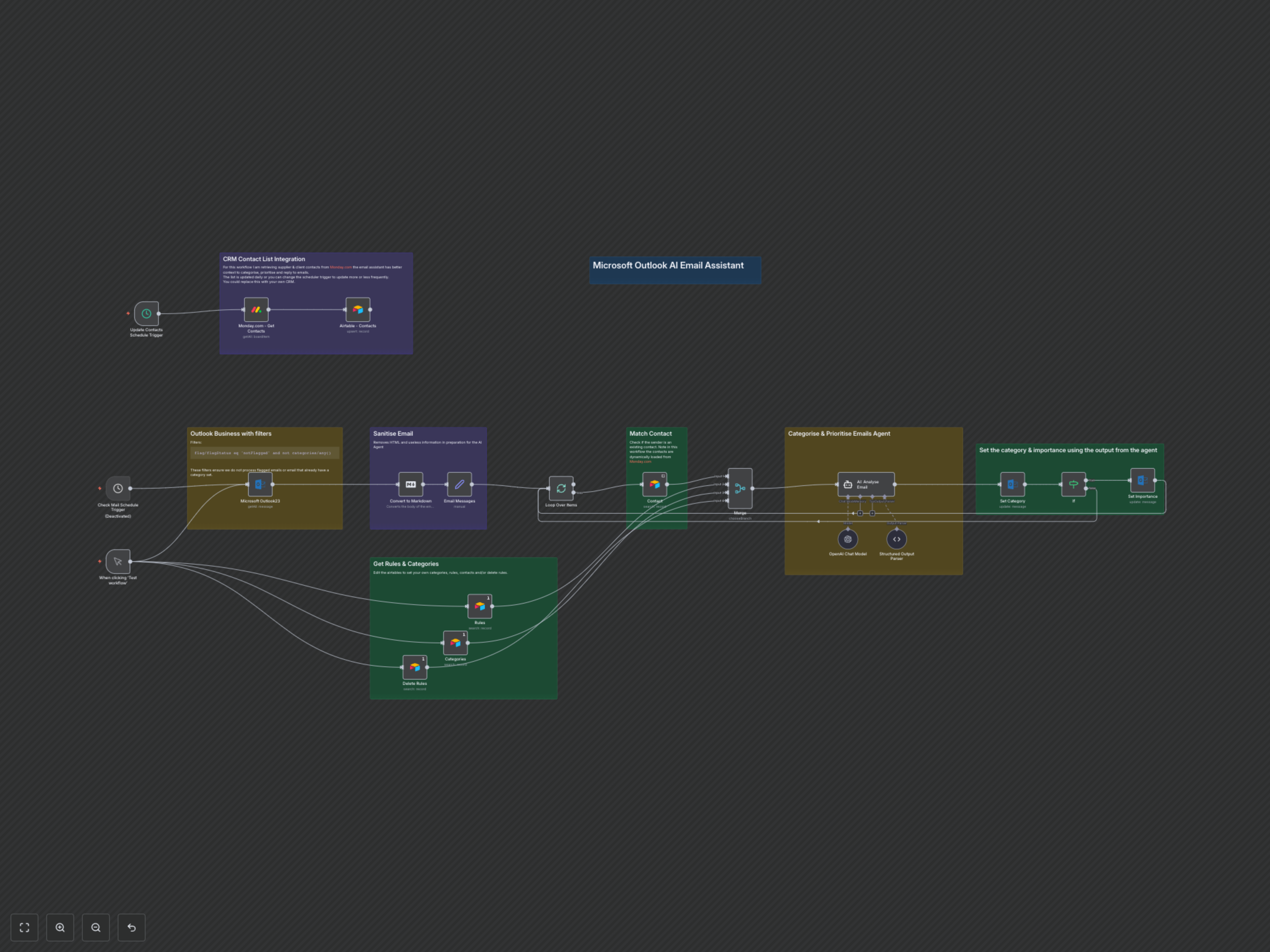
Microsoft Outlook AI Email Assistant
This workflow transforms your Microsoft Outlook inbox into a highly organized, prioritized communication hub. Leveraging the power of AI and custom rules, it automates the tedious task of email management, ensuring that every message is categorized correctly and critical items are immediately brought to your attention.
Key Features
- Automated email categorization using custom Airtable rules and powerful AI.
- Intelligent prioritization: emails marked for 'Action' are automatically set to 'High' importance.
- Dynamic contact synchronization from your CRM (e.g., Monday.com) to enhance AI context.
- Sanitizes email content by removing HTML and noise for accurate AI analysis.
- Configurable scheduled checks for continuous, hands-free inbox management.
How It Works
1. Email Acquisition & Filtering: The workflow automatically checks your designated Microsoft Outlook folder at regular intervals. It intelligently filters for new emails that are neither flagged nor already categorized, ensuring only relevant messages proceed.
2. Contextual Data Enrichment: Prior to AI analysis, the workflow retrieves comprehensive context. This includes your custom categorization rules, deletion guidelines, and a dynamically updated list of contacts (from Monday.com via Airtable). It also checks if the email sender matches an existing contact for personalized context.
3. Content Preparation for AI: Each email's body is sanitized by converting it to Markdown and removing extraneous HTML, links, and excessive whitespace. This ensures the AI agent receives a clean, focused input for accurate analysis.
4. AI-Powered Categorization & Prioritization: An advanced AI agent (using OpenAI and LangChain) processes the sanitized email, considering all retrieved contextual data. It then assigns a primary category (e.g., 'Client', 'Invoice', 'Internal') and an optional 'Action' subcategory based on the content and rules.
5. Outlook Action & Update: Finally, the workflow updates the original email in Microsoft Outlook. The AI-determined category is applied, and if the email requires 'Action', its importance level is automatically elevated to 'High', ensuring you never miss a critical task.