
Automate LinkedIn Content: Medium Articles, Daily & Dupe-Free
Automate daily LinkedIn content updates, saving 10+ hours per month on manual curation and ensuring a consistent, professional online presence.
Manual content sharing to LinkedIn is time-consuming, inconsistent, and risks duplicate posts. This n8n workflow automatically fetches fresh Medium articles, ensures unique posts via Airtable, and publishes them twice daily to LinkedIn, keeping your profile active effortlessly.



Documentation
Automate Medium Article Sharing to LinkedIn
Effortlessly maintain an active and professional LinkedIn presence by automatically posting fresh Medium articles. This n8n workflow eliminates manual effort and ensures your network always sees engaging, relevant content without risk of duplicates.
Key Features
- Scheduled Posting: Automatically publishes new content twice daily at specified times.
- Smart Content Curation: Discovers relevant Medium articles based on customizable tags.
- Duplicate Prevention: Utilizes Airtable to track posted articles, ensuring unique content every time.
- Real-time Notifications: Sends instant Telegram alerts upon successful article publication.
- Rich Media Support: Posts articles with their corresponding main image for higher engagement.
How It Works
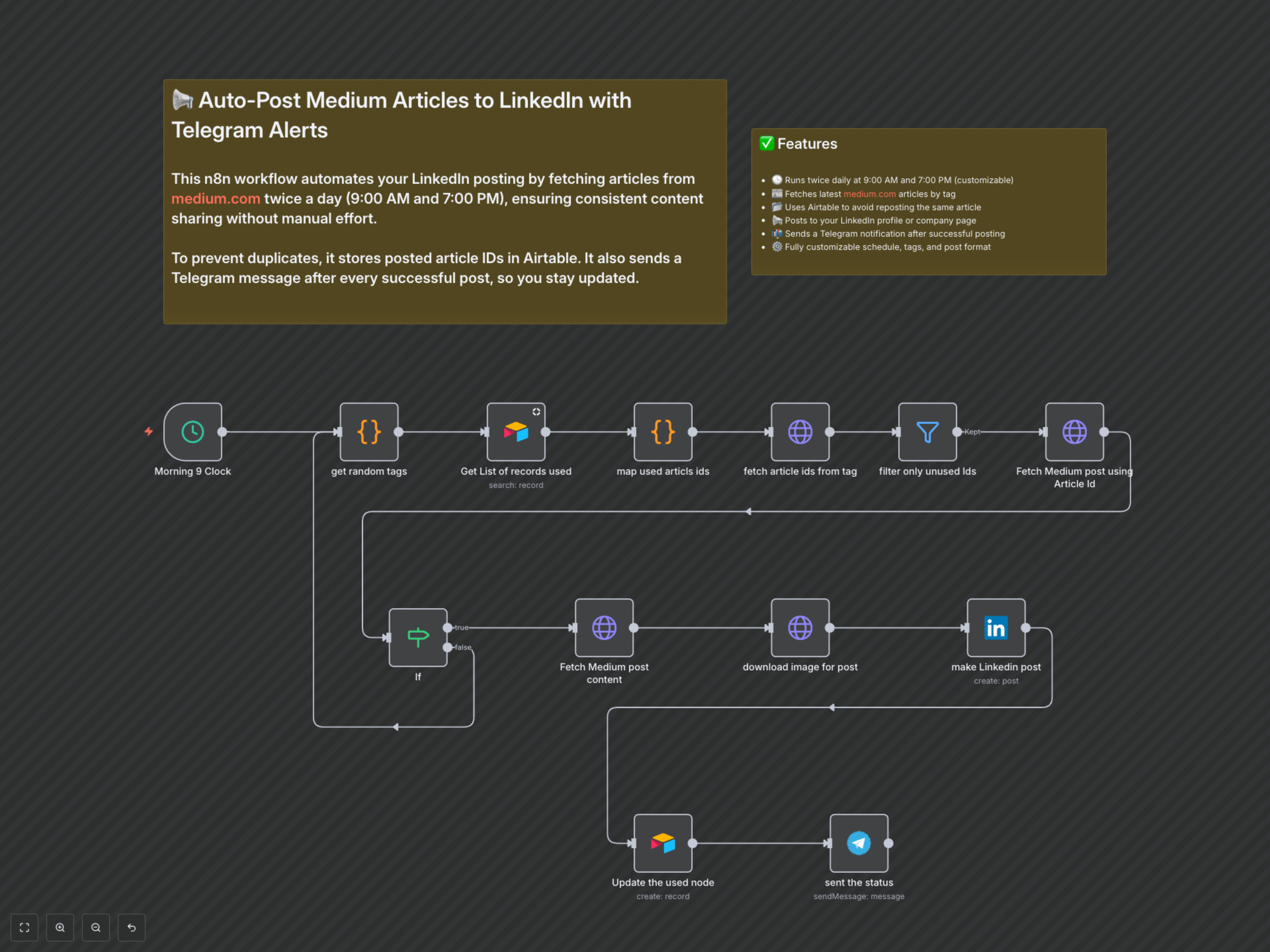
1. Scheduled Activation: The workflow triggers at predefined times (e.g., 9 AM and 7 PM).
2. Tag Selection: A random tag (e.g., "androiddev", "kotlin") is chosen from a pre-configured list.
3. Article Discovery: The Medium2 RapidAPI searches for articles matching the selected tag.
4. Airtable Lookup: Previously posted article IDs are retrieved from your Airtable "Used Articles" base.
5. Duplicate Filtering: The workflow filters out any articles that have already been posted, ensuring only fresh content proceeds.
6. Content Retrieval: A unique, available article is selected, and its detailed information and main image URL are fetched.
7. Image Check: A conditional step verifies that the chosen article has an associated image.
8. LinkedIn Post Creation: The article's title, a truncated summary, a freedium.cfd link, the fetched image, and relevant hashtags are automatically posted to your LinkedIn profile.
9. Airtable Update: The ID of the newly posted article is recorded in Airtable to prevent future reposting.
10. Telegram Notification: A confirmation message, including the article's title, is sent to your Telegram chat.