
Automate Gmail Draft Replies with AI, Save Hours Daily
Reduce manual email response time by up to 80% by generating intelligent draft replies, allowing more focus on critical tasks.
Manually sifting through emails and crafting replies is a significant time sink. This n8n workflow employs AI to intelligently assess incoming messages and automatically generates professional draft responses directly in Gmail, boosting your productivity.



Documentation
Gmail AI Draft Responder
Drowning in emails and struggling to keep up with responses? This n8n workflow empowers you to reclaim your time by automating the initial drafting of professional email replies, ensuring you never miss an important message while significantly reducing your manual workload.
Key Features
- Intelligent Email Assessment: AI determines which emails truly require a response, filtering out marketing or non-urgent messages.
- Automated Draft Generation: Craft professional, context-aware email replies using advanced AI models.
- Seamless Gmail Integration: Drafts are created directly in your Gmail inbox, within the original conversation thread, ready for review.
- Customizable AI Tone and Style: Easily adjust the AI's persona and instructions to match your communication preferences.
How It Works
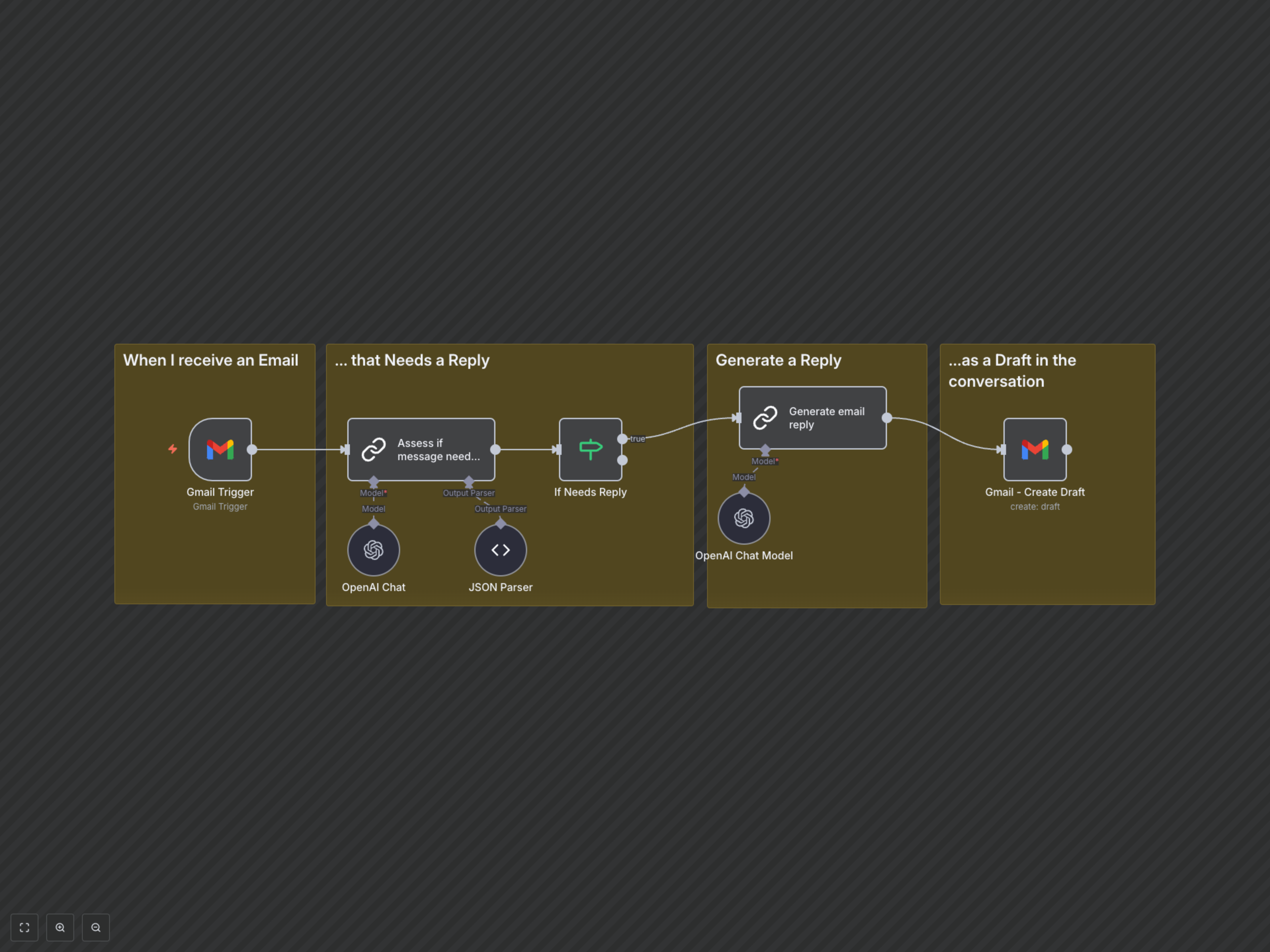
This workflow operates in a streamlined, intelligent sequence: 1. **Incoming Email Trigger**: The workflow is activated instantly when a new email arrives in your connected Gmail account (excluding emails you've sent yourself). 2. **AI Assessment**: An OpenAI model, powered by LangChain, analyzes the incoming email's subject and content. Based on predefined rules (e.g., ignoring marketing emails), it determines whether a reply is necessary. 3. **Conditional Proceed**: If the AI determines a reply is needed, the workflow continues. Otherwise, it gracefully exits, preventing unnecessary draft creation. 4. **AI Draft Generation**: A second, powerful OpenAI model (GPT-4-turbo) then processes the original email's context and generates a suitable, professional draft reply. It adheres to instructions for tone, structure, and language. 5. **Gmail Draft Creation**: Finally, the AI-generated reply is automatically saved as a draft in your Gmail inbox, directly within the original email thread. This allows you to review, edit, and send it at your convenience.