
AI-Powered Earnings Analysis: Generate Deep Financial Reports
Generate in-depth financial reports on stock earnings in minutes, reducing manual analysis time by over 90% and ensuring comprehensive data coverage.
Manually sifting through quarterly earnings reports for key insights and trends is incredibly time-consuming and often leads to missed opportunities. This n8n workflow leverages a powerful AI and RAG system to automatically process earnings PDFs, analyze financial data, and generate comprehensive, well-structured reports in Google Docs, saving countless hours of detailed research.




Documentation
AI-Powered Earnings Analysis: Generate Deep Financial Reports
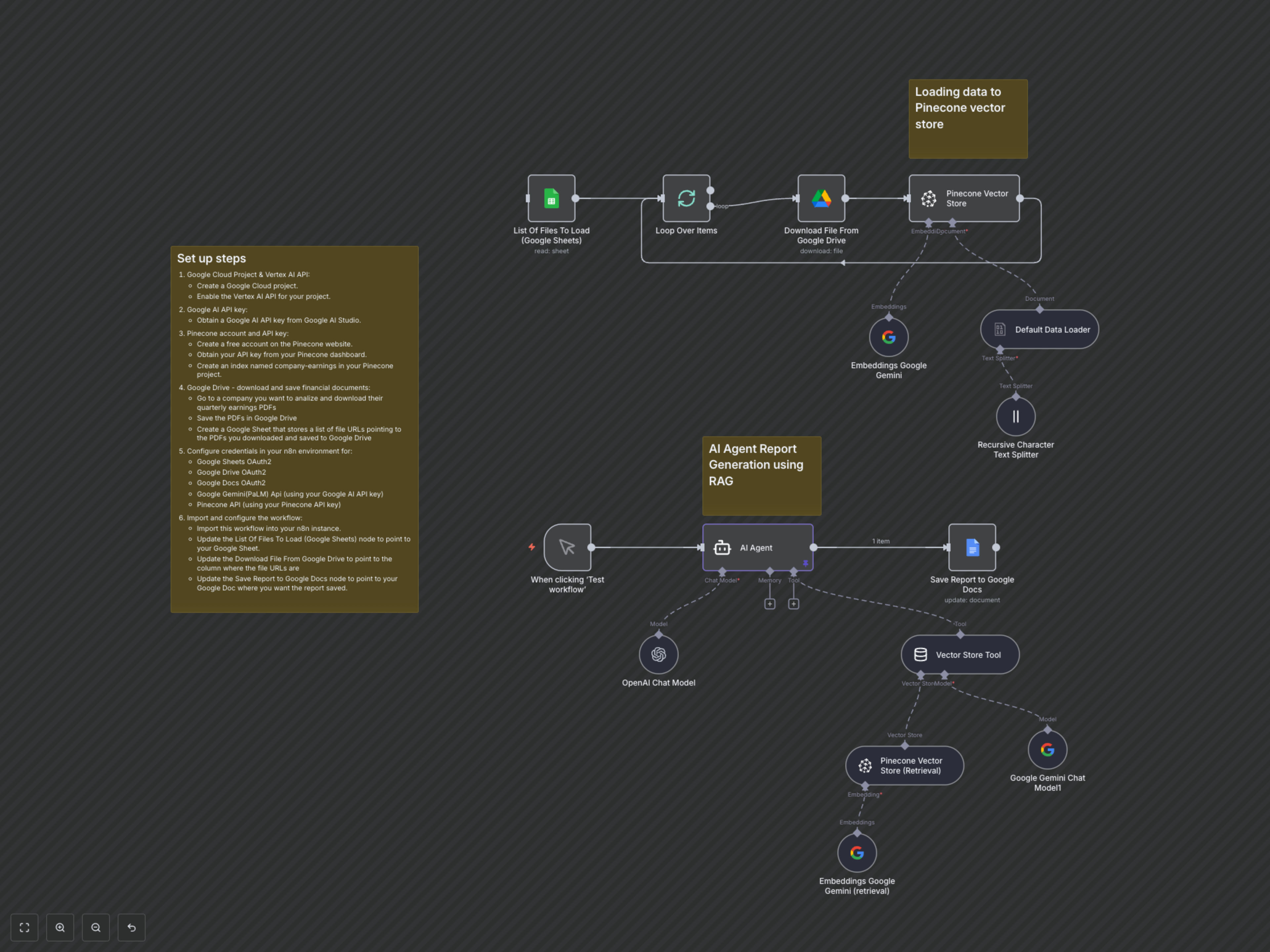
Manually sifting through quarterly earnings reports for key insights and trends is incredibly time-consuming and often leads to missed opportunities. This n8n workflow revolutionizes financial analysis by leveraging a powerful Retrieval-Augmented Generation (RAG) system to automatically process earnings PDFs, analyze financial data, and generate comprehensive, well-structured reports in Google Docs, drastically cutting down research time.
Key Features
- Automated Document Ingestion: Automatically downloads quarterly earnings reports (PDFs) from Google Drive, guided by a list in Google Sheets.
- Intelligent Text Processing: Efficiently loads and splits complex PDF documents into optimized chunks for granular analysis.
- Semantic Search with Pinecone: Stores processed financial data as embeddings in a Pinecone vector database, enabling highly accurate, context-aware information retrieval.
- Hybrid AI Agent (OpenAI & Gemini): Utilizes an advanced AI agent powered by OpenAI for intelligent reasoning and Google Gemini for robust embeddings, capable of understanding intricate financial queries.
- Retrieval-Augmented Generation (RAG): Ensures all generated financial reports are directly sourced from the provided earnings PDFs, guaranteeing accuracy and reliability.
- Automated Google Docs Reporting: Delivers fully formatted, insightful financial reports directly into a Google Doc, ready for immediate review and sharing.
- Trend & Outlier Detection: Specifically designed to analyze financial performance across multiple quarters, highlighting significant trends, comparisons, and unexpected anomalies.
How It Works
The workflow initiates by fetching a list of your company's earnings report PDF file URLs from a designated Google Sheet. Each PDF is then downloaded from Google Drive, processed by a default data loader, and intelligently split into smaller, manageable text chunks by a Recursive Character Text Splitter. These text chunks are transformed into powerful numerical embeddings using Google Gemini's embedding model and stored in a Pinecone vector database named 'company-earnings'. Upon activation, an AI Agent (primarily driven by OpenAI) receives a prompt to analyze specific earnings reports (e.g., Google's last three quarters). This agent is equipped with a 'Vector Store Tool'. The 'Vector Store Tool', utilizing Pinecone and Google Gemini Embeddings for efficient semantic search, queries the indexed earnings data to retrieve highly relevant financial information. The AI Agent synthesizes the retrieved data, analyzing revenue, expenses, profitability, key metrics, and identifying crucial trends and outliers. It then formats this analysis into a detailed Markdown report. Finally, the generated financial report is automatically inserted or appended into a pre-specified Google Doc, providing a comprehensive, data-backed analysis report with minimal manual effort.