
Smart Email List Cleaner – Google Sheets & Hunter.io
Ensure higher email deliverability and campaign performance by automatically cleaning and validating your Google Sheets email lists, removing invalid or inactive addresses.


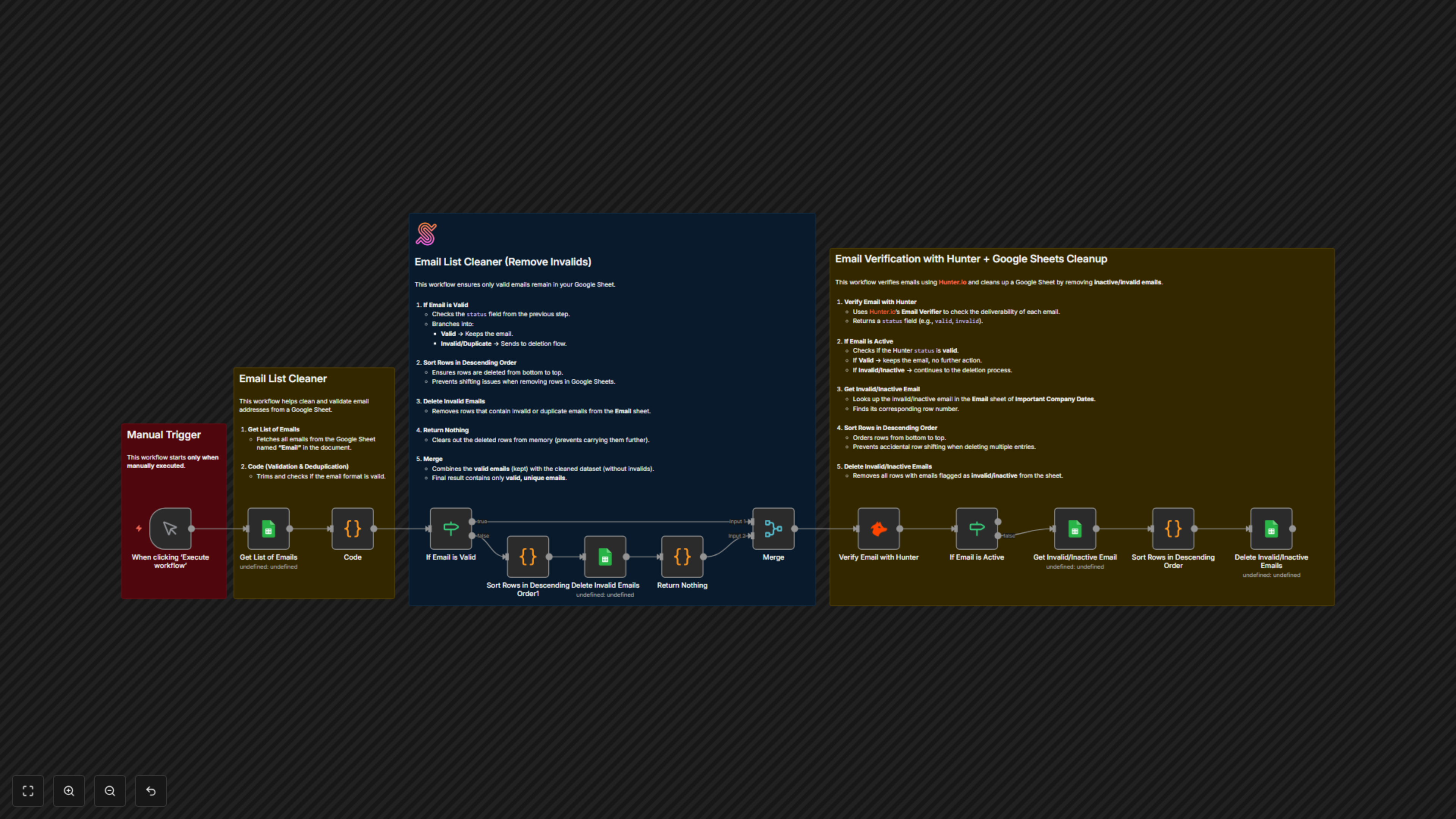
Automates the cleaning and verification of email lists in Google Sheets by removing duplicates, validating formats, and checking deliverability with Hunter.io to ensure only active emails remain.
Smart Email List Cleaner – Google Sheets & Hunter.io
📌 Overview
This workflow automates the cleaning and validation of email lists stored in Google Sheets. It validates email format, removes duplicates, verifies deliverability with Hunter.io, and deletes invalid or inactive emails directly from the sheet. This ensures your mailing lists remain accurate, reliable, and ready for campaigns.
Category: Data Management / Marketing AutomationTrigger: Manual execution (workflow runs only when executed manually in n8n).
⚙️ Workflow Steps
- Manual Trigger
- Workflow starts only when you manually click Execute Workflow in n8n.
- Get List of Emails (Google Sheets)
- Fetches all email addresses from the specified Google Sheet (Email tab).
- Code (Validation & Deduplication)
- Trims whitespace, validates email format with regex.
- Flags duplicates as "Duplicate" and invalid formats as "Invalid".
- Marks unique, correctly formatted emails as "Valid".
- If Email is Valid
- Branches email records:
- Valid → Keeps the email.
- Invalid/Duplicate → Moves to deletion flow.
- Sort Rows in Descending Order (Google Sheets)
- Orders rows from bottom to top to prevent row shifting issues when deleting.
- Delete Invalid Emails (Google Sheets)
- Removes all rows flagged as invalid or duplicate from the Email sheet.
- Verify Email with Hunter.io
- Sends remaining emails to Hunter Email Verifier API.
- Returns deliverability status (valid, invalid, inactive).
- If Email is Active
- Keeps emails flagged as valid.
- Routes invalid/inactive emails to be removed.
- Get Invalid/Inactive Email (Google Sheets)
- Finds the exact row number of the inactive or invalid email in the sheet.
- Sort Rows in Descending Order
- Ensures deletions start from bottom to avoid misalignment.
- Delete Invalid/Inactive Emails (Google Sheets)
- Removes all rows with inactive or invalid emails.
✅ End result: Only valid, unique, and active emails remain in your Google Sheet.
🗂️ Data Sources
- Google Sheets: Stores email lists and logs cleaned data.
- Hunter.io: Validates email deliverability status.
- n8n: Automates cleaning, deduplication, and validation workflow.
✅ Key Benefits
- Removes invalid and duplicate emails automatically.
- Ensures mailing lists are up-to-date and campaign-ready.
- Improves email deliverability by keeping only active addresses.
- Saves time compared to manual list cleanup.