Discover Hidden YouTube Trends – Outlier Videos in Your Niche
Uncover trending YouTube videos in your niche with AI-powered summaries, automatically delivered to Google Sheets for effortless analysis.


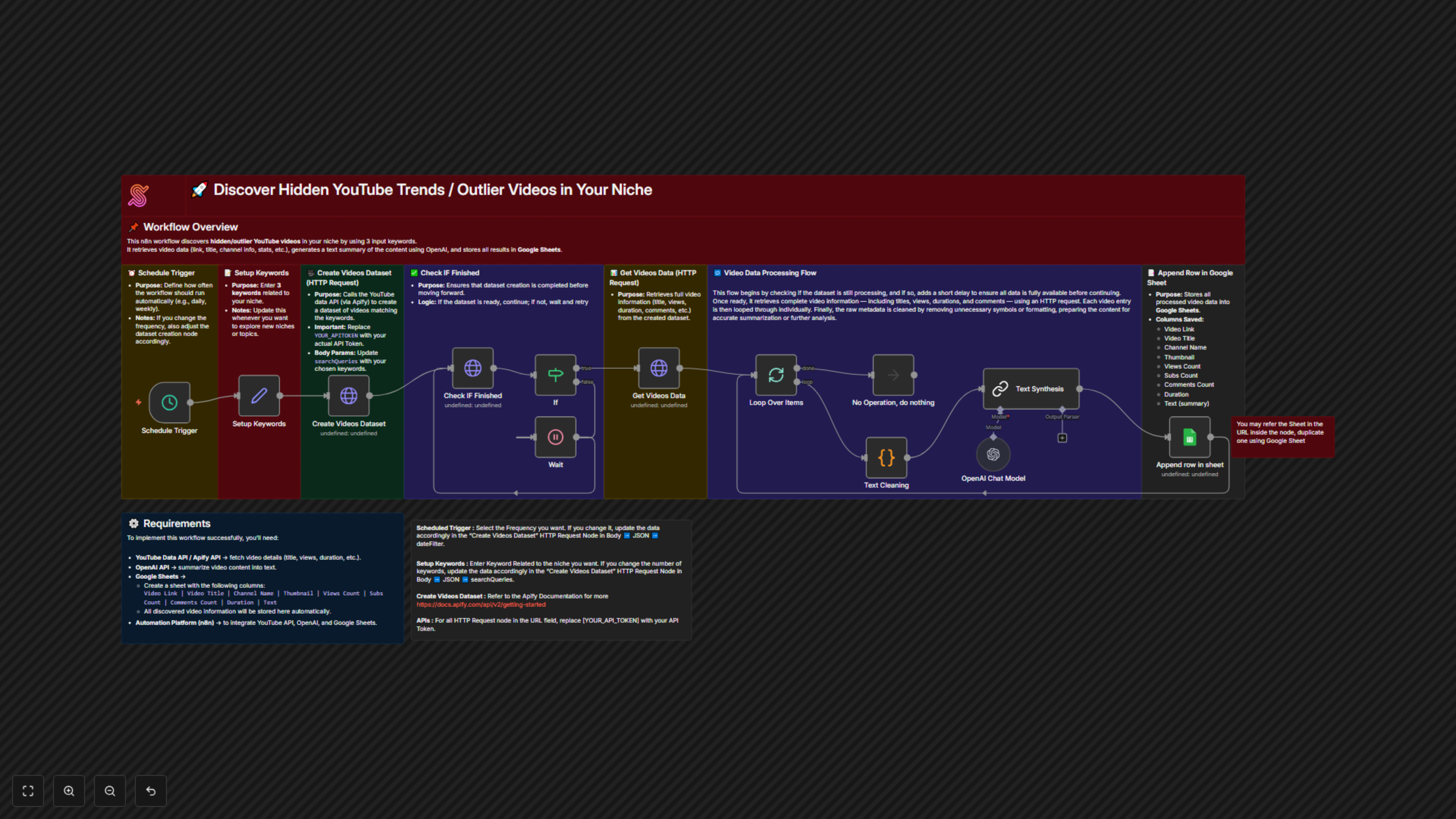

The workflow runs on a schedule, collects YouTube videos from Apify based on keywords, waits for the dataset, retrieves video details, cleans and summarizes subtitles with an LLM, and saves the metadata and summaries into Google Sheets.
This automation workflow enables creators, marketers, and researchers to systematically identify underexposed YouTube video trends that competitors often miss, yet demonstrate strong indicators of growth and engagement.
By simply providing three niche-specific keywords, the workflow automatically performs the following actions:
- Searches YouTube for videos relevant to the specified niche.
- Collects and stores key video metadata, including:
- Video URL
- Video Title
- Channel Name
- Thumbnail Image
- View Count
- Subscriber Count
- Comment Count
- Video Duration
- Content Summary (extracted text)
- Saves the complete dataset to Google Sheets, enabling efficient monitoring, filtering, and analysis.
This workflow allows users to rapidly detect high-potential or emerging video trends and apply these insights to inform content creation and marketing strategies.
Key Benefits
- Data-Driven DiscoveryIdentify overlooked videos with strong engagement signals using structured, actionable data.
- Accelerated ResearchEliminate time-consuming manual searches and streamline your research process through automation.
- Strategic Content PlanningMake informed content and marketing decisions based on real-world performance metrics.
- Centralised Data ManagementAutomatically organise and store results in Google Sheets for easy access, review, and collaboration.
- Early Trend DetectionDiscover promising content opportunities before they become widely adopted.
Prerequisites
To use this workflow, prepare a Google Sheet with the following columns:
- Video URL
- Video Title
- Channel Name
- Thumbnail Image
- View Count
- Subscriber Count
- Comment Count
- Video Duration
- Content Summary
Setup & Configuration Notes
- Scheduled TriggerConfigure how frequently the workflow should run.If the schedule is modified, ensure the dateFilter The parameter in the Create Videos Dataset HTTP Request node is updated accordingly.
- Keyword ConfigurationProvide three niche-related keywords.If the number of keywords changes, update the searchQueries parameter in the Create Videos Dataset HTTP Request node to match.
- Create Videos DatasetFollow the official Apify API documentation for correct dataset configuration.
- API AuthenticationReplace [YOUR_API_TOKEN] with a valid API token in all HTTP Request nodes.
Technology Stack
- Google Sheets – Centralised storage for all extracted video data
- Apify API – Retrieves YouTube video datasets based on keyword searches
- n8n – Orchestrates and automates the end-to-end workflow